Is your team overwhelmed by missed deadlines, duplicated efforts, or constant status meetings just to stay aligned? A chaotic office workflow doesn’t just slow things down—it erodes morale and impacts results. The solution lies in learning how to organize office workflow with a systematic, team-focused approach. By streamlining processes, clarifying responsibilities, and using the right tools, you can turn disarray into a smooth, predictable operation that boosts efficiency and reduces stress.
This guide gives you a step-by-step blueprint to restructure your office workflow from the ground up. You’ll learn how to map existing processes, eliminate bottlenecks, assign clear roles, and implement tools that automate routine tasks. Whether you lead a small team or manage cross-departmental operations, these strategies will help you create a sustainable workflow that scales with your goals—without burning out your people.
Map Your Current Workflow to Spot Hidden Inefficiencies

Before making changes, you need a clear picture of how work actually moves through your office. Mapping your current workflow exposes redundancies, delays, and communication gaps that drain productivity.
Break Down Daily Processes by Department and Role
Start by listing all recurring tasks across key functions—administration, client communication, project delivery, reporting, and support. For each task, document:
• Who performs it
• How long it typically takes
• What tools or systems are involved
• Where handoffs occur between team members
Use a whiteboard or digital tool like Miro to lay out each step in sequence. Visualizing the flow makes it easier to spot where tasks loop back, stall, or get repeated.
Look for red flags: Are team members answering the same questions daily? Do approvals require multiple follow-ups? These indicate missing documentation or unclear procedures.
Identify Bottlenecks That Slow Down Progress
A bottleneck is any stage where work consistently backs up. Common causes include single points of failure (one person approving everything), unclear decision paths, or reliance on outdated methods like email chains.
Ask your team: “Where do projects usually get stuck?” Track task durations over a week. If a step regularly exceeds its estimated time, investigate why. Possible causes include insufficient training, poor tool access, or unclear expectations.
Fixing these early prevents recurring delays and builds trust in the new system.
Set Clear Priorities to Focus on High-Impact Work
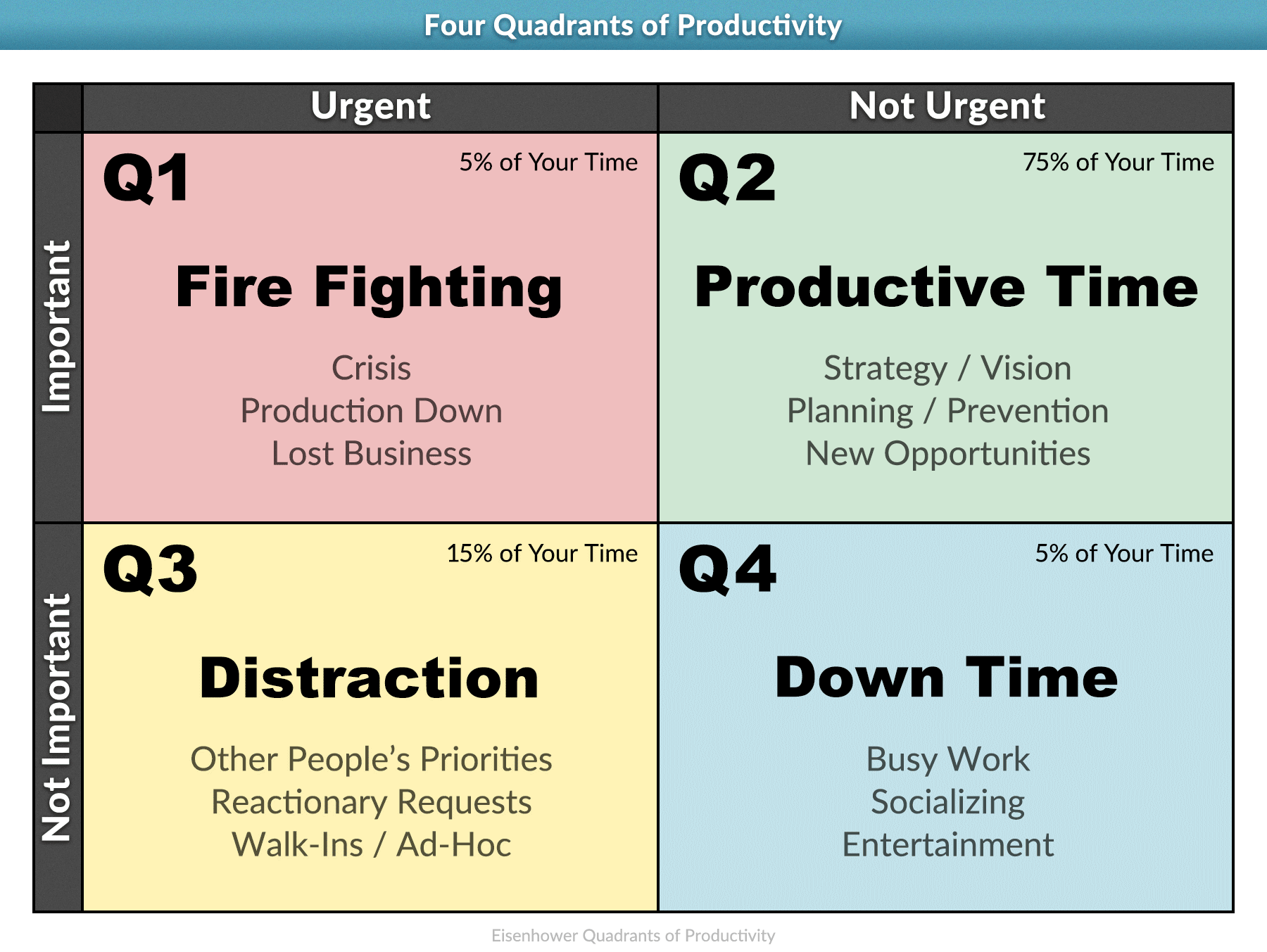
Without clear direction, teams default to urgent but low-value tasks. Organizing your office workflow starts with aligning daily actions to strategic goals.
Define Daily and Weekly Objectives Using the Eisenhower Matrix
Each week, set 3–5 key priorities. Break them into daily actions and share them in a quick team huddle or via a shared dashboard.
Use the Eisenhower Matrix to sort tasks:
• Urgent & Important: Handle immediately (e.g., client deliverables)
• Important but Not Urgent: Schedule (e.g., process improvements)
• Urgent but Not Important: Delegate (e.g., scheduling meetings)
• Neither: Eliminate (e.g., redundant status reports)
This framework helps teams focus on what truly moves the needle.
Align Tasks With Business Goals to Boost Engagement
Ensure every workflow supports a larger objective. For example:
• If customer satisfaction is a goal, prioritize response time and service quality workflows
• If revenue growth is the target, streamline lead tracking and follow-up processes
When team members see how their work contributes, accountability and motivation improve.
Assign Roles and Responsibilities to Eliminate Confusion

Unclear ownership leads to tasks falling through the cracks or being done twice. Defining roles ensures accountability and smooth handoffs.
Use a RACI Chart to Clarify Who Does What
A RACI chart identifies for each task or project:
• Responsible (does the work)
• Accountable (signs off on completion)
• Consulted (provides input)
• Informed (receives updates)
For a monthly sales report:
• Responsible: Sales analyst
• Accountable: Sales manager
• Consulted: Finance team
• Informed: Executive team
This prevents confusion and ensures no one is left out—or overloaded.
Prevent Role Overlap With Explicit Ownership
When two people think they’re in charge, tasks often get duplicated or ignored. Clearly assign ownership for every workflow step. Review assignments in team meetings and confirm understanding.
Encourage team members to speak up if they’re overloaded or unsure of their responsibilities.
Implement Workflow Tools to Automate and Centralize
The right tools reduce manual work, improve visibility, and keep communication in one place.
Choose Project Management Software That Fits Your Needs
Popular options include:
• Trello: Simple visual boards for task tracking
• Asana: Task assignments, timelines, and dependencies
• ClickUp: All-in-one workspace with docs, goals, and chat
• Monday.com: Customizable workflows for growing teams
Start with one platform and train your team thoroughly. Avoid using multiple tools for the same purpose—this creates confusion and data silos.
Automate Repetitive Tasks to Save Time and Reduce Errors
Use automation to handle routine work:
• Auto-assign tasks when a new client is added
• Set up recurring tasks (e.g., weekly reports)
• Use templates for common emails or documents
• Sync calendars with task deadlines
Even small automations save hours per week and improve consistency.
Standardize Processes With Templates and Playbooks

Consistency speeds up execution and ensures quality, especially when onboarding new team members.
Create Step-by-Step Playbooks for Common Tasks
For high-frequency workflows like onboarding, invoicing, or client intake, build simple playbooks that include:
• Task list in order
• Required tools or logins
• Common issues and solutions
• Who to contact for help
Store these in a shared drive or knowledge base so they’re always accessible.
Use Templates for Faster, Professional Output
Design reusable templates for:
• Meeting agendas
• Project briefs
• Status reports
• Client response emails
This reduces drafting time and ensures consistent branding and messaging. Review and update templates every quarter based on team feedback.
Improve Communication Flow to Prevent Misalignment
Poor communication causes delays, rework, and frustration. Streamlining how information flows keeps everyone on the same page.
Schedule Smart Meetings With Clear Outcomes
Avoid unnecessary meetings. For essential ones:
• Share a clear agenda in advance
• Keep meetings to 25 or 50 minutes (not full hours)
• Assign action items before ending
• Distribute notes immediately
Use asynchronous updates (e.g., daily check-in forms or Slack status updates) when real-time meetings aren’t needed.
Centralize Communication Channels to Reduce Noise
Stop scattering information across email, chat, and documents. Set team rules like:
• Slack/Teams: Real-time chat by project or topic
• Email: External communication and formal messages
• Project Tool Comments: Task-specific discussions
This keeps conversations organized, searchable, and tied to the right context.
Monitor and Optimize Performance Continuously
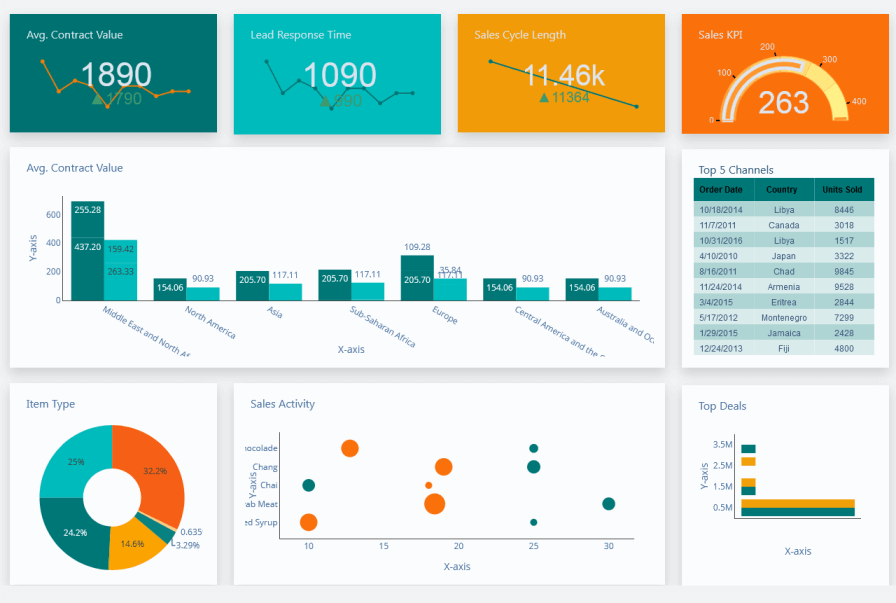
An organized workflow needs regular check-ins to stay effective as priorities shift.
Track Key Metrics to Measure Progress
Review weekly:
• Task completion rate
• Average time per task
• Number of missed deadlines
• Workload distribution across team members
Use dashboards in your project tool to visualize trends. Discuss insights in weekly team reviews.
Conduct Monthly Workflow Audits for Ongoing Improvement
Gather your team monthly to ask:
• What’s working well?
• Where are we still slowing down?
• What tools or steps need adjustment?
Make small, iterative changes. Continuous improvement keeps your workflow agile and resilient.
Prevent Burnout and Build a Sustainable Workflow
Even the best systems fail if people are overworked. A well-organized workflow protects team well-being.
Balance Workloads Proactively to Avoid Overload
Use your task management tool to monitor who has too much or too little. Redistribute tasks before burnout signs appear—missed deadlines, irritability, or disengagement.
Encourage time-blocking: dedicating focused time slots for deep work without interruptions.
Build in Flexibility for Unexpected Challenges
Rigid workflows break under pressure. Schedule buffer time between tasks and plan for disruptions. Use priority tiers so teams know what to pause when emergencies arise.
Flexibility isn’t chaos—it’s resilience built into your system.
Key Takeaways for Organizing Your Office Workflow
Organizing your office workflow is not a one-time fix but an ongoing practice. Start small: map one core process, fix one bottleneck, or introduce one new tool. Celebrate quick wins to build team confidence and momentum.
The goal isn’t perfection—it’s consistent progress. With clear priorities, defined roles, standardized processes, and the right tools, your team can work faster, smarter, and with less stress. Use this guide to build a workflow that supports both your business goals and your people.
Ready to get started? Pick one section—like mapping your current workflow—and take your first action today.
Frequently Asked Questions About Organizing Office Workflow
What are the first steps to organize office workflow?
Begin by mapping your current processes, identifying bottlenecks, and setting clear weekly priorities. Involve your team in the review to gain honest insights and buy-in.
How do you fix a slow or inefficient workflow?
Identify where delays happen, clarify roles using a RACI chart, eliminate redundant tasks, and automate repetitive steps. Use project management tools to increase visibility and accountability.
What tools help organize office workflow?
Trello, Asana, ClickUp, and Monday.com are top choices for task tracking and collaboration. Choose one that fits your team size and workflow complexity, then train everyone to use it consistently.
How do you get team buy-in for a new workflow?
Involve team members in designing the new system, explain how it reduces their pain points, and start with small, visible improvements. Show results quickly to build trust and adoption.
How often should you review office workflow?
Conduct a full workflow audit monthly and track key metrics weekly. Regular check-ins help you catch issues early and adapt to changing priorities.
Can you organize office workflow remotely?
Yes. Use cloud-based tools for task management, document sharing, and communication. Set clear expectations, standardize processes, and maintain regular check-ins to keep remote teams aligned.