You sit down to work, but your desk is buried under stacks of paper, half-used notebooks, and a tangled mess of cords. You waste time searching for a pen that works, your laptop is propped on a wobbly stack of books, and the whiteboard hasn’t been wiped in weeks. Sound familiar? A cluttered home office doesn’t just slow you down—it drains your focus, creativity, and energy. The good news: how to organize home office isn’t about perfection or expensive decor. It’s about building smart systems that keep your space functional, focused, and ready for work every single day.
True home office organization starts with a shift in mindset: design beats motivation. You don’t need to feel inspired to stay organized—you need a system that makes it easy. Just like a well-oiled engine, your workspace should support the smooth circulation of tasks, files, and ideas. This means creating clear homes for everything, minimizing visual noise, and building habits that maintain order. Whether you have a full room or a corner of the living room, these proven strategies will help you transform chaos into clarity—starting today.
Build a Workflow Circulation System

Clutter builds up when items have nowhere to go. A circulation system ensures everything moves through your office in stages—no more paper piles or forgotten projects.
Use the Four-Stage Workflow Model
Every item in your office belongs to one of four stages: ongoing, finished, archive, or discard. Assign each a designated spot:
• Ongoing projects: Keep active files in a labeled inbox or desktop tray
• Finished files: Move completed work to a clearly labeled file cabinet within arm’s reach
• Archive files: Pack away old records annually into off-site or closet storage—not under your desk
• Discards: Place labeled bins for trash, recycling, and shredding right beside your workspace
This system stops clutter before it starts and keeps your desk free for real work.
Set Up a Multi-Section Inbox
Use a five-tray inbox to manage incoming paper and tasks:
• Read
• File
• Send
• Sort
• This Week
Think of it as your personal mailroom. Each morning, process the Sort tray first. By giving every piece of paper a destination, you prevent decision fatigue and keep workflow moving.
Create a Dedicated Work Zone
Your brain needs cues to shift into work mode. A consistent, distraction-free zone signals that it’s time to focus—no matter how small the space.
Choose a Fixed Location
Avoid working from the kitchen table or couch. Even in a studio apartment, define boundaries using a room divider, bookshelf, or rug. A dedicated spot builds routine and separates work from personal life.
If space allows, use a door or curtain to visually close off the area when work ends. This reinforces professional boundaries, especially for remote workers or home-based business owners.
Adapt Your Office to Your Work
Your office should evolve with your goals. A space that once handled personal bills may now support a blog, nonprofit, or online business. When your system feels outdated:
• Audit your current workflow
• Identify bottlenecks (e.g., too many supplies, no file system)
• Update storage and zones to match your real work—not how you wish you worked
Sometimes, the discomfort of a messy transition sparks the best organizational solutions.
Keep Your Desk Clear and Functional
Your desk is a workspace—not a storage unit. Keeping it clear reduces stress and boosts productivity.
Limit What Stays on Your Desk
Stick to just four essentials:
• Your current project
• A notebook
• One pen
• Your monitor or laptop
Everything else—supplies, reference materials, chargers—should be stored out of sight. This “showroom vs. stock” model keeps daily tools handy while hiding backups.
Reset Your Desk Every Day
Spend 5 minutes at the end of each day clearing your space. File loose papers, return supplies to drawers, and wipe the surface. This small habit ensures you start each morning with a fresh, focused environment.
Users who do this report feeling more in control and energized—like walking into a clean office instead of a cluttered one.
Reserve a Buffer Zone
Keep one drawer or file holder empty as a buffer zone for temporary projects. This prevents overflow during busy weeks and gives you room to breathe when decisions are pending.
Having space to grow is part of smart organization. It stops you from cramming everything in and postponing choices.
Use Only One Stash Spot
We all have items that can’t be filed immediately. The key is containment—not chaos.
Designate a Single Catch-All Basket
Place one small basket or tray on your desk for “pending” items. Use it for:
• Unsorted receipts
• Notes to file later
• Books to return
• Items awaiting decisions
This “one stash spot rule” stops random piles from forming. It limits the space where you allow procrastination, while still giving you a safe place to park things temporarily.
At the end of each week, process the contents. If something sits too long, ask: Does this still matter?
Maximize Vertical Space

Floor space is limited—wall space is not. Use vertical real estate to free up your desk and reduce clutter.
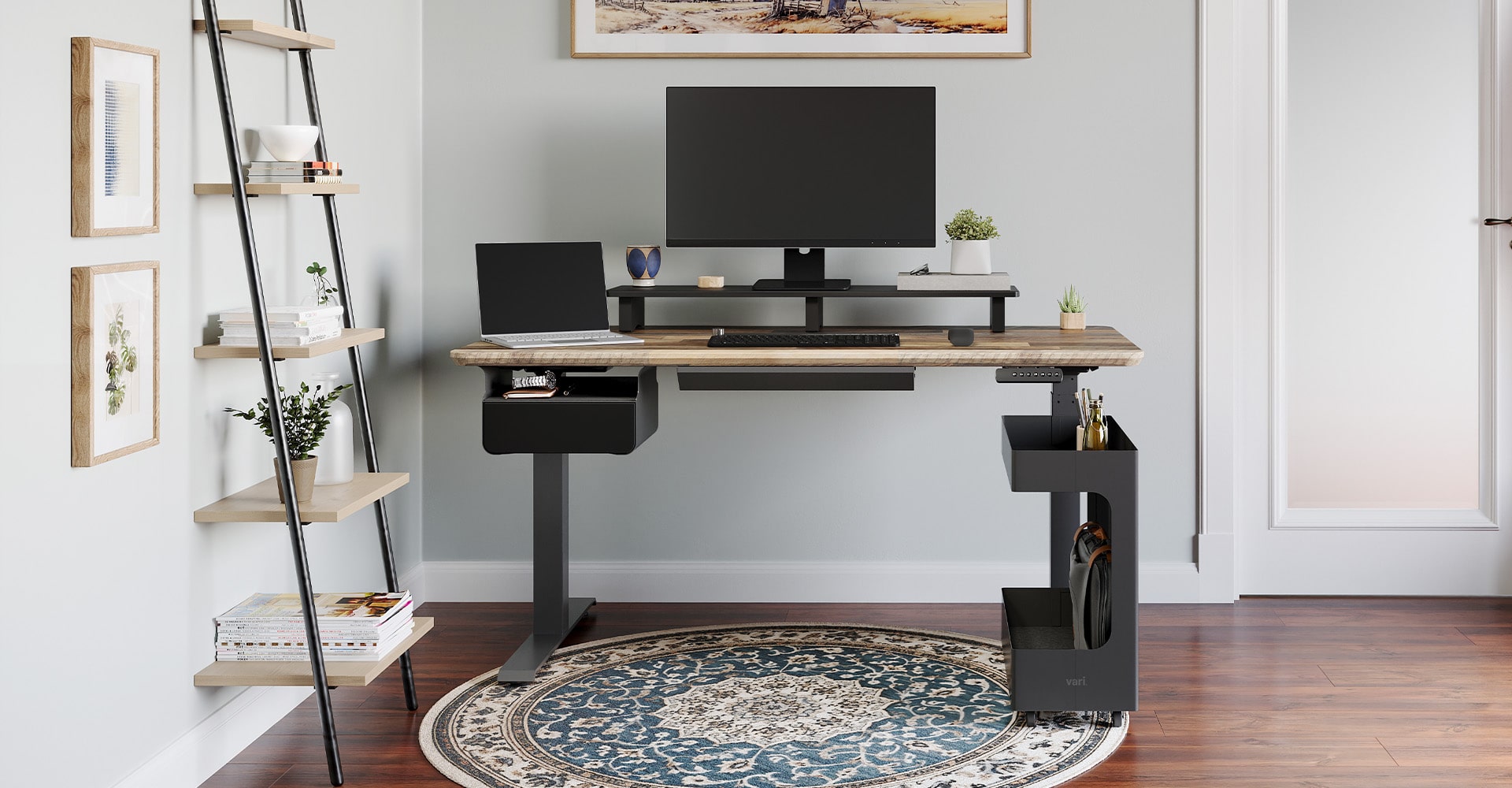
Install Wall Shelves and Racks
Mount shelves above or beside your desk for:
• File storage
• Reference books
• Decorative boxes
IKEA wall magazine racks are a popular choice for holding active paperwork. One user’s office featured two 8-foot-long white shelves above the desk—keeping essentials visible but off the work surface.
Hang Wall-Mounted Organizers
Use:
• Whiteboards for task tracking
• Pegboards for tools and supplies
• File holders for incoming/outgoing documents
Vertical storage keeps frequently used items close without sacrificing desk space.
Organize Supplies with the Showroom vs. Stock Model
Too many pens, sticky notes, and paper clips create visual noise. Simplify and store strategically.
Keep Only Daily-Use Supplies in Reach
• Showroom: Keep only daily-use supplies within arm’s reach (e.g., one notebook, one pen, one stapler)
• Stock: Store backups in drawers, cabinets, or under the desk
This reduces clutter and makes restocking intuitive—like a retail display with hidden inventory.
Contain Small Items in Trays and Boxes
Use trays (e.g., a hexagon tray from a flea market) to prevent scattering. For infrequent supplies, use stacked decorative boxes from Target or similar stores. They look clean and free up drawer space.
Simplify Your Supply Collection
Do you really need 257 pens? Likely not. Keep your favorites on hand and store the rest in a less prime location. After 6 months, if you haven’t missed them, donate or discard.
This “tough decor love” approach prevents supply overload and keeps your space intentional.
Master Paper Management

Paper piles up fast. A clear system keeps it under control.
Use Wall-Mounted Filing
Move paperwork off your desk with:
• Wall-mounted file holders
• Magazine racks
• Hanging folders labeled by category (e.g., Taxes, Clients, Receipts)
This turns vertical space into functional storage and keeps active files visible.
Organize Your Whiteboard by Category
Replace chaotic sticky notes with a divided whiteboard. Label sections:
• Tasks
• Goals
• Deadlines
This creates a visual roadmap of your priorities. Pair it with a printed planner or digital calendar for a complete system.
Many users find this cleaner and more effective than a bulletin board covered in Post-its.
Organize Your Digital Workspace Too
Your digital desktop should be as organized as your physical desk.
Apply the Same Circulation Rules to Digital Files
Use the same four stages:
• Ongoing projects: Active folders on your desktop or cloud drive
• Finished files: Moved to a “Completed” folder
• Archive: Backed up and moved to external storage annually
• Delete: Regularly purge outdated files
Schedule Quarterly Digital Cleanups
Set a calendar reminder every 3 months to:
• Delete duplicates
• Rename files consistently
• Archive old projects
• Compress large files (use tools like SmallPDF)
Digital minimalism prevents “file hoarding” and keeps searches fast.
Sync Physical and Digital Systems
If your desk is organized but your desktop is a mess, the clutter migrates. Apply the same logic: one inbox, clear categories, daily cleanup. Use cloud storage with clear folder names like “2024_Invoices” or “Client_Projects.”
Choose Functional and Stylish Items

Your office should be both useful and pleasant to be in.
Pick Dual-Purpose Decor
Every item should be functional AND look good. For example:
• A decorative box that stores supplies
• A sleek tray that holds pens
• A whiteboard with a modern frame
This dual standard prevents clutter and supports a clean aesthetic.
Favor Light, Minimalist Design
Many organized offices feature:
• White walls
• White furniture
• Butcher block desk surfaces
• Black leather chairs
This light, airy look reduces visual noise and creates a calm, focused environment.
IKEA butcher block countertops make durable, warm-toned desks. Pair them with IKEA ALEX drawer units as a base for a custom, professional setup.
Maintain Long-Term Order
Organization isn’t a one-time project—it’s a habit.
Stick to the Daily 5-Minute Reset
This is the single most effective habit for keeping your office functional. Clear your desk, file papers, and reset your space every night.
Archive Files Annually
Every year, move old files out of your workspace. Store them in labeled boxes in a closet, basement, or cloud drive. This keeps your current work front and center.
Review Unused Supplies Every 6 Months
For supplies you’re unsure about: store them away. If you haven’t needed them in 6 months, let them go.
This prevents “just in case” clutter from taking over.
Improve Your System Over Time
As your work changes, so should your office. Reassess every few months:
• Is your inbox working?
• Are supplies easy to find?
• Is digital clutter creeping in?
Update your systems to match your real workflow—not an idealized version.
Solve Common Home Office Challenges
Every home office faces obstacles. Here’s how to beat them.
Small Space? Go Vertical
In tight areas, wall shelves, pegboards, and mounted racks are essential. They free up floor space and keep tools within reach.
Mixed-Use Office? Add Categories
If your office doubles as a craft room, ministry space, or homeschool zone:
• Use labeled bins for non-office items (e.g., Craft Supplies, Toys, Ministry Files)
• Keep shared items in closed containers
• Maximize vertical space to keep surfaces clear
The same circulation principles apply—just with more categories.
Overwhelmed by Paper? Start with the Inbox
If paper is out of control, begin with the multi-inbox system. Process one tray at a time. Within a week, you’ll see progress.
Frequently Asked Questions About How to Organize Home Office
What are the best drawer units for a home office desk?
IKEA ALEX Drawer units are widely recommended. They’re sturdy, affordable, and can support a butcher block desk top.
Where can I find a durable desk surface?
IKEA butcher block countertops (kitchen counter butcher blocks) make excellent, customizable desk surfaces. They’re durable and add warmth to your space.
How do I organize my whiteboard effectively?
Divide it into labeled sections: Tasks, Goals, and Deadlines. This creates a visual roadmap and replaces cluttered sticky notes.
What should I keep on my desk?
Only your current project, a notebook, one pen, and your monitor or laptop. Everything else should be stored out of sight.
How often should I clean up digital files?
Schedule a quarterly digital cleanup. Delete duplicates, archive old projects, and compress large files to keep your system fast and efficient.
What if I love collecting pens and supplies?
Keep your favorites in reach and store the rest. If you haven’t used them in 6 months, donate or discard. This keeps your space intentional without guilt.
Key Takeaways for How to Organize Home Office
A truly organized home office isn’t about spotless shelves—it’s about creating a system that works for your real life. Focus on circulation, not clutter. Design your space so tasks, files, and ideas move smoothly from start to finish. Use vertical storage, limit stash spots, and clear your desk daily.
Start with the 5-minute nightly reset and the multi-inbox system—these two habits alone can transform your workflow. Then, build outward: organize supplies, digitize files, and adapt your space as your work evolves.
Your most productive days begin with an organized desk. Start small. Build habits. Stay consistent. You don’t need perfection—just progress.