You’ve decided to create a dedicated workspace—whether you’re launching a home office or scaling a business. Knowing how to set up an office the right way ensures better focus, smoother workflows, and long-term productivity. A poorly planned space leads to distractions, discomfort, and inefficiency. From location and layout to furniture and tech, every detail shapes how well you work. Getting it right from the start saves time, money, and stress.
This guide gives you a clear, actionable plan to build a functional and comfortable office—no matter your budget or space. You’ll learn how to choose the best location, design an efficient layout, pick ergonomic furniture, organize cables, and maintain a clutter-free environment. Whether you’re a remote worker or managing a team, these steps will help you create a professional, productive workspace in days.
Choose the Right Location for Your Office
The success of your office starts with its location. A well-chosen spot supports focus, accessibility, and growth. Avoid areas with constant noise or foot traffic that break concentration.
Decide Between Home and Commercial Office Space
For solopreneurs or remote workers, a quiet corner at home often works. Look for a spare room, enclosed porch, or basement area with minimal distractions. Keep it separate from high-traffic zones like the kitchen or living room.
If you’re hiring employees or meeting clients regularly, a leased commercial space may be better. Prioritize locations with easy access to public transit, parking, and your target market. While more expensive, a professional office enhances credibility and separates work from personal life.
Ask these key questions:
• Can this space grow with your team?
• Is it convenient for clients or employees to reach?
• Does it offer enough privacy for calls and sensitive tasks?
Maximize Natural Light and Airflow
Natural light boosts alertness and reduces eye strain. Position your desk near a window, but avoid direct sunlight that creates screen glare. Use sheer curtains to diffuse harsh light.
Good ventilation keeps the air fresh and prevents fatigue. Open windows when possible or use an air purifier. Maintain a room temperature between 68°F and 72°F (20–22°C) for optimal comfort and concentration.
Design a Layout That Supports Productivity
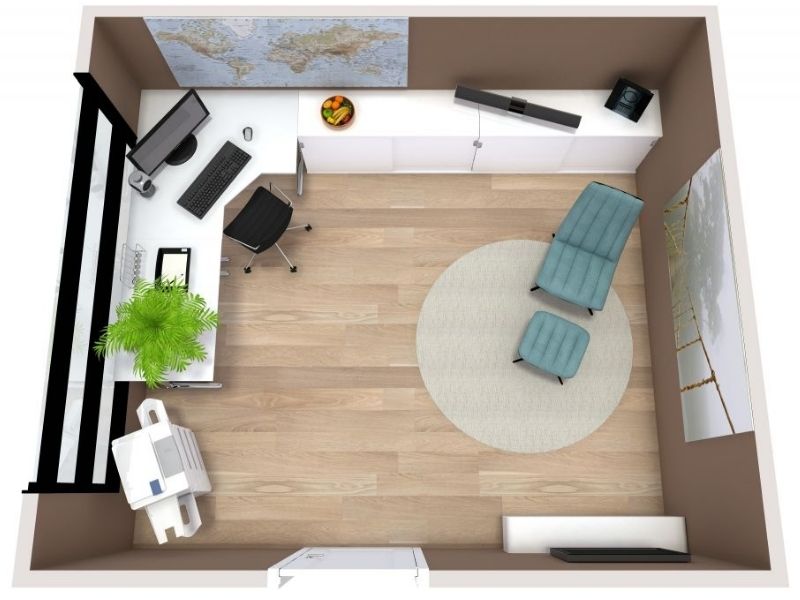
A smart office layout makes movement easy, reduces clutter, and supports different work modes—focus, collaboration, and storage.
Create Clear Work Zones
Divide your space into functional areas:
• Focus Zone: Desk and chair for solo tasks
• Collaboration Zone: Small table or seating for meetings
• Storage Zone: Shelves, filing cabinets, or drawers
• Tech Hub: Printer, router, and charging area
Keep daily-use items within arm’s reach. Store infrequently used supplies out of sight to reduce visual clutter.
Position Your Desk Strategically
Place your desk so your back faces a wall—this improves focus and reduces anxiety. If possible, position it to face the door, giving you a clear view of who enters.
Leave at least 30 inches (76 cm) behind your chair for easy movement. For larger spaces, an L-shaped desk offers room for dual monitors and extra workspace.
Invest in Ergonomic Furniture for Long-Term Comfort
Poor furniture leads to back pain, fatigue, and reduced productivity. Choosing ergonomic pieces helps you work longer and feel better.
Pick an Adjustable Office Chair
Your chair should support your lower back, let your feet rest flat on the floor, and keep your arms at a 90-degree angle when typing.
Look for these features:
• Adjustable seat depth
• Armrests that don’t interfere with desk height
• Breathable mesh or fabric
• Five-point base for stability
Replace chairs every 5–7 years or when cushions lose support.
Choose the Correct Desk Height
Standard desks (29–30 inches) suit people 5’8″ to 5’10”. If you’re taller or shorter, consider a height-adjustable desk.
Sit-stand desks let you alternate positions to reduce back strain. Switch between sitting and standing every 30–60 minutes. When seated, your elbows should form a 90-degree angle above the desk.
Stock Your Office with Essential Tools and Supplies
Having the right equipment streamlines your work and prevents daily frustrations. Don’t overlook small but critical items.
Gather Must-Have Office Supplies
Start with basics:
• Pens, notepads, sticky notes
• Stapler, paper clips, binder clips
• Scissors, tape dispenser
• Label maker or tags for organization
Add digital essentials:
• External hard drive or cloud backup
• Surge protector
• Wireless keyboard and mouse
Buy in bulk to save money, but store supplies in labeled containers to avoid mess.
Set Up Reliable Internet and Power Sources
A slow or unstable internet connection kills productivity. Choose a business-grade plan with at least 100 Mbps download speed.
Use Ethernet cables for desktops and critical devices. Place your Wi-Fi router in the center of the space, away from walls and metal objects.
Install extra outlets or power strips to prevent overloading circuits. Use cable organizers to keep cords off the floor and reduce tripping hazards.
Keep Cables and Devices Neat and Accessible
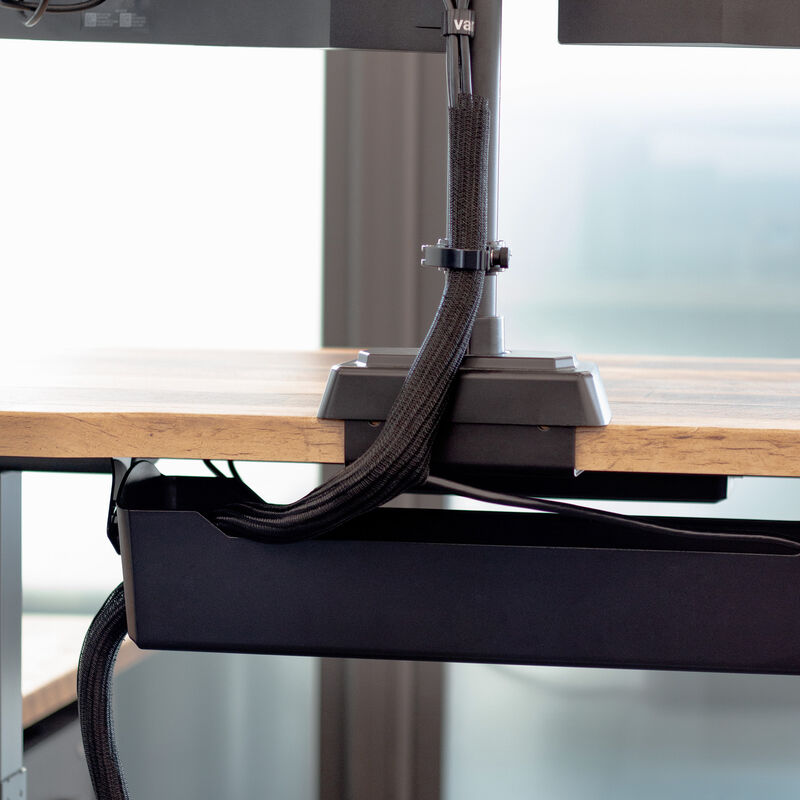
Tangled wires look unprofessional and make troubleshooting hard. A clean setup saves time and reduces stress.
Use Smart Cable Management
Bundle cords with Velcro ties, cable sleeves, or under-desk trays. Label each cable so you can identify them quickly.
Route cables through desk grommets or wall-mounted raceways. Avoid wrapping excess cord tightly—use loose coils secured with clips.
Never daisy-chain power strips, as this increases fire risk.
Build a Central Charging Station
Designate one spot for charging phones, tablets, and laptops. Use a multi-port USB hub or docking station to keep everything organized.
Keep charging cables coiled and secured. Unplug devices once fully charged to extend battery life and reduce energy waste.
Make Your Office Feel Personal and Inspiring
 you want, or paste the matching URL, I can confirm it fits the keyword “aesthetic home office decor with indoor plants and vision board.” Based on my visual read, the strongest matches are the images with clear indoor plants and an aesthetic desk setup, but none of the images I can see clearly show a vision board, so the match is partial.)
A personalized workspace increases motivation and makes you want to show up every day.
Add Meaningful Decor
Include items that reflect your goals and personality:
• Vision board or framed mission statement
• Artwork or motivational quotes
• Low-maintenance plants like snake plant or pothos
Limit decorations to 2–3 key pieces to avoid clutter.
Reduce Noise and Increase Privacy
Use noise-canceling headphones or a white noise machine if outside sounds distract you.
Install blinds or curtains for visual privacy. In open areas, use room dividers or bookshelves to create physical boundaries.
Protect Your Data and Equipment
Security is essential—both digital and physical. Losing data or hardware can set you back days or weeks.
Secure Your Digital Information
Install antivirus software and enable your firewall. Use strong, unique passwords and turn on two-factor authentication.
Back up files daily using cloud services like Google Drive or Dropbox. Encrypt laptops and external drives that store sensitive data.
Safeguard Physical Equipment
Lock drawers containing important documents. Use laptop locks for expensive devices, especially in shared or public spaces.
Consider installing a smart camera or alarm system if your office holds valuable equipment.
Keep Your Office Clean and Ready to Work
A tidy workspace improves focus and professionalism. Daily and weekly habits keep your office running smoothly.
Follow a Daily Reset Routine
Spend 5 minutes at the end of each day:
• Clear your desk of papers and trash
• Wipe down surfaces with disinfectant
• Return supplies to their spots
• Shut down computers properly
This simple habit keeps your office ready for the next morning.
Schedule Weekly Maintenance
Once a week:
• Vacuum or mop the floor
• Dust shelves and electronics
• Empty shredder and recycling bins
• Check printer ink, paper, and supply levels
If multiple people use the space, assign rotating tasks to stay consistent.
Frequently Asked Questions About Setting Up an Office
What is the best room for a home office?
Choose a quiet, low-traffic room with natural light, like a spare bedroom or enclosed den. Avoid kitchens or living rooms where distractions are high. A basement or converted garage can also work if properly insulated and lit.
How much does it cost to set up an office?
A basic home office can cost $300–$800 for a desk, chair, and essentials. A full setup with tech, storage, and decor may reach $1,500. Commercial offices cost more due to rent, utilities, and furniture for multiple people.
What are the most important ergonomic features?
Your chair must support your lower back, and your desk should allow your arms to bend at 90 degrees. Feet should rest flat on the floor. A monitor at eye level prevents neck strain. Sit-stand desks improve posture and reduce back pain.
How do I organize cables without drilling holes?
Use adhesive cable clips, under-desk trays, or cord sleeves. Route cords along baseboards with mounting clips. Bundle them with Velcro ties and label each one. A cable management box can hide power strips and excess length.
How can I make a small office feel bigger?
Use light wall colors, mirrors, and minimal furniture. Choose a desk with open legs to create visual space. Mount monitors or use wall shelves. Keep floors clear and use vertical storage to maximize square footage.
What office supplies should I buy first?
Start with a notebook, pens, stapler, paper clips, scissors, and tape. Add sticky notes, labels, and a filing system. For digital work, get a surge protector, wireless mouse, and external storage.
Key Takeaways for Setting Up an Office That Works
Creating a functional office starts with choosing the right location, designing a smart layout, and investing in ergonomic furniture. Equip your space with reliable internet, organized cables, and essential supplies. Personalize it to stay motivated, secure your data and devices, and maintain cleanliness with daily and weekly habits.
Start small, focus on what you need most, and improve over time. A well-set-up office isn’t about luxury—it’s about creating a space where you can focus, produce, and grow. Use this guide to build a workspace that supports your goals and makes every workday more effective.