Creating a productive and comfortable workspace at home starts with knowing how to build a home office that fits your lifestyle and work demands. Whether you’re transitioning to remote work or upgrading a cluttered corner, the right setup can boost focus, reduce stress, and support long-term health. A well-planned home office balances ergonomics, organization, and personal style—turning any space into a functional retreat. From measuring your area to managing cables and adding inspiring touches, this guide walks you through every step to design a space that enhances both performance and well-being.
You’ll learn how to assess your available square footage, choose ergonomic furniture, layer lighting effectively, and keep tech clutter under control. We’ll also cover smart storage hacks, personalization tips, and daily habits that maintain order and motivation. Whether you have a full room or just a nook, these actionable strategies will help you build a home office that’s efficient, comfortable, and uniquely yours.
Assess Your Available Space
Before purchasing a single piece of furniture, take time to evaluate the physical and functional limits of your chosen area. A thoughtful assessment ensures your home office fits seamlessly into your living space while supporting your daily workflow.
Measure Dimensions First
Grab a tape measure and record the length, width, and ceiling height of your intended office zone. Note the location of doors, windows, outlets, radiators, or vents—these can impact furniture placement and usability. For small spaces like closets or alcoves, prioritize compact or multi-functional furniture such as wall-mounted desks or nesting tables. Avoid overcrowding by leaving at least 24 inches of clearance around seating and walkways for comfortable movement.
Identify Natural Light Sources
Natural light improves alertness and reduces eye strain, so position your desk to take advantage of daylight without glare. Face your monitor perpendicular to windows to prevent screen reflections—especially from south-facing exposures, which receive strong midday sun. East- and west-facing windows may cause morning or afternoon glare, so test the space at different times. If natural light is limited, plan to enhance brightness with layered artificial lighting later.
Define Your Work Activities
Clarify what tasks you’ll perform daily—writing, video calls, design work, or document storage. This shapes your layout and equipment needs. If you host frequent Zoom meetings, choose a tidy backdrop and add front-facing lighting. For creative work like sketching or reading, include extra surface space and task lamps. Matching your setup to real-world use prevents wasted effort on aesthetics alone.
Plan an Efficient Layout
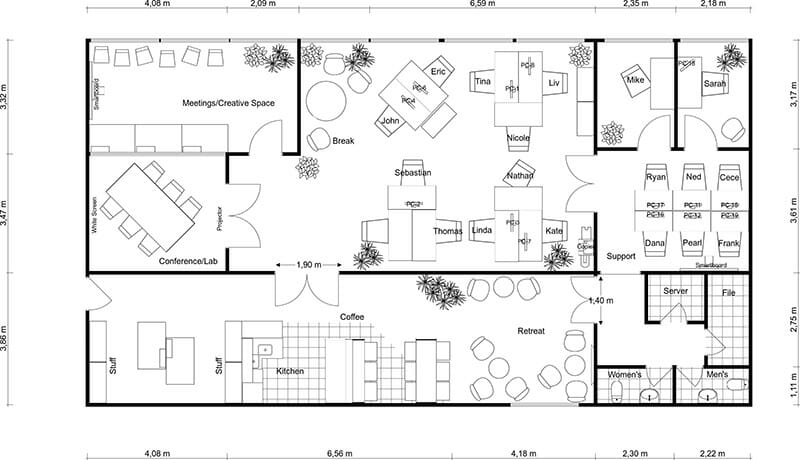
A smart layout maximizes productivity, even in tight areas. The goal is to create distinct zones for working, storing, and resting while maintaining clear sightlines and easy access.
Optimize Workflow Placement
Position your desk so natural light comes from the side, not directly behind or in front of your screen. Keep your keyboard, mouse, phone, and notebook within arm’s reach to reduce strain. Allow 24–30 inches between your chair and desk for legroom, and ensure door swings or foot traffic don’t interfere. Place power outlets and charging stations nearby to minimize cord stretching.
Create Functional Zones
Break your office into three focused areas to improve organization and mental clarity.
Work Zone: Desk and Chair Setup
This is your productivity center. Position your monitor so the top is at or slightly below eye level, about an arm’s length away. Use a monitor arm or stand to adjust height. Align your chair so your feet rest flat (use a footrest if needed), knees bent at 90 degrees, and lower back supported.
Storage Zone: Shelves and Cabinets
Place bookshelves, filing cabinets, or supply drawers close to your desk but out of high-traffic paths. In small rooms, go vertical—use tall narrow cabinets or floating shelves to save floor space and keep essentials visible and accessible.
Relaxation Zone: A Spot to Unplug
Even in compact offices, include a mini break area. A small armchair with a reading lamp or a cushioned window seat gives you a place to step away and recharge. Physically separating work and rest zones helps your brain switch off at the end of the day.
Choose the Right Furniture

Furniture directly impacts comfort, posture, and efficiency. Select pieces that support long hours of work while fitting your space and style.
Pick a Desk That Fits Your Tasks
Choose a desk with enough surface area for your monitor, laptop, notebook, and tools. For small areas, consider L-shaped, corner, or fold-down desks. Look for built-in cable grommets or under-desk trays to manage cords. If you sit and stand throughout the day, an adjustable-height desk improves circulation and reduces back fatigue.
Invest in an Ergonomic Chair
Never compromise on seating. Look for a chair with:
• Adjustable seat height
• Lumbar support for lower back alignment
• Breathable mesh or fabric
• Swivel base and smooth-rolling casters
Test chairs in person when possible, or read verified user reviews for long-term comfort. Poor support leads to fatigue, neck pain, and reduced focus over time.
Add Flexible Furniture When Needed
In shared or multi-use rooms, opt for adaptable pieces. A rolling cart stores supplies and tucks away at night. Nesting tables offer extra workspace when needed and disappear when not. These choices keep your office functional without dominating the room.
Layer Your Lighting Strategically
Relying on overhead lights alone creates harsh shadows and eye strain. A layered lighting plan combines ambient, task, and accent sources for balanced, adaptable illumination.
Use Ambient Lighting for General Illumination
Start with ceiling fixtures like recessed lights or a soft-diffused pendant to evenly light the room. Choose warm-white LED bulbs (3000–4000K) for a natural, inviting glow. Avoid cool blue tones or fluorescents, which can feel sterile. Install dimmer switches to adjust brightness based on time of day or task.
Add Task Lighting for Focus
Place an adjustable desk lamp on the side opposite your dominant hand—left for right-handed users—to prevent shadows. LED models with dimming and color temperature controls let you switch from cool white (for concentration) to warm white (for relaxation). Gooseneck or swivel-head lamps allow precise aiming.
Include Accent Lighting for Ambiance
Use wall sconces, floor lamps, or small table lights to add warmth and depth. These work well behind your desk to reduce screen contrast at night or near your relaxation zone to create a calming atmosphere. Subtle lighting transforms a clinical workspace into a welcoming environment.
Organize with Smart Storage

Clutter distracts and drains mental energy. A clean, organized home office helps you work faster and stay focused.
Install Floating Shelves
Mount shelves above or beside your desk for books, binders, or decorative items. Keep frequently used supplies within arm’s reach to reduce strain. Use matching baskets or bins for a cohesive, clutter-free look.
Use a Pegboard for Tools and Accessories
A pegboard (or grid wall panel) turns empty walls into customizable storage. Hang scissors, headphones, chargers, notepads, or small plants with hooks and clips. Paint it to match your wall for a seamless look or choose a bold color for a statement feature.
Keep Drawers Tidy with Organizers
Use drawer dividers for pens, sticky notes, USB drives, and paper clips. Label sections for quick access. Only keep daily essentials in the top drawer—store backups in closed cabinets or rolling carts to avoid visual clutter.
Personalize for Motivation and Calm
Your home office should reflect your personality and inspire you to work. Thoughtful details make the space feel welcoming and uniquely yours.
Define the Area with a Rug
Lay down a 4’x6’ or 5’x8’ area rug to visually anchor your workspace, especially in open-plan rooms. Choose low-pile or flat-weave rugs so your chair rolls smoothly. Add texture or pattern for visual interest, but avoid overly busy designs that distract.
Bring in Greenery
Plants reduce stress and improve air quality. Choose low-maintenance varieties like:
• Snake plant: Thrives in low light, needs little water
• Pothos: Grows quickly, tolerates neglect
• ZZ plant: Survives dim corners, requires minimal care
Place one on your desk, shelf, or floor to add life without extra effort.
Display Inspiring Art or Photos
Hang 1–3 meaningful pieces—framed photos, motivational quotes, or artwork—to personalize your walls. Avoid overcrowding; a few curated items create a more uplifting atmosphere than a cluttered gallery wall.
Manage Technology and Cables
A clean tech setup enhances both function and focus. Taming cords and optimizing devices prevents distractions and improves efficiency.
Tame Cords with Cable Management
Use:
• Cable clips to secure cords along desk legs
• Sleeves or braided wraps to bundle wires
• Under-desk trays to hide power strips and adapters
Label cords with colored tape or tags so you can quickly identify chargers, monitors, or speakers.
Protect Your Devices with Surge Protection
Plug all electronics into a high-quality surge protector—not a basic power strip. Choose one with USB ports, overload protection, and enough outlets. Keep it accessible but out of sight, like under the desk or behind a cabinet.
Optimize Monitor Positioning
Use a monitor arm to free up desk space and adjust height, tilt, and distance. Position the top of the screen at or slightly below eye level. For dual monitors, align them side-by-side with no gap to reduce neck strain and improve workflow.
Maintain a Productive Routine
A great home office isn’t just about design—it’s about how you use it. Small daily habits keep your space effective and enjoyable.
Do a 5-Minute Daily Tidy
At the end of each workday, spend five minutes:
• Clearing trash
• Returning items to drawers
• Wiping down surfaces
• Coiling loose cables
This prevents clutter buildup and sets you up for a fresh start the next morning.
Use Noise-Canceling Headphones
If your home is noisy—kids, pets, traffic—noise-canceling headphones help you focus. They’re ideal for calls or deep work. Keep them charged and within reach for instant use.
Test and Adjust Your Setup
After one week, evaluate your office:
• Is your chair comfortable after hours of sitting?
• Does lighting cause glare or shadows?
• Are supplies easy to access?
Make small tweaks—reposition the desk, add a footrest, or swap a lamp—until everything feels just right.
Frequently Asked Questions About How to Build a Home Office
What is the best location for a home office?
Choose a quiet area with natural light and minimal foot traffic, like a spare room, alcove, or quiet corner. Avoid high-traffic zones like the kitchen or living room unless you use room dividers or screens to create separation.
How small can a home office be?
You can create a functional workspace in as little as 50 square feet. Use space-saving furniture like wall-mounted desks, vertical storage, and foldable chairs. Prioritize ergonomics and keep only essential items in the space.
What are the must-have items for a home office?
Essential items include an ergonomic chair, a desk with enough surface area, proper lighting, storage solutions, and cable management tools. Add a monitor arm, surge protector, and noise-canceling headphones for enhanced comfort and efficiency.
How do I reduce glare on my computer screen?
Position your monitor perpendicular to windows and avoid placing it directly in front of or behind a light source. Use blinds or curtains to control sunlight. Consider an anti-glare screen filter if needed.
Can I build a home office on a budget?
Yes. Use existing furniture, shop secondhand, or repurpose items like a dining chair or bookshelf. Focus on key upgrades like an ergonomic seat or monitor stand. DIY storage solutions like pegboards or drawer organizers are also affordable and effective.
How do I keep my home office organized?
Use drawer dividers, labeled bins, and cable organizers. Adopt a 5-minute daily tidy habit. Store only frequently used items within reach and archive or donate unused supplies regularly.
Key Takeaways for Building a Functional Home Office
Creating a home office that supports productivity and well-being starts with assessing your space, needs, and workflow. Prioritize ergonomics by choosing an adjustable desk and supportive chair, and optimize layout with distinct work, storage, and relaxation zones. Layer lighting to reduce eye strain, manage cables for a clean look, and personalize with rugs, plants, and artwork to stay motivated. Finally, maintain order with daily tidying and regular setup reviews. By following these steps, you can build a home office that’s not only functional but a joy to use every day. Start small, make adjustments as needed, and enjoy the benefits of a workspace designed just for you.