Creating a functional workspace in a small apartment, studio, or shared room doesn’t require major renovations. More people than ever are learning how to set up home office in small space, turning forgotten corners and narrow nooks into productive zones. The key is working with what you have—using smart furniture, clever storage, and strategic layout choices to maximize every inch. Without thoughtful planning, cramped setups lead to clutter, discomfort, and distractions. But with the right approach, even a 50-square-foot area can support focus, efficiency, and professional video calls.
This guide walks you through proven strategies to build a compact yet comfortable home office. From space-saving desks and vertical storage to lighting hacks and cable control, each tip is designed for real-life small spaces. Whether you’re converting a closet, tucking a desk beside your bed, or using a fold-down unit in your living room, these steps help you create a workspace that feels intentional, organized, and ergonomic.
Choose a Space-Saving Desk Design

Your desk defines the office. In tight areas, every inch counts—so selecting the right style and placement is critical.
Install a Wall-Mounted Desk for Maximum Floor Clearance
A floating desk mounted directly to the wall eliminates bulky legs and frees up floor space. These units stay fixed but can include drop-leaf sides that fold down when not in use. Perfect for studio apartments or bedrooms, they maintain an open feel while providing a sturdy surface for laptops, notebooks, or dual monitors. Pair with a slim metal frame or wooden finish to match your decor.
Fit a Corner Desk into Unused Room Angles
L-shaped or triangular corner desks make use of dead space often ignored in small rooms. They offer extended surface area without protruding into walkways. Look for models with narrow depths (18–24 inches) and built-in grommets to route cables neatly. A corner setup keeps your back to the wall, creating a natural sense of separation from the rest of the room.
Pick a Compact Desk with Built-In Storage
Narrow desks (30–42 inches wide) fit between furniture or against short walls. Choose one with drawers, cubbies, or open shelving underneath to store supplies vertically. This keeps the desktop clear and reduces the need for additional furniture. A writing-style desk works well at the foot of a bed or beside a sofa in a living room setup.
Pro Tip: Always measure your available space before buying. Allow at least 24–30 inches behind the desk for chair movement and legroom.
Select a Smart Seating Option
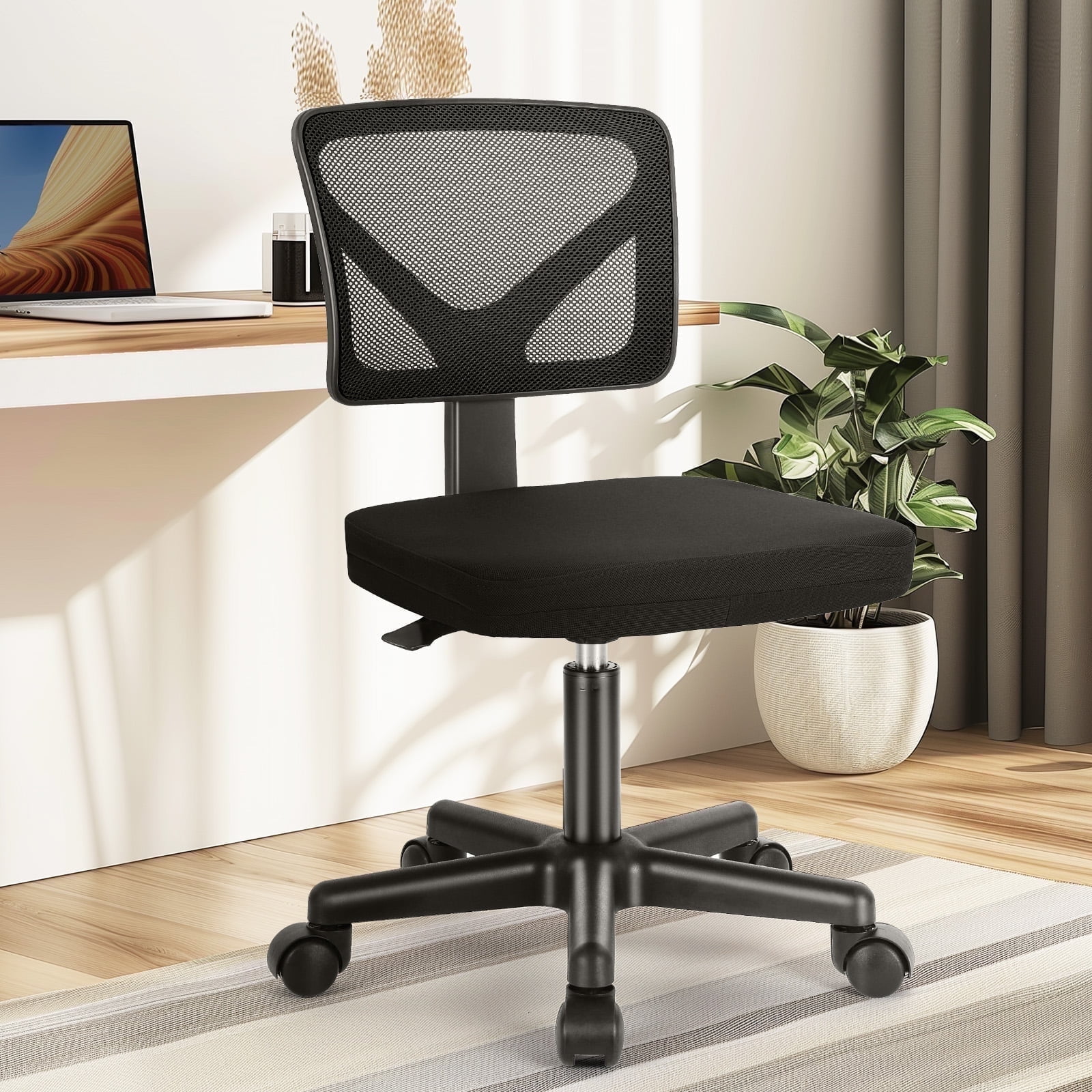
Your chair should support good posture—but in a small office, it also needs to be compact or easily stored.
Use a Compact Ergonomic Chair
Opt for an ergonomic chair labeled “small frame” or “space-saving.” These models feature narrow arms, adjustable height, and lumbar support without dominating the room. Look for breathable mesh backs and waterfall seat edges to reduce pressure during long work sessions.
Try a Foldable or Rolling Task Chair
If your office doubles as a guest room or lounge, choose a foldable chair stored in a closet when not in use. Alternatively, a rolling stool with casters lets you tuck it under the desk or move it out of the way. Some modern designs combine style and function, doubling as side seating.
Consider an Active Sitting Alternative
For minimal setups, swap a traditional chair for a stability ball with a backrest or a seated cushion that promotes posture. These take up less visual space and encourage movement, ideal for short workdays or part-time use.
Warning: Avoid oversized office chairs. They consume valuable floor area and make small rooms feel tighter.
Maximize Vertical Storage and Wall Space

When floor space is limited, look up—your walls are underused real estate.
Mount Floating Shelves Above Your Desk
Install shelves within arm’s reach to hold notebooks, books, or decorative items. Stagger heights to avoid a boxed-in look and maintain airflow. Use matching finishes to create a seamless, built-in appearance. Keep frequently used items within easy reach.
Hang Pegboards or Wall Pockets for Quick Access
A pegboard with hooks, bins, and clips organizes pens, headphones, chargers, and even small monitors. Paint it to match your wall for a subtle look or use bold colors for a creative vibe. Fabric wall pockets offer a soft alternative for lightweight supplies.
Elevate Your Monitor or Laptop
Use a monitor arm or wall-mounted laptop stand to free up desk space. Raising your screen to eye level improves posture and reveals hidden surface underneath for notes or a notebook. Pair with cable clips to keep wires off the desk.
Pro Tip: Add vertical file trays or stackable bins on shelves to sort documents without spreading them across your workspace.
Layer Lighting for Clarity and Comfort
Good lighting prevents eye strain and keeps energy levels steady throughout the day.
Combine Ambient, Task, and Accent Light Sources
Use ceiling lights for general illumination, a desk lamp for focused work, and under-shelf LEDs to highlight key areas. Layering prevents harsh shadows and screen glare. Avoid relying only on overhead lighting, which can feel flat or too bright.
Use Adjustable Desk Lamps
A gooseneck or swing-arm lamp lets you direct light exactly where needed. LED models with dimming controls adapt to different tasks—bright for reading, soft for video calls. Choose one with a clamp base to save desk space.
Position Your Desk Near Natural Light
Place your desk close to a window to take advantage of daylight. Sit perpendicular to the window to reduce screen reflections. Use sheer curtains or blinds to soften direct sunlight without blocking the view.
Pro Tip: Use warm-white bulbs (3000K–4000K) to create a calm, alert atmosphere. Avoid cool blue tones that feel clinical.
Keep Cables and Devices Tidy

Tangled cords ruin the clean look of any small office.
Bundle and Label Cables
Use Velcro straps, braided sleeves, or adhesive clips to group cords together. Run them along the back of the desk or down the wall. Label each cable with tags for quick identification when switching devices.
Hide Power Strips and Adapters
Mount a surge protector under the desk or inside a cable management box. Choose one with USB ports to reduce the number of wall warts. Use wall raceways to conceal cords running to outlets.
Switch to Wireless Devices
Use wireless keyboards, mice, and headphones to cut down on clutter. Pair them via Bluetooth and charge on a shared dock overnight. Fewer cables mean more desk space and easier cleaning.
Pro Tip: Attach a small outlet strip to the back of your desk for easy access and hidden plug-ins.
Define Your Workspace Visually
In shared or open areas, clear boundaries help you focus and disconnect after work.
Use Room Dividers or Bookshelves
Place a folding screen, low bookshelf, or curtain between your desk and living area. This blocks distractions and adds privacy during calls. Lightweight dividers let you reconfigure the space as needed.
Mark the Zone with a Rug or Paint
Lay a small rug under your desk to define the work area. Choose a color or pattern that contrasts with the rest of the floor. Alternatively, paint one wall a different shade to create a dedicated backdrop.
Create a Clean Video Call Background
Hang a simple shelf, artwork, or fabric panel behind your monitor. Avoid cluttered shelves or busy patterns on camera. Use a ring light to illuminate your face and make the background less noticeable.
Pro Tip: Use smart lighting to adjust brightness during calls—making your setup look polished on screen.
Optimize Storage Without Clutter
Smart storage keeps essentials close while maintaining a sense of openness.
Use Multi-Functional Furniture
Pick a desk with drawers, or use a storage ottoman that doubles as seating. A filing cabinet can serve as a side table or monitor riser when topped with a wooden board. Every piece should serve more than one purpose.
Store Supplies Out of Sight
Keep daily tools on your desk, but tuck away chargers, cables, and extra notebooks in labeled bins. Use under-desk trays or over-the-door organizers for quick access without visual clutter.
Digitize Documents and Notes
Scan paperwork and save files in cloud folders like Google Drive or Dropbox. Use apps like Notion or Evernote instead of physical notebooks. This reduces the need for file cabinets and paper stacks.
Warning: Don’t overfill shelves. Keep desktops and surfaces at least 50% clear to maintain a spacious feel.
Maintain Ergonomic Comfort in Tight Quarters
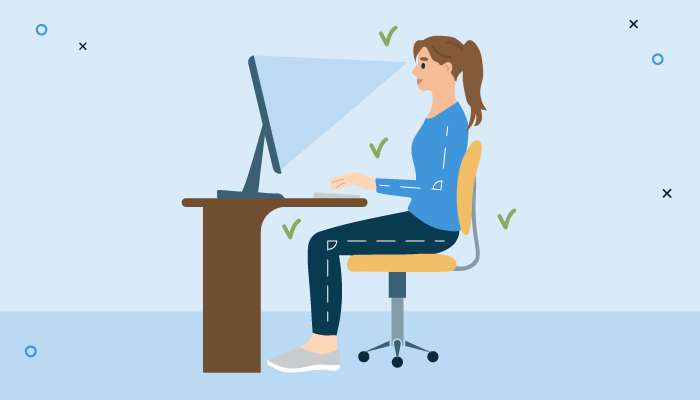
Even in small spaces, your body deserves proper support.
Set Your Screen at Eye Level
The top of your monitor should align with your eyes to prevent neck strain. Use a stand, stack of books, or wall mount to raise it. Pair with an external keyboard if using a laptop.
Keep Keyboard and Mouse Within Easy Reach
Your arms should bend at 90 degrees with wrists straight. A pull-out keyboard tray saves space and promotes correct alignment. Avoid stretching or hunching over.
Take Frequent Movement Breaks
Set a timer to stand, stretch, or walk every 30–60 minutes. Even small movements—like shoulder rolls or neck stretches—boost circulation and focus in confined areas.
Pro Tip: Use a laptop stand with an external keyboard and mouse for ideal ergonomics in compact setups.
Add Personal Touches to Inspire Focus
A small office should feel motivating, not like a forgotten corner.
Bring in Low-Maintenance Plants
A small succulent, pothos, or snake plant adds life and improves air quality. Choose varieties that thrive in indirect light and need minimal watering—perfect for busy remote workers.
Display a Few Meaningful Items
Hang a small frame with a quote, photo, or vision board. Limit decor to 1–3 items to avoid visual overload. Keep it simple and uplifting.
Use Calming Colors and Textures
Paint walls or add accessories in soft blues, greens, or warm neutrals. These tones support concentration and reduce stress. Use removable wallpaper or decals for renters who want a pop of color.
Pro Tip: Swap out seasonal decor or artwork to keep the space feeling fresh without adding clutter.
Frequently Asked Questions About Small Space Home Offices
How do I set up a home office in a studio apartment?
Use a corner or wall-mounted desk to save floor space. Define the area with a rug, shelf, or screen. Choose multi-functional furniture and go vertical with shelves and pegboards. Keep surfaces clear and lighting layered for a clean, functional zone.
What is the smallest space needed for a home office?
You can create a functional workspace in as little as 30–50 square feet. A 24-inch desk, compact chair, and wall storage fit in tight areas like closets, under stairs, or beside a bed. Prioritize ergonomics and cable management.
How can I hide my home office in a small room?
Use a fold-down desk, foldable chair, or rolling cart that you can store when not in use. Hide supplies in closed bins or ottomans. Use a room divider or curtain to conceal the area during non-work hours.
How do I make a small home office look professional for video calls?
Position a clean backdrop—like a solid wall, shelf, or artwork—behind your monitor. Use a ring light or adjustable lamp to illuminate your face. Keep the desk tidy and minimize background noise.
Can I use a closet as a home office?
Yes. Convert a walk-in or large reach-in closet by installing a floating desk, shelf, and task lighting. Use the doors for pegboards or mirrors. Ensure proper ventilation and outlet access.
How do I manage cords in a small workspace?
Bundle cables with Velcro ties, use adhesive clips, and route them through wall raceways. Hide power strips under the desk or in a box. Switch to wireless devices when possible and label each cord.
Key Takeaways for Setting Up a Home Office in Small Space
• Choose wall-mounted, corner, or compact desks with storage to save floor area.
• Use small-footprint or foldable chairs that support posture without crowding the room.
• Go vertical with shelves, pegboards, and monitor mounts to free up desk space.
• Layer lighting with ambient, task, and accent sources to reduce eye strain.
• Hide cables using clips, sleeves, and wireless devices for a clean look.
• Define your workspace with rugs, dividers, or paint to separate work from living areas.
• Store smart—use multi-functional furniture and digitize files to minimize clutter.
• Maintain ergonomics: position screens at eye level and take regular movement breaks.
• Add plants, art, and calming colors to make the space inviting and inspiring.
Start with one corner, test different layouts, and refine as you go. The goal isn’t a perfect office—it’s a practical, comfortable space where you can focus, stay organized, and log off with ease.