Sitting in an uncomfortable office chair for hours can lead to back pain, poor posture, and fatigue. If your chair feels like it’s working against you instead of supporting you, you’re not alone—especially if it’s a budget or poorly designed model. The good news? You don’t need to buy a $1,000 ergonomic chair to find relief. With a few smart upgrades and adjustments, you can transform even the most basic office chair into a comfortable, supportive workstation. From adding lumbar support to optimizing seat height and incorporating movement breaks, small changes make a big difference. In this guide, you’ll learn actionable, step-by-step ways to improve comfort, reduce strain, and create a healthier sitting experience—whether you’re working from home, studying in a dorm, or logging long hours at the desk.
Fix Poor Lumbar Support

Add a Contoured Lumbar Pillow
Most budget chairs lack proper lower back support, leading to slouching and lower back pain. The spine has a natural inward curve in the lower region, and without support, that curve flattens over time. Inserting a contoured lumbar pillow at the small of your back restores this alignment. Choose one with adjustable straps so it stays securely in place. Position it so it fills the gap between your lower back and the chair—don’t place it too high on the upper back.
Use a DIY Towel Roll
No pillow? Roll up a hand towel or small bath towel and secure it with rubber bands. Place it in the same spot—right at the natural curve of your spine. This simple fix is surprisingly effective and costs nothing. Users report immediate relief from lower back pressure, especially during long work sessions.
Upgrade to an Adjustable Back Support Frame
For a more permanent solution, consider a structured back support frame that attaches to the chair. These provide firmer, more consistent support than soft cushions and help maintain proper posture throughout the day. Some models even allow height and depth adjustments for a custom fit.
Improve Seat Comfort

Choose the Right Seat Cushion
A thin, hard seat creates pressure points on your sit bones (ischial tuberosities), leading to numbness and discomfort. A high-quality memory foam or gel seat cushion distributes weight evenly and reduces pressure. Look for models with a cutout or indentation under the sit bones—this relieves direct pressure and improves blood flow.
Prioritize Breathable Materials
Foam cushions can trap heat, making sitting uncomfortable over time. Opt for ones with mesh or breathable fabric covers to stay cool. If you work long hours, gel-infused cushions offer both comfort and temperature regulation.
Secure It in Place
Even the best cushion slips around if it doesn’t stay put. Choose one with a non-slip bottom or anti-skid backing. Some models come with straps that anchor to the chair, ensuring the cushion stays aligned no matter how much you shift.
Adjust Seat Height Correctly
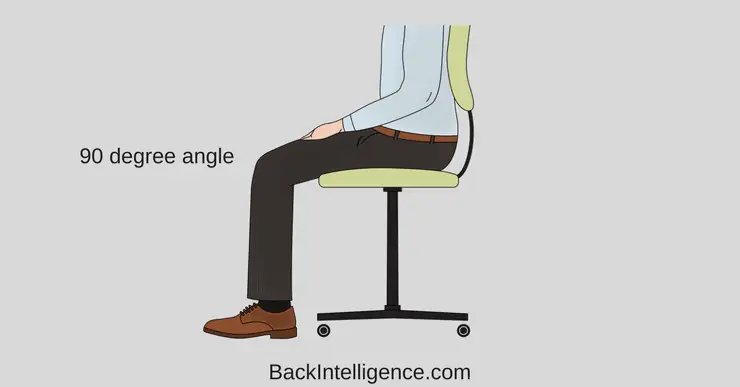
Set Hips and Knees at 90 Degrees
Your seat height determines how well your legs and back are supported. When seated, your feet should rest flat on the floor, thighs parallel to the ground, and knees bent at a 90-degree angle. If your hips are lower than your knees, your chair is too low. If your feet dangle, it’s too high.
Raise the Seat with a Cushion
If your chair won’t go high enough, place a firm foam pad or seat riser on the seat to elevate your hips. This simple trick allows your back to rest fully against the backrest and your feet to reach the floor—two critical factors in proper posture.
Lower the Chair with a Footrest
If your chair is too high and can’t be lowered further, use a footrest. It supports your feet, keeps your knees at 90 degrees, and prevents pressure buildup in the lower back. Even a stack of books or a yoga mat works in a pinch.
Optimize Seat Depth
Leave Space Behind the Knees
The front edge of the seat should stop 2–4 fingers’ width before the back of your knees. If the seat is too deep, it presses against the underside of your legs, restricting blood flow and causing discomfort or numbness.
Use a Seat Wedge for Shallow Seating
If your chair is too deep, a seat wedge or cushion with a sloped front can help. It raises the front of your seat slightly, encouraging a more upright pelvis position and reducing pressure on the back of your legs. This subtle tilt promotes better spinal alignment.
Stabilize Wobbly Bases
Replace the Chair Base
A shaky or wobbly chair undermines comfort and safety. If the base feels loose or one leg is bent, replace it with a sturdy 5-star base made of reinforced nylon or metal. A heavier base improves stability and prevents tipping.
Upgrade to Floor-Appropriate Casters
Casters matter more than you think. Hard rubber wheels are ideal for hardwood or tile floors—they roll smoothly without scratching. Soft rubber or polyurethane casters grip carpet better and prevent the chair from sinking. Swapping out old or wrong-type casters makes a noticeable difference in mobility and comfort.
Enhance Armrest Support

Position Armrests at Elbow Height
Your armrests should support your forearms without forcing your shoulders to hunch or rise. When typing, elbows should bend at 90 degrees and arms hang naturally at your sides. Wrists should remain neutral, slightly angled downward.
Add Aftermarket Armrests
If your chair lacks adjustable armrests—or has none at all—consider installing clip-on or screw-on aftermarket versions. These can be height- and width-adjustable, offering much-needed support for shoulders, elbows, and wrists.
Avoid Armrest Misuse
Never use armrests to push yourself up from the chair—that strains the joints and can damage the mechanism. Also, if they’re too high or too wide, remove or disable them. Poorly positioned armrests do more harm than good.
Use a Footrest When Needed
Support Entire Feet Flat
A footrest isn’t just for short people—it’s for anyone whose feet don’t rest flat on the floor. Your feet should lie fully supported, heels down, with knees at 90 degrees. This alignment reduces lower back strain and improves circulation.
Choose an Adjustable Footrest
Height- and angle-adjustable footrests let you customize your leg position. Look for models with textured surfaces to prevent slipping. Some even rock slightly to encourage gentle movement while seated.
Try DIY Footrests
No budget? Stack books, use a sturdy box, or place a yoga mat on the floor. One user reported, “Used a yoga mat as a footrest and it helped so much. My legs don’t fall asleep anymore.” It’s a simple, effective fix.
Optimize Tilt and Recline
Recline to 100–110 Degrees
Sitting upright like a soldier increases pressure on your lower back. Instead, recline slightly—between 100 and 110 degrees. This position reduces disc pressure and allows your back to rest fully against the backrest.
Adjust Tilt Tension
Use the tension knob under the seat to control how easily the chair reclines. It should match your body weight—tight enough to support you, loose enough to move smoothly. A well-adjusted tilt lets you shift positions naturally, reducing static muscle fatigue.
Avoid Locking the Chair
Keeping the chair locked in an upright position forces you into a rigid posture. Allow some recline to encourage dynamic sitting—small movements that engage core muscles and improve circulation.
Add Neck and Head Support
Use a Neck Pillow for Strain Relief
If you lean forward or crane your neck toward the screen, a small neck support pillow can help. Place it at the base of your neck, not the head. It encourages proper alignment and reduces strain during long sessions.
Install an Adjustable Headrest
Some chairs allow headrest attachments. If yours doesn’t, consider a clip-on version. Position it so the back of your head rests lightly against it when reclined—this supports the neck without encouraging slumping.
Adjust Monitor Height Properly
 is a strong match, but the first image in the list is the Amazon image of a monitor riser (71N79a7uc2L). Looking at the list order, the first image shown is the black dual-monitor riser on a desk, which corresponds to the first UR)
https://m.media-amazon.com/images/I/71N79a7uc2L.AC_UF894,1000_QL80.jpg)
Position Screen at Eye Level
Your eyes should look 2–3 inches below the top of the monitor. If the screen is too low, you’ll tilt your head forward, causing neck strain and shoulder tension. If it’s too high, you’ll tilt your head back, which also causes discomfort.
Elevate with a Stand or Books
Use a laptop stand, monitor riser, or stack of books to raise your screen. A monitor arm offers the most flexibility, allowing precise height and angle adjustments. One user said, “I used books to lift my laptop—game changer for my neck.”
Try a Standing Desk Converter
Alternate Between Sitting and Standing
Prolonged sitting is linked to back pain, poor circulation, and fatigue. A standing desk converter lets you raise your workspace so you can stand part of the day. Alternating every 30–60 minutes reduces strain and boosts energy.
Use a Budget-Friendly Option
You don’t need a full standing desk. A simple converter that sits on your existing desk works well. For a DIY version, place an ironing board on a sturdy table—it’s surprisingly effective and costs almost nothing.
Set Standing Height Correctly
When standing, your elbows should be at 90 degrees and wrists neutral. The top of the screen should still be at eye level. Use a mat under your feet to reduce leg fatigue.
Apply the Franken Chair Method
Combine Multiple Upgrades
Think of your chair as a project—add support where it’s missing. This “Franken chair” approach combines:
• A memory foam seat cushion
• A lumbar pillow
• A footrest
• An aftermarket armrest
• A monitor riser
Together, these can transform a $50 chair into a functional ergonomic setup.
Test and Refine
After each addition, sit and test for comfort. Adjust positioning until everything feels natural. One user shared, “I added a memory foam pad and lumbar pillow—game changer! My back hasn’t hurt in weeks.”
Maintain Your Chair
Clean Regularly
Dust, crumbs, and spills degrade fabric and foam over time. Wipe down surfaces weekly. Use machine-washable cushions and chair covers to keep things fresh.
Check for Loose Parts
Tighten screws, inspect casters, and test the tilt mechanism monthly. A well-maintained chair lasts longer and performs better.
Replace Worn Components
Foam flattens, straps break, and casters wear out. Replace cushions every 2–5 years depending on use. Don’t wait until something fails—proactive replacement keeps your setup comfortable.
Know When to Upgrade
Recognize Chair Limitations
No amount of padding can fix a chair with broken mechanisms or poor structure. If adjustments don’t help, or discomfort persists after trying all fixes, it may be time to invest in a better chair.
Look for Key Features
A quality ergonomic chair should have:
• Adjustable seat height and depth
• 3D or 4D armrests
• Recline with tension control
• Built-in lumbar support
• Breathable mesh back
These features reduce strain and last for years.
Consider Long-Term Value
High-end chairs cost $500–$1,300, but they’re built to last a decade or more. For people who sit 8+ hours daily, the investment pays off in comfort, health, and productivity.
Move Frequently
Take Movement Breaks
Even the best chair isn’t meant for hours of static sitting. Stand, stretch, or walk every 30–60 minutes. Set a timer or use a smartwatch reminder.
Stretch Key Areas
Focus on hips, hamstrings, lower back, and shoulders. Simple stretches like seated spinal twists or shoulder rolls relieve tension and improve circulation.
Walk During Calls
Take phone or video meetings while walking. It boosts energy, creativity, and posture awareness.
Frequently Asked Questions About Making Office Chairs More Comfortable
How can I make my office chair more comfortable without buying a new one?
Add a memory foam seat cushion, use a contoured lumbar pillow, adjust the seat height so your feet rest flat, and install a footrest if needed. Combine these with proper monitor positioning and armrest alignment to significantly improve comfort.
What is the best seat cushion for long sitting sessions?
A memory foam or gel cushion with a cutout for the sit bones provides the best pressure relief. Look for breathable fabric covers to prevent overheating. These cushions distribute weight evenly and improve blood flow.
Why does my lower back hurt after sitting in my office chair?
Poor lumbar support is the most common cause. Without proper support, your spine’s natural curve flattens, straining muscles and discs. Add a lumbar pillow or towel roll at the small of your back to restore alignment.
How do I know if my chair is the right height?
When seated, your feet should be flat on the floor, thighs parallel to the ground, and knees bent at 90 degrees. If your feet dangle, the chair is too high. If your hips are below your knees, it’s too low.
Can a footrest really improve posture?
Yes. A footrest supports your feet when they can’t reach the floor, keeping your knees at 90 degrees and reducing strain on your lower back. It also improves circulation and prevents leg numbness.
Is it better to sit upright or recline slightly?
Recline slightly to 100–110 degrees. This reduces pressure on your lower back discs and allows your back to rest against the chair. Sitting bolt upright increases spinal strain and fatigue.
Key Takeaways for Making Your Office Chair More Comfortable
Start with lumbar support and seat cushioning—these have the biggest impact on comfort and posture. Adjust your chair height so your feet rest flat and knees stay at 90 degrees. Add a footrest if needed, and use a monitor riser to keep your screen at eye level. Combine these upgrades using the “Franken chair” method to turn a basic chair into an ergonomic workstation. Finally, take movement breaks every 30–60 minutes to reduce the risks of prolonged sitting. While accessories can dramatically improve comfort, a high-quality ergonomic chair is the best long-term investment for health and productivity.