You need a secure, private place to receive mail—maybe you’re tired of porch pirates, you work remotely and want a professional address, or you’re living temporarily without a permanent residence. A Post Office Box (PO Box) is the solution. The United States Postal Service (USPS) offers PO Box rentals at thousands of locations nationwide, giving you a reliable, 24/7-accessible mailbox with added benefits like package holding, street addressing, and mail previewing.
Finding and renting a PO Box doesn’t have to be complicated. Whether you’re looking online, using the USPS app, or visiting in person, there are fast, easy ways to locate available boxes near you. In this guide, you’ll learn exactly how to find a post office box, compare sizes, apply online or in person, and manage your box—all with up-to-date, actionable steps based on official USPS procedures.
Use the USPS PO Box Locator Tool
The fastest way to find an available PO Box is through the official USPS PO Boxes Available Locator. This online tool shows real-time availability, pricing, and access hours—no guesswork required.
Go to the Official PO Box Page
Start at www.usps.com/poboxes. Look for the “Locate a Post Office Box” section on the right side of the page and click “Go.”
This tool is designed specifically for PO Box searches—unlike general location finders, it filters only facilities that offer box rentals and displays which sizes are currently available.
Search by ZIP Code or Address
Enter your ZIP code or full street address to find the closest Post Offices with PO Boxes. The results will show:
• Available box sizes
• 6-month rental prices
• Facility address, phone number, and fax
• PO Box lobby access hours (click “More Info”)
You can compare multiple locations side by side and choose the one that fits your schedule and mail volume.
Find PO Boxes Using the USPS Locations Tool
If you want more context about services offered at each location, use the Find USPS Locations tool. It’s broader than the PO Box locator but lets you filter by specific features.
Enter Location Details
Go to the USPS Locations page and enter a ZIP code, city, or state.
Filter for PO Box Availability
After searching, use the “Services” filter and check “PO Boxes” to display only locations that offer box rentals.
This tool also shows additional services like:
• Self-service kiosks
• Passport acceptance
• Package pickup lockers
• Retail hours
It’s ideal if you want a Post Office that offers multiple conveniences beyond just mail access.
Check PO Box Sizes and Availability
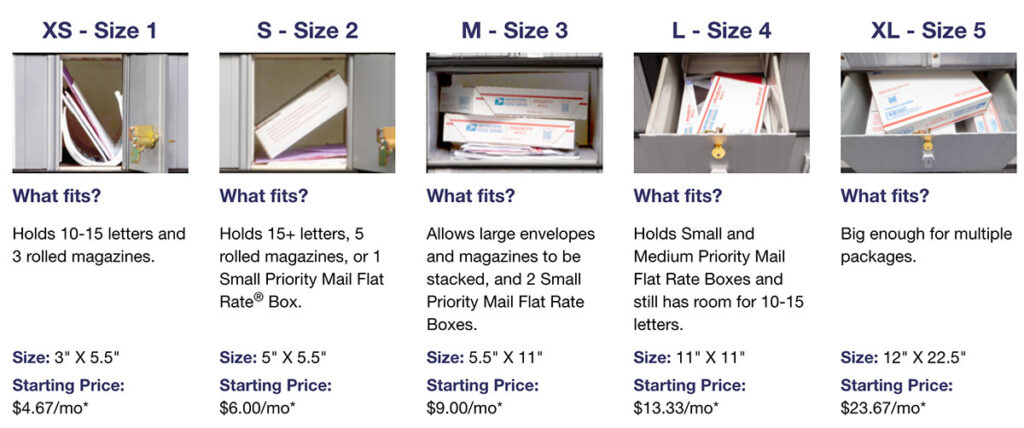
Not all Post Offices have every box size. Before choosing a location, understand what each size holds so you don’t overpay—or end up with overflow mail.
XS – Size 1 (3″ x 5.5″)
Holds 10–15 letters and 3 rolled magazines. Best for minimal mail users or small businesses with digital billing. If you check your box daily, this compact option saves money.
S – Size 2 (5″ x 5.5″)
Fits 15+ letters, 5 magazines, or 1 Small Priority Mail Flat Rate Box. A step up for households receiving regular bills and small envelopes.
M – Size 3 (5.5″ x 11″)
Ideal for large envelopes and stacked magazines. Holds 2 Small Flat Rate Boxes. Great for freelancers or remote workers getting occasional documents.
L – Size 4 (11″ x 11″)
Fits Small and Medium Flat Rate Boxes with room for letters. Perfect for online shoppers or small businesses receiving daily mail and packages.
XL – Size 5 (12″ x 22.5″)
The largest standard box. Fits multiple packages and high-volume mail. Best for e-commerce sellers or those with frequent deliveries.
Note: Depth is typically 14.75 inches across all sizes. If a package exceeds this, it won’t fit and will be held at the counter or in a parcel locker.
Rent a PO Box Online in 4 Steps
You can reserve a PO Box from home in minutes. The process is secure and locks in your box while giving you time to verify ID in person.
Step 1: Search and Select a Location
On the PO Box locator, click a Post Office with available boxes. Choose your preferred size and rental term (3, 6, or 12 months).
Step 2: Choose Rental Term
• 3-month term: Requires automatic renewal (no opt-out)
• 6- and 12-month terms: Can opt out of auto-renewal
Longer terms often offer better value and more flexibility.
Step 3: Complete the Online Application
Fill out the digital PS Form 1093. You’ll provide:
• Name
• Contact information
• Desired box size and term
• Billing details
Accept the Terms & Conditions, then submit. You’ll get a confirmation email with your application PDF.
Step 4: Verify ID at the Post Office
Within 30 days, visit the Post Office where your box is located. Bring:
• Printed application
• 2 forms of U.S. ID (e.g., driver’s license + passport or utility bill)
A retail associate will verify your identity and issue 2 keys or a lock combination.
⚠️ Warning: Failure to verify within 30 days cancels your reservation.
Apply for a PO Box In Person

If you prefer face-to-face service or the online tool shows no availability, go directly to a Post Office.
Bring Required Documents
You’ll need:
• 2 forms of valid U.S. identification
• Payment method (credit/debit card, cash, or check)
Optional: Pre-fill PS Form 1093 online and print it to save time.
Talk to the Retail Associate
Say: “I’d like to apply for a PO Box.” The clerk will:
• Show available sizes
• Explain pricing
• Help you complete the form
• Collect payment
• Issue keys or combo on the spot
This method is instant—no waiting for verification.
Use the USPS Mobile App to Find a PO Box
The USPS Mobile App (iOS and Android) includes a “Find Post Office” feature that works just like the desktop locator.
Search by ZIP or City
Open the app, tap “Locations,” then enter your ZIP code or city and state. Filter results by “PO Boxes” to see only relevant facilities.
View Hours and Services
Tap any location to see:
• PO Box lobby access times
• Retail counter hours
• Available services (e.g., package pickup, kiosks)
The app is perfect for on-the-go searches and includes GPS navigation to the facility.
Understand PO Box Access and Hours
Most PO Box lobbies offer 24/7 access, but hours vary by location. Always confirm before relying on after-hours pickup.
Check Lobby vs. Counter Hours
• PO Box lobby: Often open 24/7 for mail retrieval
• Retail counter: Staffed during business hours (typically 9 AM–5 PM, Mon–Sat)
Use the “More Info” link in search results to see exact lobby access times.
What If the Lobby Is Closed?
If you need service outside hours:
• Use self-service kiosks for stamps or label printing
• Drop off outgoing mail in collection boxes
• Schedule package pickup via USPS.com
Link Your PO Box to a USPS.com Account
Once you have a PO Box, link it to your USPS.com account for full online management.
Create or Sign In to Your Account
Go to USPS.com and sign in. If you don’t have an account, create one with email and password.
Link Your PO Box
Navigate to “Manage PO Box” and follow prompts to link your box using:
• Box number
• Post Office ZIP
• Verification code (mailed or given at pickup)
Manage Online
Once linked, you can:
• Renew your box (30 days before due)
• Close your box
• Request refunds
• Update contact info
💡 Pro Tip: Set up email reminders for renewal dates to avoid losing your box.
Handle Packages That Don’t Fit
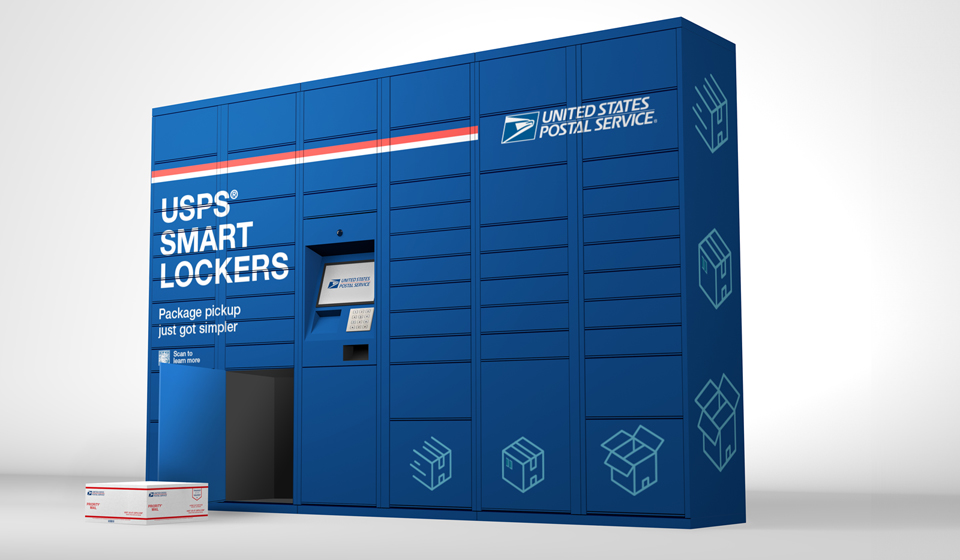
Not all packages fit in PO Boxes—especially large or deep ones.
What Happens When a Package Is Too Big?
You’ll receive a notice in your PO Box or via Informed Delivery email. The package will be:
• Held at the retail counter for pickup during business hours, or
• Placed in a secure parcel locker (like USPS Smart Lockers) for 24/7 access
Use Street Addressing for Private Carriers
Want to receive FedEx, UPS, DHL, or Amazon packages at your PO Box?
Opt in to Street Addressing Service at participating locations. This lets you use:
[Post Office Street Address] + PO Box #[Number]
Example:
123 Main St, PO Box 456, Anytown, ST 12345
This service is not available at all locations, so confirm with your Post Office.
Know the ID and Payment Rules
To rent or renew a PO Box, you must meet USPS requirements.
Two Forms of ID Required
You must present two acceptable U.S. IDs when:
• Picking up keys after online application
• Applying in person
Acceptable IDs include:
• Government-issued photo ID (driver’s license, passport)
• Social Security card
• Utility bill with name and address
• Lease agreement
The names on both IDs must match.
Payment Deadlines Matter
• Pay by the 10th of the month your term ends
• If unpaid, your box closes on the 11th
• Partial refunds are issued if you close early
Set up automatic renewal for 6- or 12-month terms to avoid lapses.
What If Your Desired Box Isn’t Available?
High demand means popular sizes sell out fast—especially in urban areas.
Choose an Alternative Size
Consider upgrading or downgrading. For example:
• If Size 4 is gone, Size 5 may still be open
• If you get little mail, Size 2 might suffice
Try a Nearby Location
Search for Post Offices within a 5–10 mile radius. Smaller branches may have availability.
Join the Wait List
Request to be added to the wait list online or at the Post Office.
• You’ll be contacted by phone or email when a box opens
• You have 48 hours to reserve it
• After that, it goes to the next person
✅ Smart Move: Join wait lists at multiple locations to increase chances.
Close or Move Your PO Box
Need to cancel your rental? It’s easy to close your box and forward mail.
Close Online
Go to “Manage PO Box” > “Close/Request Refund”. Confirm the action—you’ll get a partial refund based on unused time.
Close In Person
Tell the retail associate at your Post Office. They’ll process the closure and issue a refund if applicable.
Forward Your Mail
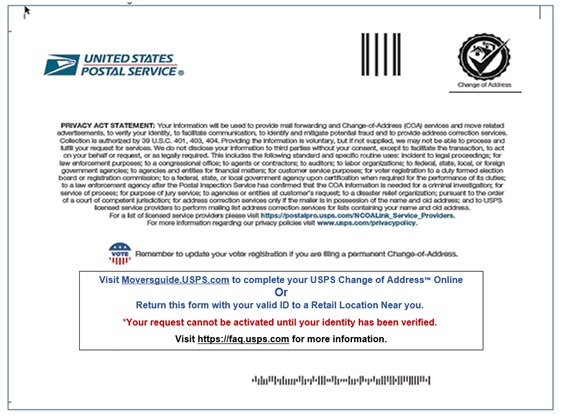
After closing, submit a Change of Address (COA) form:
• Online via the confirmation page
• In person at the Post Office
Your mail will be forwarded for up to 1 year.
Maximize PO Box Benefits
A PO Box is more than just a mailbox—it’s a tool for privacy, security, and convenience.
Enable Signature on File
This free service lets signature-required mail go straight into your box or parcel locker. Without it, you’d get a slip and have to sign at the counter.
Use Informed Delivery
Sign up for Informed Delivery to:
• See digital previews of incoming letters
• Track packages
• Manage deliveries from your phone
Available for personal and business accounts.
Use for Business
A PO Box gives your small business:
• A professional address
• Separation from personal mail
• Secure package handling
Combine with Street Addressing for a complete business mailing solution.
Frequently Asked Questions About Finding a PO Box
Can I rent a PO Box online and skip the Post Office visit?
No. You can reserve a PO Box online, but you must visit the Post Office within 30 days with two forms of ID to verify your identity and receive your keys or combination.
Can I get a PO Box without a permanent address?
Yes. You can use a temporary address (like a shelter or friend’s home) for application, but you must provide two valid U.S. IDs with matching names. Some locations may require additional verification.
How much does a PO Box cost?
Prices vary by location and size. Rental terms are 3, 6, or 12 months. Smaller boxes start around $20 for 6 months in rural areas; urban locations can range from $50 to over $150 for larger boxes.
Can I receive Amazon and UPS packages in my PO Box?
Only if your Post Office offers Street Addressing Service. With this, you can use the Post Office’s street address plus your box number. Without it, private carriers like UPS and FedEx cannot deliver to PO Boxes.
What happens if my package doesn’t fit in the PO Box?
You’ll receive a notice in your box or via email. The package will be held at the retail counter or placed in a secure parcel locker for pickup.
Can I have someone else pick up my mail?
Yes. You can authorize another person by completing a PS Form 1583 (Application for Delivery of Mail to an Agent) at your Post Office. They must present ID when picking up mail.
Key Takeaways for Securing Your PO Box
• Use the USPS PO Box locator to find real-time availability by ZIP code
• Compare sizes and access hours before choosing a location
• You can start the rental process online but must verify ID in person within 30 days
• Link your box to USPS.com for easy renewal and management
• Opt in to Street Addressing and Informed Delivery to maximize convenience
Now that you know how to find a post office box, take the next step: visit USPS.com/poboxes and start your search today.