You’re tired of package theft, want to keep your home address private, or need a professional mailing address for your side hustle. A PO Box offers a secure, reliable solution—and getting one is easier than you think. The United States Postal Service (USPS) makes it simple to get a PO Box online or in person, with flexible sizes, 24/7 access, and added benefits like package handling and street addressing. Whether you’re an individual or small business owner, this guide walks you through every step—from choosing the right size to picking up your keys and managing your box online. No guesswork, no delays—just a clear path to securing your private mailbox.
This step-by-step breakdown ensures you avoid common mistakes, maximize convenience, and start receiving mail quickly. You’ll learn how to check availability, verify ID requirements, activate street addressing for Amazon and UPS deliveries, and manage renewals—all from one trusted source.
Find Available PO Box Locations Near You

Search for Nearby Post Offices Using ZIP Code
Start by visiting USPS.com and using the “Find a PO Box Near You” tool. Enter your ZIP code, city, or full address to see all nearby Post Office locations that offer PO Box service. Each result displays real-time availability, operating hours, and whether 24/7 access is offered.
Not all Post Offices have PO Boxes, so check multiple locations if your first choice is full. You can also filter results by street addressing availability, which allows carriers like FedEx, UPS, and Amazon to deliver to your PO Box—provided the package meets USPS size rules.
Check Which Box Sizes Are Available at Each Location
Most Post Offices offer five PO Box sizes—XS (Size 1) to XL (Size 5)—but not every size is available everywhere. Use the online tool to preview what’s offered before heading in. If your preferred size isn’t available:
– Choose a larger or smaller box
– Try a different Post Office
– Request to be added to the wait list for your desired size
USPS will contact you via phone or email when a box opens up—and you’ll have just 48 hours to reserve it. This fast response window means you should keep your application info ready and respond quickly.
Choose the Right PO Box Size for Your Mail Volume
Match Box Size to Your Mailing Needs
Picking the right size prevents overflow and saves money. Here’s what each size holds:
XS – Size 1 (3″ × 5.5″)
Ideal for light mailers. Holds 10–15 letters and 3 rolled magazines. Best for individuals who check mail frequently or run small online businesses with minimal correspondence.
S – Size 2 (5″ × 5.5″)
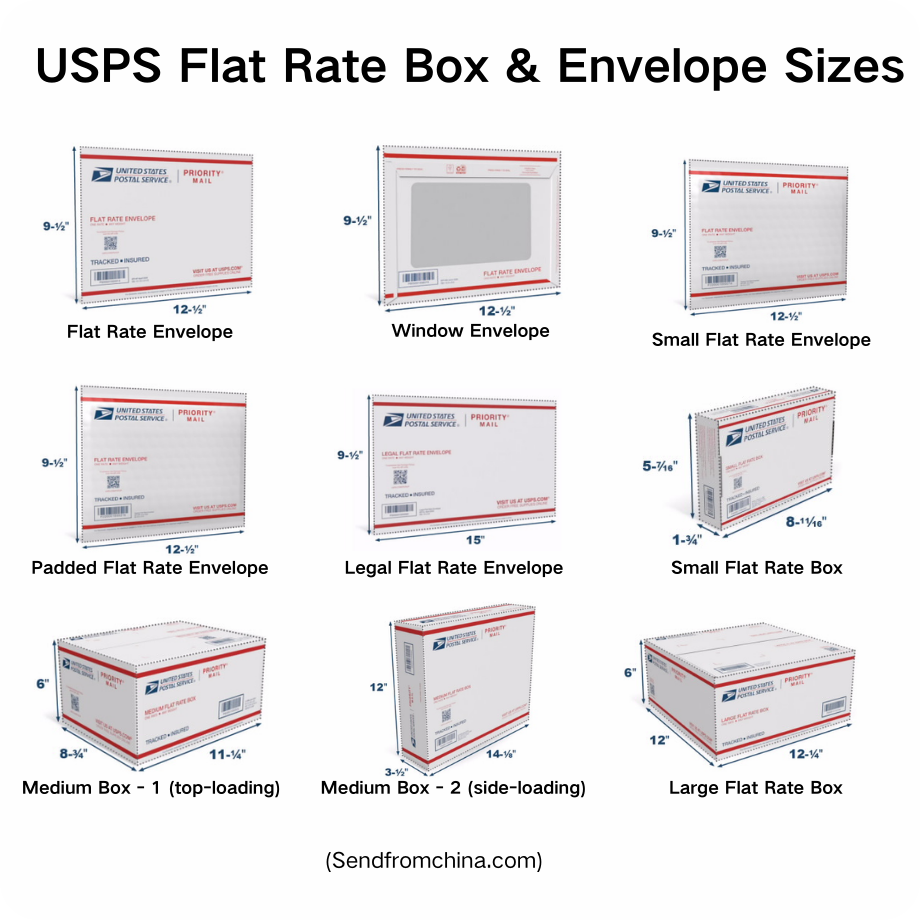
Fits 15+ letters, 5 magazines, or 1 Small Priority Mail Flat Rate Box. Great for households receiving weekly bills and occasional packages.
M – Size 3 (5.5″ × 11″)
Accommodates large envelopes and stacked magazines without folding. Holds 2 Small Flat Rate Boxes. Perfect for freelancers or remote workers getting regular documents.
L – Size 4 (11″ × 11″)
Handles Small and Medium Flat Rate Boxes plus 10–15 letters. Ideal for online shoppers or small businesses receiving daily mail and multiple packages.
XL – Size 5 (12″ × 22.5″)
Largest option. Fits multiple packages and high-volume mail. Best for e-commerce sellers or businesses with frequent deliveries.
Note: All PO Boxes are 14.75 inches deep. If a package doesn’t fit, you’ll get a pickup slip or it may go to a secure parcel locker.
Apply for a PO Box Online or In Person

Complete the Online Application in Minutes
Applying online saves time and locks in your box instantly. Follow these steps:
- On the USPS PO Box page, select your preferred location.
- Choose your box size and rental term (3, 6, or 12 months).
- Fill out PS Form 1093 online—your application details are saved automatically.
- Accept the Terms & Conditions and pay the rental fee with a credit or debit card.
- Print your completed form or save it digitally.
You have 30 days to visit the Post Office and verify your identity. After that, your reservation expires.
Pro Tip: Paying for 6 or 12 months lets you opt out of automatic renewal. The 3-month plan requires auto-renewal with no opt-out.
Apply In Person at the Post Office Counter
Prefer to do it all face-to-face? You can apply directly at the counter:
- Download PS Form 1093 ahead of time and fill it out (optional but speeds things up).
- Bring 2 forms of U.S. government-issued ID (e.g., driver’s license + passport or Social Security card).
- Tell the clerk you want to rent a PO Box.
- Select your size and pay the rental fee.
The clerk will process your application and prepare your keys or combination on the spot.
Verify Your ID and Pick Up Your PO Box Keys

Bring Two Valid Government-Issued IDs
No matter how you apply, you must visit the Post Office in person to pick up your keys or combination. Even if you live in another state, you must go to the facility where your box is located.
Acceptable IDs include:
• Driver’s license
• State ID
• Passport
• Military ID
• Permanent Resident Card
• Government employee badge
At least one must have a photo. Both must be current and not expired.
Receive Your Keys or Lock Combination
Once your identity is verified:
• You’ll receive 2 physical keys or a lock combination
• Need more keys? Request up to 4 total for an additional fee
• Business accounts may designate authorized users
Your PO Box is now active. You can start receiving mail immediately.
Warning: If you don’t pick up your keys within 30 days of online application, your reservation is canceled and you’ll need to reapply.
Activate Street Addressing for Amazon, FedEx, and UPS Deliveries
Use a Real Street Address Instead of a PO Box Number
One of the biggest perks? Street Addressing—available at select locations. Instead of “PO Box 123,” your address becomes: