A messy or dull desk can silently sabotage your focus and energy. But when you know how to decorate desk in office intentionally, your workspace becomes a hub of efficiency, calm, and personal expression. The right setup blends clean organization, professional style, and subtle personal touches that inspire without distracting. This guide gives you a step-by-step plan to create a workspace that feels both polished and uniquely yours—using smart organization, natural elements, and purposeful decor.
You’ll learn how to choose a cohesive theme, manage clutter, add personality responsibly, and use lighting and tech to enhance both comfort and performance. Whether you’re in a corporate office or a shared workspace, these practical tips will help you build a desk environment that supports focus, creativity, and long-term well-being.
Choose a Design Theme That Works for Your Role
Embrace Minimalist Elegance for Maximum Focus
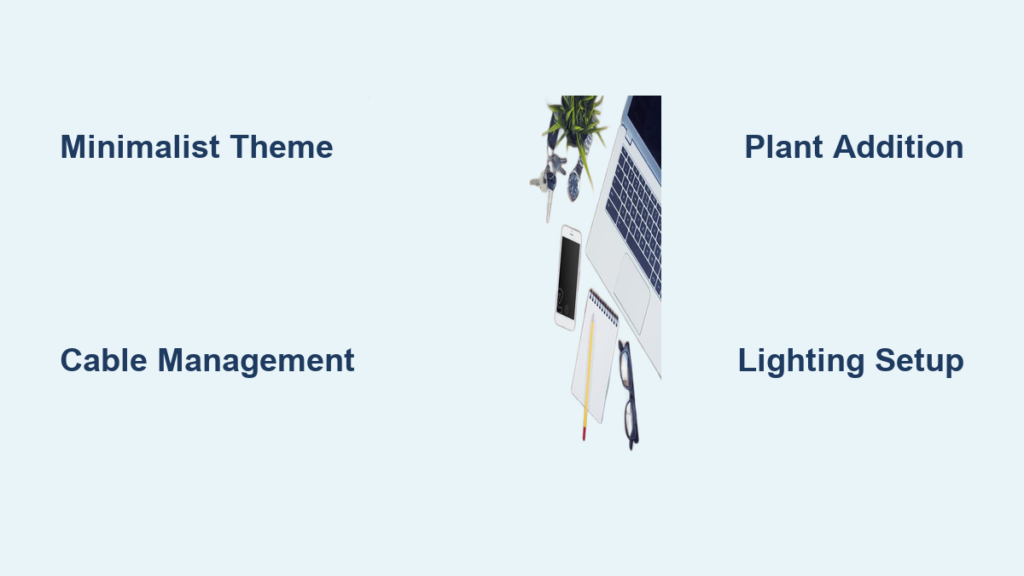
Start by defining your desk’s visual direction. Minimalist elegance is one of the most effective themes for office professionals. It centers on simplicity—using a sleek wooden desk as the foundation and keeping only essential items visible: your laptop, a notebook, a pen holder, and one small plant. This style reduces visual distractions and mental fatigue. Stick to neutral colors like white, gray, or beige to maintain a calm, cohesive look. Every object should either serve a function or bring you genuine joy.
• Use only high-quality, functional items
• Remove anything that doesn’t support your work or mood
• Opt for clean lines and uncluttered surfaces
Maintain a Professional Aesthetic at All Times
Even when adding personal flair, remember your desk is part of a professional environment. Your decor should reflect competence, not clutter. Avoid loud colors, flashy patterns, or excessive trinkets. Instead, choose refined pieces—like a leather-bound notebook or a matte-finish pen cup—that signal attention to detail. A well-styled desk communicates reliability and pride in your work.
• Keep decor subtle and inclusive
• Avoid overly emotional or controversial items
• Prioritize neatness over novelty
Organize for Efficiency Before Adding Decor
Use Drawer Organizers to Hide the Clutter
Before placing anything on your desk, tackle what goes inside. Use drawer organizers to sort pens, sticky notes, paper clips, and other small supplies. Modular trays fit neatly into standard drawers and keep everything accessible but out of sight. Label sections if you share the space, so order stays consistent. A clean drawer means a clear mind.
• Choose slim, customizable dividers
• Group similar items together
• Reassess contents monthly to prevent buildup
Manage Cables Strategically to Reduce Visual Noise
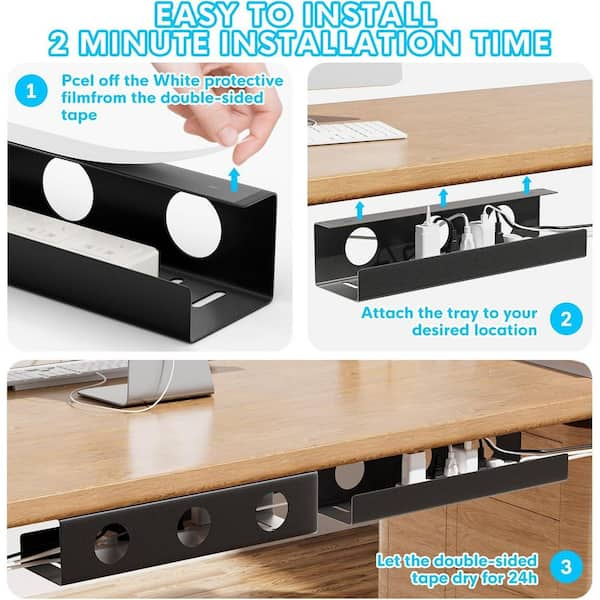
Tangled cords are a major source of stress and distraction. Use cable clips, sleeves, or under-desk trays to route power cords, USB cables, and charging wires neatly. Bundle similar cables with velcro ties and plug devices into a central power strip. This keeps your setup looking tidy and makes it easier to unplug when needed.
• Route cables along the back edge of the desk
• Use a cable management box to hide the hub
• Check weekly for tangles or loose connections
Sort Documents with Desktop Trays for Daily Flow
Paperwork can quickly take over. Use a desktop tray to create a system for incoming mail, pending forms, or printed notes. Use multiple trays if needed—one for “to do,” one for “in progress,” and one for “to file.” Process or file items daily to prevent pile-up.
• Place trays to the side or behind your monitor
• Limit to three trays max to avoid clutter
• Choose neutral-colored trays that match your theme
Personalize with Purpose, Not Clutter
Display Meaningful Photos in Small Frames
Your desk should reflect who you are. Add warmth with one or two small framed photos—4×6” or smaller—of family, pets, or a favorite trip. Place them at the back corner of your desk so they’re visible but not in the way. These quiet reminders can boost your mood during long days.
• Avoid large or multiple frames
• Choose simple, modern frames in neutral tones
• Rotate photos seasonally to keep it fresh
Add Inspirational Quotes to Stay Motivated
Pair photos with a framed quote that aligns with your values. Choose short, powerful phrases like “Done Is Better Than Perfect” or “One Step at a Time.” Print on quality paper or use a digital photo frame to rotate messages. Position it where you’ll see it often—just above eye level when seated.
• Keep text concise and uplifting
• Match frame style to your overall theme
• Change quotes monthly for renewed inspiration
Select Tasteful Decorative Accents That Reflect You
Go beyond basics with 2–3 decorative accents that express your personality. A ceramic sculpture, a sleek paperweight, or a textured notebook cover can elevate your desk. Ensure each piece fits your theme—minimalist, modern, or professional—and avoid overcrowding.
• Choose items with clean lines and neutral colors
• Limit decor to three non-essential pieces
• Replace items periodically to keep the space feeling fresh
Optimize Lighting for Comfort and Clarity

Install an LED Desk Lamp with Adjustable Settings
Lighting is critical for eye health and alertness. A LED desk lamp with adjustable brightness and color temperature lets you tailor light to your task. Use cooler white light (5000K–6500K) for focused work and warmer tones (2700K–3000K) for reading or winding down. Position the lamp on the opposite side of your dominant hand to avoid shadows.
• Choose a lamp with touch controls for ease
• Angle the light to reduce screen glare
• Turn off when not in use to extend bulb life
Include Ambient Glow with a Himalayan Salt Lamp
Complement task lighting with soft ambient light. A small Himalayan salt lamp emits a warm, calming glow that reduces eye strain and creates a soothing vibe—ideal for windowless offices or late hours. Place it behind your monitor or to the side for subtle background illumination.
• Keep away from high-traffic areas
• Wipe dust weekly with a dry cloth
• Use a low-watt bulb to preserve the glow
Bring in Greenery to Refresh Your Space

Pick Low-Maintenance Plants That Thrive Indoors
Plants improve air quality and reduce stress. Choose low-maintenance options like succulents, snake plants, or pothos—they need little water and tolerate low light. A small snake plant in a neutral pot fits perfectly in a minimalist setup.
• Water succulents every 3–4 weeks
• Wipe leaves monthly to remove dust
• Avoid overwatering—most office plants die from too much care
Try a Mini Indoor Garden for a Natural Statement
For a bolder touch, create a mini indoor garden. A glass terrarium or a small herb pot (like basil or mint) brings nature indoors with visual interest. If allowed, you can even snip fresh herbs for tea. Just ensure pots have drainage or use faux plants in sunny spots where real ones might dry out.
• Use self-watering pots for convenience
• Place near indirect light sources
• Avoid strong scents in shared spaces
Use Natural Material Accessories for Warmth
Extend the natural theme with bamboo or wood accents. A wooden pen holder, a cork memo pad, or a bamboo keyboard tray adds organic texture. These materials pair beautifully with neutral tones and enhance the earthy, calming feel of your desk.
• Choose unfinished or matte finishes
• Wipe with a dry cloth to maintain appearance
• Match wood tones across items for cohesion
Upgrade Tech & Accessories for Modern Efficiency
Add a Wireless Charging Pad to Reduce Cord Clutter
Simplify your routine with a wireless charging pad. Place it in a convenient spot to charge your phone and earbuds without daily plugging. Choose a slim, non-slip design that matches your desk color. This small upgrade saves time and keeps your surface tidy.
• Ensure device compatibility before buying
• Clean the pad weekly to maintain efficiency
• Position near your dominant hand for easy access
Set Up Dual Monitors for Better Multitasking
Boost productivity with a dual monitor setup. Use ergonomic stands to elevate screens to eye level, reducing neck strain. Place your main monitor in front and the secondary to the side for emails or references. This layout supports deep work while maintaining a clean, modern look.
• Align tops of monitors at or slightly below eye level
• Use a monitor arm for flexible positioning
• Match bezel widths for a seamless view
Choose Minimalist Input Devices for a Clean Look
Your keyboard and mouse should be both functional and stylish. Opt for a compact keyboard without a number pad and a minimalist wireless mouse in black, white, or gray. These reduce cable use and align with a sleek, professional aesthetic. Test for comfort—your hands will thank you after hours of typing.
• Look for quiet, responsive keys
• Clean weekly with compressed air
• Replace batteries or recharge before they die
Maintain Design Cohesion for a Polished Look
Match Colors and Styles Across All Items
A professional desk feels intentional. Ensure all items—lamps, trays, plants, tech—follow the same color palette and design language. Stick to neutral tones and consistent materials like matte finishes or natural textures. If you add a pop of color, repeat it subtly—like a green plant and a matching notebook cover.
• Audit your desk monthly for mismatches
• Replace mismatched items gradually
• Take a photo to assess visual balance
Avoid Over-Decorating at All Costs
It’s easy to go overboard. Remember: less is more. Every item should earn its place. If it doesn’t help you work or make you feel good, reconsider it. A crowded desk defeats the purpose of decoration. Aim for balance—functional, personal, and visually calm.
• Remove one item before adding a new one
• Keep surfaces at least 50% clear
• Step back daily to assess clutter
Respect Professional Boundaries in Shared Spaces
Keep Decor Tasteful and Subtle
Your desk is not your living room. Avoid large family portraits, religious symbols, or political statements. Keep decor work-appropriate and inclusive. When in doubt, choose neutral, universally appealing items that won’t distract or alienate colleagues.
• Ask HR if unsure about policy
• Avoid strong scents or moving parts
• Keep personal items small and discreet
Prevent Distractions That Break Focus
Decor should support concentration, not interrupt it. Avoid fidget toys, flashing lights, or noisy gadgets. Even a fish tank, while calming, can pull attention in a shared office. Stick to static, quiet elements that enhance focus.
• Test new items during a busy workday
• Remove anything that draws glances or comments
• Prioritize silence and stillness
Sustain Your Setup with Simple Habits
Choose Easy-to-Maintain Elements for Longevity
Long-term success depends on upkeep. Select low-maintenance plants, wipeable surfaces, and durable materials. A succulent needs water once a month; a leather notebook resists wear; a metal pen holder wipes clean in seconds. The easier it is to care for, the more likely you are to keep it looking great.
• Prioritize function and durability
• Avoid delicate or high-maintenance items
• Choose items with replaceable parts
Review Weekly to Reset Your Desk
Set a 5-minute weekly habit to reset your desk. Clear trash, file papers, wipe surfaces, and reposition items. This “mini refresh” keeps your space functional and inviting. Think of it as digital defragmentation for your physical workspace.
• Schedule it after a weekly meeting
• Use disinfectant wipes for quick cleaning
• Celebrate a clean desk with a fresh cup of coffee
Frequently Asked Questions About How to Decorate Desk in Office
How can I decorate my office desk professionally?
Stick to a minimalist theme with neutral colors and essential items only. Use a sleek wooden desk, add a small plant, and include one or two tasteful personal items like a framed photo or quote. Keep everything organized and avoid clutter to maintain a polished look.
What are the best desk accessories for productivity?
Top accessories include a wireless charging pad, LED desk lamp, dual monitor stand, compact keyboard, and desktop trays. These tools reduce clutter, improve ergonomics, and streamline your workflow for better focus and efficiency.
How do I keep my desk from getting messy?
Use drawer organizers, cable management tools, and document trays. Limit decor to 2–3 meaningful items and commit to a 5-minute weekly reset. Process papers daily and return items to their designated spots after use.
Can I add plants to my office desk?
Yes—choose low-maintenance options like succulents, snake plants, or pothos. They purify air, reduce stress, and add warmth without needing much care. Just ensure they fit your space and don’t block your work area.
How do I personalize my desk without being unprofessional?
Use small, subtle touches: a 4×6” photo, a framed quote, or a minimalist sculpture. Avoid large, emotional, or controversial items. Keep decor inclusive and aligned with your workplace culture.
What lighting is best for an office desk?
An adjustable LED desk lamp with color temperature control is ideal. Use cool white light for focus and warm light for relaxation. Add a Himalayan salt lamp for soft ambient glow and reduced eye strain.
Key Takeaways for How to Decorate Desk in Office
Creating a well-decorated office desk starts with intention—not decoration for decoration’s sake. Focus on minimalism, organization, and subtle personalization to build a space that supports both productivity and well-being. Use neutral tones, natural materials, and smart tech to keep your setup clean and functional.
• Start with a clear theme and stick to it
• Organize first, then personalize
• Maintain weekly to keep it fresh
Take 15 minutes today to remove one unnecessary item, wipe down your surface, and adjust your lighting. Small changes lead to big improvements in how you feel and perform at work.