If your home office leaves you feeling drained, unfocused, or squinting at your screen by midday, the culprit is likely your lighting. Poor illumination doesn’t just make your space look dull—it actively harms your productivity, eye health, and energy levels. The best lighting setup for home office combines natural light with three intentional layers: ambient, task, and bias lighting. This proven system reduces eye strain, supports alertness during work hours, and creates a workspace you actually enjoy being in. You’ll feel sharper, stay focused longer, and avoid the afternoon slump—all with simple, budget-friendly upgrades.
This guide reveals the exact lighting strategy used by remote workers and designers to build balanced, eye-friendly environments. From positioning your desk to choosing high-CRI bulbs and installing bias lighting, you’ll learn how to layer light like a pro—regardless of room size or budget. Whether you’re working in a spare bedroom, a corner of the living room, or a dedicated office, these actionable steps will transform your setup for better comfort, focus, and long-term eye health.
Maximize Natural Light First
Position Your Desk for Daylight Exposure
Natural light is the most powerful tool in your lighting toolkit. It boosts mood, sharpens focus, and helps regulate your sleep-wake cycle. For the best lighting setup for home office, place your desk near a window—ideally facing north or east to avoid harsh afternoon glare.
Never position your monitor directly in front of or behind a window. This causes screen reflections and forces your eyes to constantly adjust between bright light and dark surfaces, leading to fatigue. Instead, angle your desk so daylight flows in from the side. Use sheer curtains or blinds to diffuse harsh sunlight without blocking it entirely.
If your room has no windows, simulate daylight with full-spectrum LED bulbs (5000K–6500K). Install them in ambient fixtures to create a daylight-like base before adding other layers. Take regular breaks near natural light sources—like a living room window or outdoor space—to reset your circadian rhythm and reduce mental fatigue.
Build a Three-Layer Lighting System

Ambient: Create a Warm, Even Glow
Ambient lighting sets the overall tone of your office. It should feel soft and inviting, not harsh or clinical. Avoid overhead ceiling lights—they cast deep shadows, create glare, and make the room feel sterile.
Instead, use floor lamps, wall sconces, or shelf lighting to bounce light off walls and ceilings for a diffused effect. The IKEA Hektar floor lamp is a top choice—place it in a corner to anchor the space. Add subtle LED strips under shelves to fill in dark areas without overwhelming the room.
Use bulbs with a 2700K–3000K color temperature for warmth. In dual-purpose rooms like bedroom offices, keep ambient lighting warm while adjusting task lighting separately for focus.
Task: Illuminate Your Work Surface Without Glare
Your desk light should support reading, typing, and screen work—without creating shadows or reflections. Light bars are the best option. Mount them to your monitor or desk edge to shine downward, saving space and minimizing glare.
The BenQ ScreenBar Halo is a top pick—it delivers focused task lighting while reducing screen glare. If using a traditional lamp, place it to the side (left for right-handed users) so it doesn’t cast shadows across your work.
Always choose dimmable lights. Adjust brightness based on time of day:
– Daytime: 4000K–5000K for alertness
– Evening: Dim to 3000K to reduce eye strain and support melatonin
Avoid overly bright desk lights—they turn your workspace into a spotlight, disconnecting it from the rest of the room.
Bias: Reduce Eye Strain Behind Your Monitor

Bias lighting is subtle illumination behind your monitor that reduces the contrast between your bright screen and a dark room. This dramatically cuts eye fatigue during long work sessions.
Use LED strips like Philips Hue Play Bars or the BenQ ScreenBar Halo’s built-in bias light. Mount them with 3M tape on the back of your monitor or wall. Set brightness below your screen’s output—never brighter.
Ideal color temperature: 4500K. This neutral white blends seamlessly with most screens and softens blue-light harshness.
Benefits include:
– Reduced eye strain
– Richer perceived image quality (deeper blacks, better contrast)
– Monitor feels integrated into the room, not like a glowing hole in the dark
Match Color Temperature and Brightness
Keep All Lights in the Same Family
Mixing warm (3000K) and cool (5000K+) lights creates visual dissonance. Your eyes struggle to adapt, leading to fatigue.
Rule: All lights should feel like they belong together. If your ambient lights are 3000K, keep desk and bias lighting within 300–500K of that (e.g., 3500K–4000K). For a clean, focused look, use 4000K–4500K across all layers.
Exception: Dual-purpose rooms. Use warm ambient lights (3000K string lights) and cooler task lighting (4500K LED strips). Just ensure brightness is adjustable to avoid imbalance.
Balance Brightness Across All Layers
No single light should dominate. A bright desk lamp in a dark room forces your pupils to constantly adjust, causing strain.
Test: Turn on all lights. The room should feel cohesive—no harsh contrasts. Use dimmers to fine-tune:
– Ambient: Soft glow, not a spotlight
– Desk: Bright enough to read, but not blinding
– Bias: Subtle—just enough to soften screen edges
Lower brightness at night. High-intensity light after sunset suppresses melatonin, disrupting sleep.
Choose High-Quality Bulbs for Eye Health
Use 90+ CRI Bulbs for True Color Accuracy
CRI (Color Rendering Index) measures how accurately a light reveals colors. Low-CRI bulbs make everything look dull or distorted.
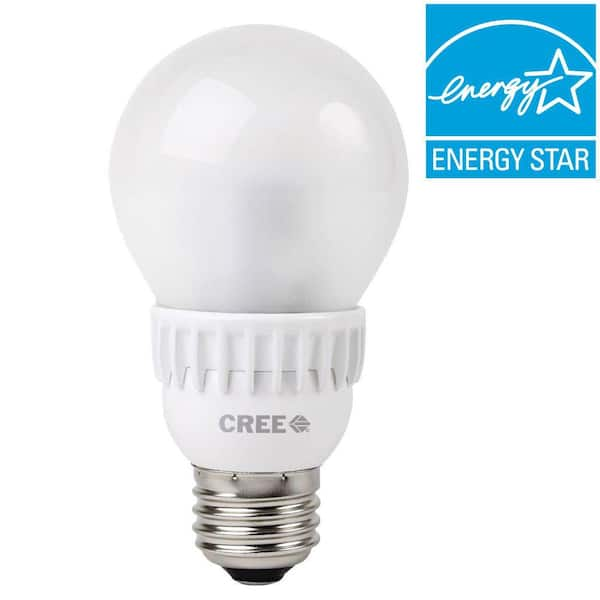
Aim for 90+ CRI for visual clarity and eye comfort. The Cree Edison A19 LED bulb (90–92 CRI, 100% uniform) is a top recommendation. It’s widely available at Home Depot or Lowe’s, lasts 7–12 years, and comes with a replacement guarantee.
Avoid knock-offs from Menards or unknown brands. They often have poor CRI, flicker, or degrade quickly—hurting your eyes over time.
Avoid Problematic Fixtures and Dimmers
- Inbuilt LED fixtures ($600+): Stylish but not practical. LEDs degrade and can’t be replaced—making them “throwaway lamps.”
- Lampshades: Can ruin high-CRI bulb performance. Use fixtures with white interiors to reflect light evenly.
- Digital dimmers: Cause flicker and eye strain. Use traditional dimmer switches or dimmer cords with compatible bulbs (e.g., 75W Cree LEDs).
Optimize for Bedroom Offices and Dual-Purpose Rooms
Balance Work Focus and Relaxation
In bedroom offices, you need both alertness for work and warmth for sleep. The solution? Separate your lighting layers.
- Ambient: Warm (3000K) string lights or floor lamps for relaxation
- Task: Cooler (4500K) light bar or desk lamp for concentration
- Bias: Adjustable white LED strips behind monitor/TV
Use smart lighting (e.g., Philips Hue) to switch profiles: cool white for work, warm for bedtime. But note: Philips Hue is criticized for eye health—some users report discomfort from flicker or blue spikes. For most, solid white dimmable strips are safer and cheaper.
Use Smart Lighting Wisely
Smart lights offer automation but aren’t all eye-friendly. Stick to white modes for work—avoid constant color changes, which are distracting.
Set schedules:
– 6:00 AM–6:00 PM: 4500K, full brightness
– 6:00 PM–10:00 PM: 3500K, dimmed
– Off by 10:00 PM to support sleep
Support Long-Term Eye Comfort and Air Quality
Reduce Eye Strain with the Right Setup
Eye fatigue is the #1 complaint in poorly lit home offices. Prevent it with:
– Bias lighting behind monitor
– Glare-free desk lights (mounted to side or edge)
– Dimmable controls for day/night transitions
– High CRI bulbs (90+)
Never work in a dark room with only a bright screen. The contrast is brutal on your eyes.
Manage Environmental Factors
Lighting isn’t the only factor in comfort.
- Allergies & dust: Home offices collect dust. Use a quiet dehumidifier (like Dehumidifier Critic brand) to reduce airborne particles.
- Seating & posture: Discomfort distracts your brain. Invest in ergonomics.
- Oxygen & airflow: Open windows when possible. Stale air increases drowsiness.
- Fatigue: Lighting helps—but so does movement, hydration, and coffee. Just don’t rely on caffeine alone.
Build Your Setup in 5 Steps
Follow the Lighting Sequence
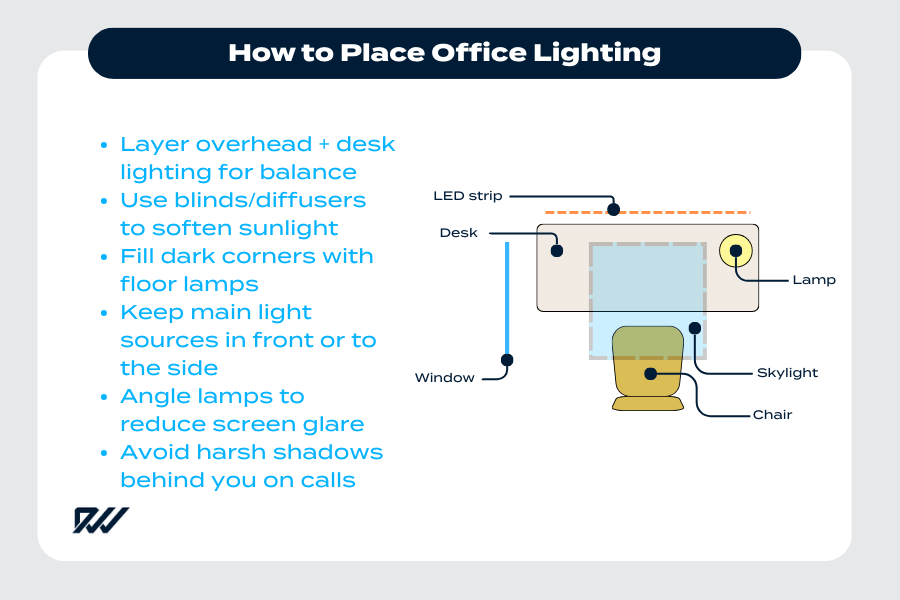
Build your lighting in order:
1. Natural light first – Position desk near window
2. Add ambient lights – Floor lamp + shelf lighting (3000K)
3. Install desk light – Light bar or dimmable lamp (4000K–4500K)
4. Add bias lighting – LED strip behind monitor (4500K, dimmed)
5. Fine-tune – Adjust brightness and color until it “feels right”
Use the “Feel It” test: When lighting is balanced, you’ll know. The space will feel inviting, focused, and comfortable—no explanations needed.
Create a Budget-Friendly Setup Under $100
Affordable, High-Performance Options
You don’t need to spend hundreds. A great setup can be built for under $100.
Budget setup example:
– 2x Cree A19 75W equivalent bulbs (~$7 for 2-pack): Use in floor lamp and desk lamp
– Dimmable fixtures or dimmable cord (~$15–$20): Avoid digital dimmers
– White interior lamp shades: Maximize light output
– Non-RGB LED strip (4500K, dimmable) (~$20): For bias lighting
– Skip expensive inbuilt LED fixtures—they’re not worth it
Total: ~$60–$80, with 7–12 year bulb lifespan.
Key Rules for the Best Home Office Lighting
13 Must-Follow Lighting Principles
- Natural light first – Maximize daylight exposure
- Layer ambient, desk, and bias lights – No single source
- Avoid overhead lighting – Causes shadows and glare
- Use light bars – Better than traditional desk lamps
- Dimmability is essential – Adapt to time of day
- Bias light must be subtle – Never brighter than screen
- Match color temperatures – Stay within 500K range
- Balance brightness – No single light dominates
- Choose 90+ CRI bulbs – Cree A19 is top pick
- Avoid digital dimmers – Use traditional dimmer switches
- Use white interior fixtures – Lampshades ruin bulb quality
- Less is more – Right light, right place, right intensity
- Dim at night – Support melatonin and better sleep
Frequently Asked Questions About Home Office Lighting
What is the best color temperature for home office lighting?
For task lighting, use 4000K–4500K for alertness and focus. For ambient lighting, 3000K creates a warm, cozy feel. In dual-purpose rooms, combine both—warm ambient, cool task lighting.
Do I really need bias lighting behind my monitor?
Yes. Bias lighting reduces eye strain by softening the contrast between your bright screen and a dark room. It also improves perceived image quality and makes your monitor feel part of the space.
Are smart lights good for home office setups?
Smart lights offer convenience but vary in eye health. Stick to white modes—avoid RGB color changes during work. Philips Hue is criticized by some for flicker and blue spikes. Solid white dimmable strips are often safer and cheaper.
Can poor lighting cause headaches or eye strain?
Absolutely. Overly bright lights, glare, flickering, and high contrast (bright screen in dark room) all contribute to eye fatigue and headaches. Use layered lighting, dimmable controls, and bias lighting to prevent this.
What is CRI, and why does it matter?
CRI (Color Rendering Index) measures how accurately a light reveals colors. Low-CRI bulbs make everything look dull. For eye health and clarity, use bulbs with 90+ CRI, like the Cree Edison A19.
How can I improve lighting in a windowless home office?
Use full-spectrum LED bulbs (5000K–6500K) in ambient fixtures to mimic daylight. Add task and bias lighting, take breaks near natural light, and consider a daylight-simulating lamp for circadian support.
Key Takeaways for the Best Lighting Setup for Home Office
The best lighting setup for home office isn’t about brightness—it’s about balance, quality, and consistency. Start with natural light, then layer ambient, task, and bias lighting to create a space that supports focus, comfort, and eye health. Use high-CRI bulbs (90+), avoid overhead lights, and match color temperatures within 500K of each other.
Dim lights at night, prioritize dimmable fixtures, and never let bias lighting outshine your screen. For budget builds, stick to proven products like Cree A19 bulbs and non-RGB LED strips. Follow the 5-step sequence, fine-tune with the “Feel It” test, and you’ll create a workspace that feels energizing, not exhausting.
Ready to upgrade? Start today by repositioning your desk near a window, adding a floor lamp, and installing a light bar. Small changes make a big difference—your eyes and productivity will thank you.