Imagine never losing a file again. No more printing, filing, or digging through cabinets for an overdue invoice. You’re not alone—82% of companies still rely on paper, despite the high costs, security risks, and inefficiencies. Going paperless isn’t just about saving trees; it’s a strategic move to cut costs, boost productivity, and future-proof your business.
The average knowledge worker wastes 30 minutes a day managing paper—costing organizations nearly $20,000 per employee annually. Paper records are responsible for 62% of data breaches in large companies, and printing alone eats up 1–3% of revenue. The solution? Transition to a paperless office in a structured, scalable way. This guide gives you a clear, step-by-step plan to eliminate paper, automate workflows, and empower your team—all within 90 days.
Start with a High-Impact Paper-Heavy Process
Choose one painful, manual process to kickstart your paperless transformation. Focusing on a single workflow builds momentum without overwhelming your team.
Pick a Process That Causes Delays or Errors
Target areas where paper creates bottlenecks, mistakes, or frustration. Top candidates include:
– Invoice processing
– Employee onboarding
– Contract approvals
– Client intake forms
Red flags that signal a high-impact opportunity:
– Manual data entry from paper
– Multiple people handling the same document
– Frequent misfiling or lost documents
– Long approval cycles due to physical routing
Jason, an accountant at a mid-sized firm, chose accounts payable because his team spent hours matching paper invoices to purchase orders—often making errors. By digitizing just this one process, he cut processing time in half and eliminated recurring mistakes.
Why a Focused Start Prevents Failure
Trying to eliminate all paper at once leads to confusion and resistance. A targeted approach lets you:
– Test tools and workflows in real conditions
– Train users gradually and effectively
– Measure ROI with clear before-and-after data
– Scale success to other departments with proven results
Aim for a quick win. When employees see how much easier their jobs become, adoption spreads naturally across the organization.
Build Leadership and Employee Buy-In
No digital transformation succeeds without support from leadership and engagement from staff. Culture change starts with clear communication.
Form a Cross-Functional Paperless Team
Assemble a team that includes:
– A C-level sponsor (CEO or CFO)
– Department heads (HR, Finance, Operations)
– IT representative
– Frontline employees who use the process daily
This group identifies pain points, champions the change, and ensures alignment across departments.
Communicate the Personal Benefits
Employees adopt new systems when they see how it helps them. In team meetings, explain:
– How the new system reduces daily workload
– Why it’s safer than paper files
– What’s in it for them—less overtime, fewer errors, faster approvals
Use real examples: “Instead of searching for files all morning, you’ll find them in seconds.”
Secure IT Early in the Process
IT ensures technical feasibility, security, and integration. Meet early to discuss:
– Data privacy requirements (e.g., HIPAA, GDPR)
– System integrations (e.g., QuickBooks, Salesforce)
– User access controls
– Backup and disaster recovery plans
Their support is critical for long-term success.
Map Your Current Paper Workflow
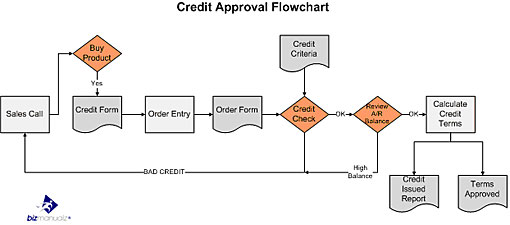
Before designing a digital solution, document every step in your current process to identify inefficiencies.
Break Down Each Step in the Process
For invoice approval, for example:
1. Invoice arrives via email or mail
2. Printed and manually routed to manager
3. Manager approves and forwards to accounting
4. Filed in cabinet or scanned later
5. Data entered into accounting software
Identify bottlenecks: Where do delays happen? Who handles the document most?
Ask Key Questions to Find Digitization Gaps
Use these prompts:
– How do documents enter the system?
– Who needs to approve or review them?
– Where are they stored?
– How long does retrieval take?
– Are there recurring errors or missing files?
At Swagelok Manchester, mapping revealed employees wasted 30 minutes daily filing paperwork—time now used for higher-value tasks.
Design a Digital-First Workflow Solution

Now that you understand the current process, design a paperless version that automates manual steps.
Choose Tools That Automate, Not Just Store
Avoid basic tools like Dropbox or Google Drive—they store files but don’t automate workflows. Also avoid overly complex enterprise systems.
Ideal paperless software includes:
– Document scanning with OCR (optical character recognition)
– Workflow automation
– Electronic signatures
– Role-based access
– Integration with existing apps (e.g., ERP, CRM)
Recommended platforms:
– DocuWare – Best for mid-sized businesses with complex workflows
– M-Files – Strong metadata and compliance features
– Google Workspace + DocuSign – Affordable for small teams
Prioritize Cloud-Based Systems
Cloud solutions offer:
– Faster deployment
– Lower upfront costs
– Remote access
– Automatic updates
– Built-in backups
They scale easily as your paperless initiative expands.
Deploy in Three Phases for Smooth Adoption
Roll out your solution in stages to ensure user adoption and continuous improvement.
Phase 1: Run a Proof of Concept
Test the system with real documents from your target process:
– Scan 10–20 invoices
– Set up automated routing to approvers
– Track time saved vs. old method
This proves value quickly and builds confidence.
Phase 2: Gather Feedback and Improve
Ask users:
– Are workflows intuitive?
– Can they find documents easily?
– Are notifications timely?
Adjust based on feedback:
– Simplify forms with dropdowns and checkboxes
– Break complex steps into smaller tasks
– Combine redundant approvals
Phase 3: Full Company Rollout
Launch with:
– Role-specific training sessions
– Video tutorials (e.g., YouTube playlist)
– Power users who mentor others
– A launch event (e.g., team lunch) to celebrate
Train step-by-step: Show users exactly how to submit, approve, and retrieve documents.
Digitize Existing Paper Files
Don’t leave legacy documents behind. Convert physical files into searchable digital records.
Sort and Organize Before Scanning
Categorize documents by:
– Department (HR, Finance, Sales)
– Type (contracts, invoices, employee records)
– Date or project
Securely discard outdated or unnecessary files.
Scan with Consistency and OCR
Use:
– High-speed scanners for large volumes
– Mobile apps like Adobe Scan or Microsoft Lens for occasional use
Best practices:
– Save files with clear names: Vendor_Invoice_2024-04-15.pdf
– Use OCR so text is searchable
– Tag with metadata: client name, date, project
Store in a Secure, Centralized System
Upload to a cloud-based, encrypted system with:
– Role-based access (e.g., HR sees only employee files)
– Version control
– Audit trails
– Automatic backups
Avoid local drives—they’re prone to failure and hard to secure.
Automate Digital Workflows to Eliminate Manual Steps

Replace paper-based processes with automated digital ones.
Replace Paper Forms with Digital Versions
Use:
– Google Forms or Jotform for simple intake
– Embed forms on websites or share via email
Data flows directly into your document system—no re-entry.
Set Up Automated Approval Workflows
Example:
Invoice submitted → auto-routed to manager → alert sent → approval with e-signature → synced to accounting software
Tools: DocuWare, PandaDoc, or Microsoft Power Automate
Enable E-Signatures for Faster Turnaround
Eliminate printing just to sign. Use:
– DocuSign
– Adobe Sign
– HelloSign
Legally binding, faster, and fully digital.
Train and Support Your Team for Long-Term Success
Even the best system fails if people don’t use it.
Train by Role and Responsibility
Customize training:
– Administrators: System setup, user roles, backups
– Managers: Approvals, reporting, access control
– Employees: Submitting forms, retrieving files, using e-signatures
Offer live demos and written guides.
Build a Culture of Digital Responsibility
Encourage habits like:
– Naming files consistently
– Using tags and folders correctly
– Never saving sensitive files on personal devices
Recognize early adopters—make going paperless a shared win.
Secure and Maintain Your Paperless System
A paperless office must be secure, compliant, and resilient.
Enforce Strong Security Protocols
- Require strong passwords and multi-factor authentication
- Assign role-based access (e.g., only HR sees payroll files)
- Encrypt data in transit and at rest
- Conduct regular access audits
Backup Data Using the 3-2-1 Rule
- 3 copies of data
- 2 different media (cloud + local)
- 1 offsite copy
Test recovery procedures annually.
Stay Compliant with Regulations
If you handle sensitive data:
– HIPAA: Ensure encryption, access logs, and audit trails
– GDPR: Allow data deletion, track consent, limit access
Digital systems make compliance easier than paper.
Measure Success and Scale Across Departments
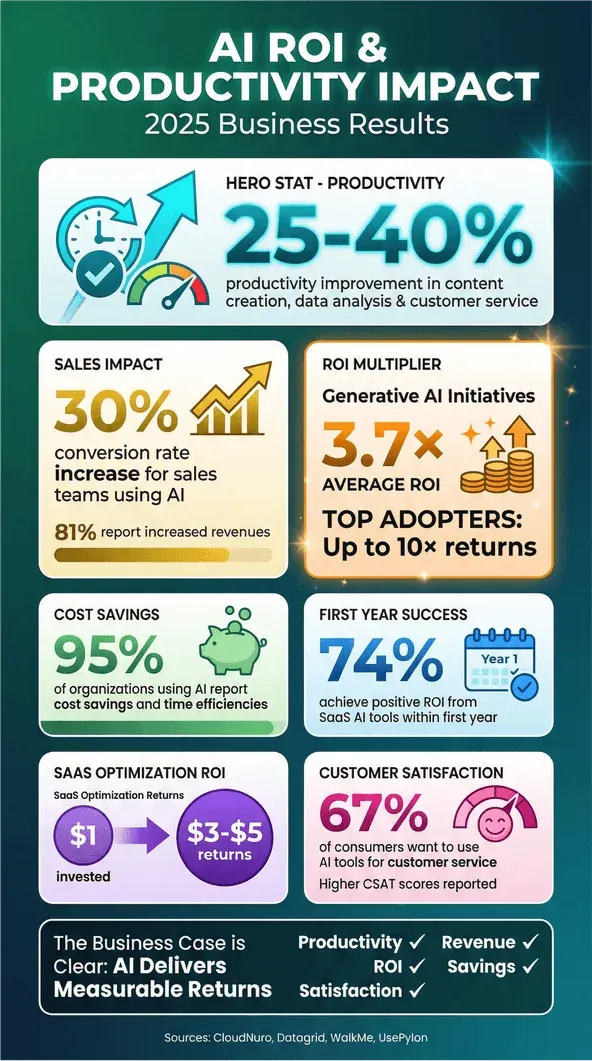
Prove ROI and expand to other areas.
Track Key Before-and-After Metrics
| Metric | Before | After |
|---|---|---|
| Time to process invoice | 5 days | 1.5 days |
| Employee filing time | 30 min/day | 5 min/day |
| Storage costs | $1,500/year | $300/year |
| Document retrieval time | 20 min | 30 seconds |
Ask employees: “Has this made your job easier?”
Calculate Your ROI
Use this formula:
ROI = (Time saved × Hourly wage) + Cost reductions – Software cost
Example:
6 employees save 15 hours/week = 780 hours/year
At $30/hour = $23,400 saved annually
Minus $3,000 software = $20,400 net gain
That’s a 680% ROI—not including error reduction or risk mitigation.
Scale to Other Departments
Once one process works, replicate:
– HR: Digitize onboarding, PTO requests, performance reviews
– Sales: Paperless proposals, contracts, e-signatures
– Operations: Digital checklists, maintenance logs
Use lessons learned to accelerate each rollout.
Prevent Backsliding and Maintain Momentum
Even successful transitions can regress if not maintained.
Eliminate Printer-Dependent Habits
- Disable default printing in email and accounting software
- Remove personal printers from desks
- Set print quotas or require manager approval
Audit Quarterly for Compliance
Check:
– Are new documents still being printed?
– Are files properly named and tagged?
– Are workflows running smoothly?
Fix issues early.
Review Tools Annually
Ask:
– Are new features available?
– Is integration still working?
– Are employees requesting improvements?
Stay agile and responsive.
Frequently Asked Questions About Going Paperless
Why should my company go paperless?
Going paperless cuts costs, boosts productivity, and reduces security risks. Companies save up to $20,000 per employee annually by eliminating paper waste. It also improves compliance, enables remote work, and supports environmental sustainability.
How long does it take to become a paperless office?
Most organizations can complete a high-impact paperless transition in 90 days by focusing on one process first. Larger companies may take 3–6 months for full rollout, but quick wins build momentum early.
What are the best tools for a paperless office?
Top tools include DocuWare for automation, M-Files for compliance, and Google Workspace + DocuSign for small teams. Use Adobe Scan for mobile scanning and Jotform for digital forms.
How do I get employees to stop printing?
Start by disabling default printing, removing personal printers, and setting print quotas. Train staff on digital alternatives and highlight personal benefits—like less overtime and fewer errors.
Is a paperless office secure?
Yes—when done right. Use encryption, multi-factor authentication, role-based access, and regular backups. Digital systems are more secure than paper, which accounts for 62% of data breaches in large companies.
Can I digitize old paper files easily?
Yes. Sort documents by type or department, use high-speed scanners or mobile apps like Microsoft Lens, and save with clear names and metadata. Store them in a secure, searchable cloud system.
Key Takeaways for Making a Paperless Office
Going paperless isn’t about eliminating paper—it’s about building a faster, safer, and smarter workplace. Start with one high-impact process, prove the value, and scale. With the right tools and team support, you can cut costs, reclaim time, and future-proof your business—all within 90 days.
The paperless office isn’t a fantasy. It’s your next competitive advantage. Begin today: pick one process, map it, digitize it, and measure the results. Then scale—your team, your customers, and your bottom line will thank you.