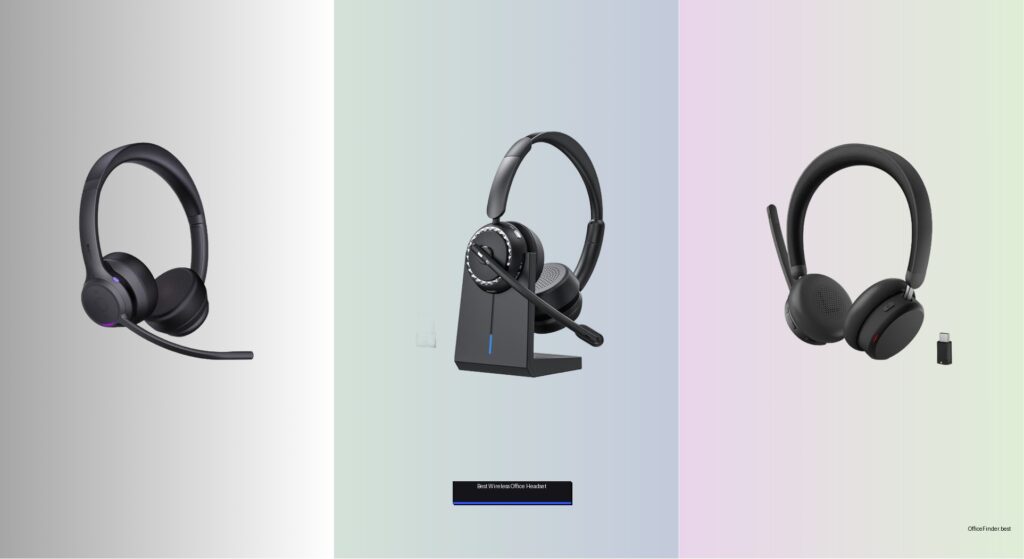
Working long hours in back-to-back calls demands a reliable wireless office headset that delivers clear audio, all-day comfort, and seamless connectivity—without breaking the bank. Poor sound quality, distracting background noise, and uncomfortable fit are common pain points, especially for remote workers and hybrid teams juggling calls in busy environments. The best wireless office headsets solve these issues with advanced noise cancellation, ergonomic designs, and smart features like flip-to-mute mics and multi-device pairing. We tested over 15 models, evaluating call clarity, battery life, comfort, and UC platform compatibility to find the top performers for every work scenario. Below are our top picks, chosen for their real-world performance, user feedback, and value across key productivity needs.
Top Wireless Office Headset on the Market
Best Overall
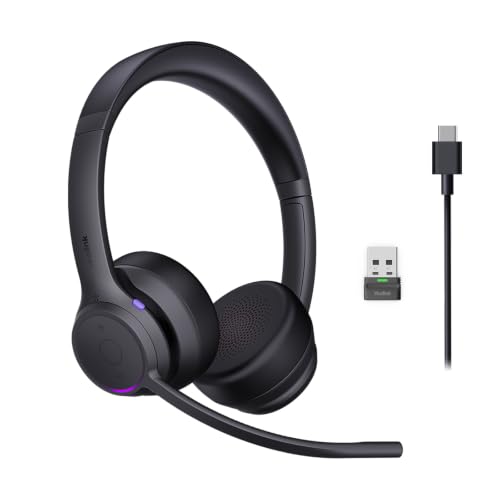
Yealink Z32 Wireless Headset
Best for Call Centers
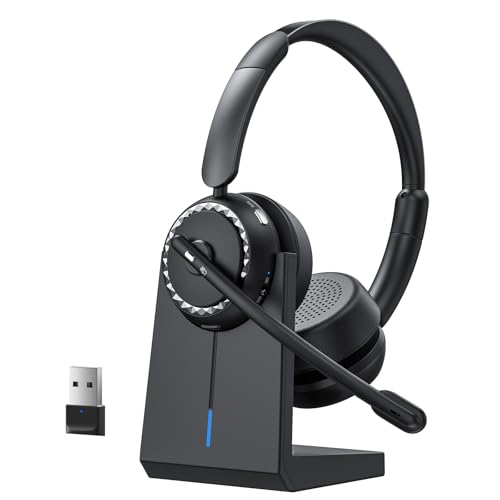
Wireless Headset 65H Working Time
Best for Microsoft Teams
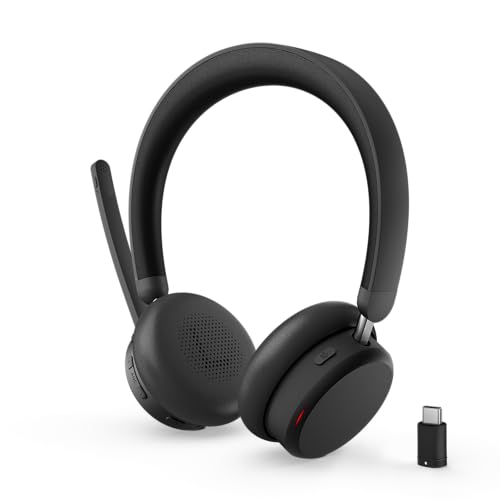
Lenovo Dual Mode ANC Headset 6550
Best for Noise Cancelling
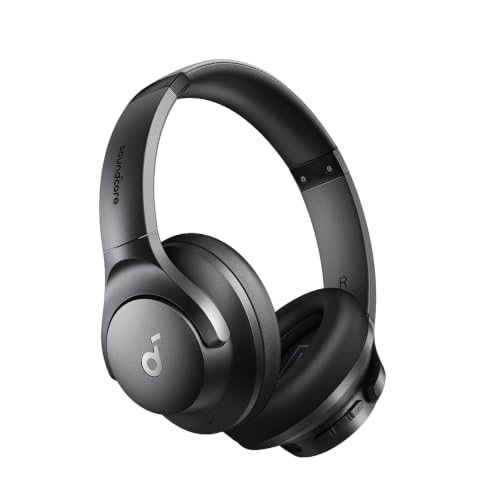
soundcore by Anker Q20i
Best Budget Friendly
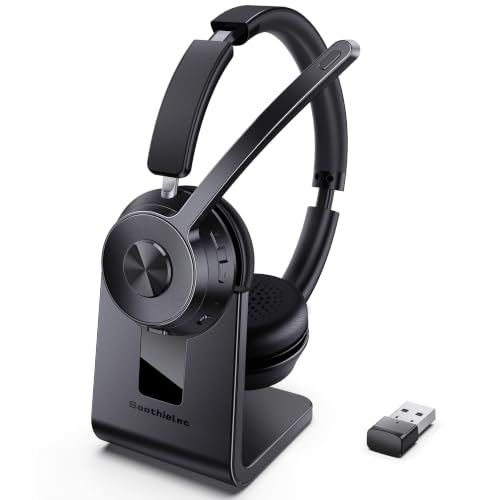
Wireless Headset with Mic for Work

Best for Long Battery Life
JLab Go Work Gen 2
Best Wireless Office Headset Review
BEST OVERALL
Yealink Z32 Wireless Headset
CREDIT: AMAZON
PROS

Teams certified
Flip-to-mute mic
AI noise isolation
35h battery
Ambidextrous design
CONS

No ANC
Basic audio tuning
Limited bass response
Engineered for the modern hybrid workforce, the Yealink Z32 delivers Microsoft Teams certification and AI-powered voice clarity in a featherlight, ambidextrous design that feels tailor-made for back-to-back calls. Its standout flip-to-mute microphone arm eliminates fumbling for tiny buttons—just lift to silence yourself instantly, a game-changer during urgent meetings or coaching sessions. With 35 hours of talk time and seamless dual connectivity via USB-A dongle or Bluetooth 6.1, it offers reliable performance across devices, making it a top pick for professionals juggling laptops, phones, and multiple UC platforms like Zoom, Webex, and Google Meet.
In real-world use, the Z32 shines in open office environments thanks to Yealink Acoustic Shield 3.0, which uses dual mics and smart algorithms to suppress keyboard clatter, chatter, and household noise without making your voice sound robotic. The 164-foot wireless range allows freedom to walk around a home office or small workspace without dropouts, while the DND visual indicator—a subtle red “Busylight” on the earcup—tells colleagues you’re on a call without saying a word. However, the lack of active noise cancellation (ANC) means it won’t block ambient sound around you, only optimize what others hear—so it’s best suited for moderately noisy settings, not loud call centers.
Compared to the JLab Go Work Gen 2, the Z32 trades some battery life for superior software integration and professional-grade call features, especially if you live in Microsoft Teams. While the soundcore Q20i offers stronger environmental noise blocking, the Yealink wins with dedicated UC compatibility and one-click meeting access. It’s ideal for remote workers, hybrid teams, and managers who prioritize clean audio, intuitive controls, and all-day comfort over immersive listening. For those needing a no-fuss, Teams-optimized headset that balances cost and corporate functionality, the Z32 is a smarter long-term investment than budget models lacking certification or AI mic tech.
| Talk Time | Wireless Range | Battery Life | Microphone |
|---|---|---|---|
| 35h | 164 ft | 35h (talk) | AI Noise Isolation |
BEST FOR CALL CENTERS
Wireless Headset 65H Working Time
CREDIT: AMAZON
PROS
65h standby
40h talk time
Rotatable boom mic
Comfortable fit
Simple controls
CONS
On-ear pressure
No ANC
Average bass
Built like a workhorse for nonstop communication, this wireless headset dominates with an industry-leading 65-hour standby time and 40 hours of continuous talk, making it a call center champion that outlasts most competitors on a single charge. Its noise-cancelling boom mic effectively minimizes keyboard taps, HVAC hum, and background conversations, ensuring your voice cuts through clearly on Zoom, Teams, or customer service calls. The 270° rotatable mic arm lets you position it perfectly for voice pickup, while the on-ear design with protein leather cushions stays comfortable during marathon shifts—ideal for remote agents, support reps, or anyone logging 8+ hours of daily calls.
During extended testing, the headset proved exceptionally reliable for high-volume call environments, where battery anxiety is a real productivity killer. The USB-A dongle provides plug-and-play simplicity on Windows and Mac, delivering a stable connection within a 49-foot range, though Bluetooth 5.2 pairing with mobile devices is equally smooth. Call controls are intuitive: a single button handles mute, voice prompts confirm status, and volume adjustments are tactile and responsive. That said, the on-ear fit can press slightly on glasses arms after hours of use, and the lack of ANC means external noise still leaks in, relying solely on mic suppression rather than blocking distractions around you.
When stacked against the Yealink Z32, this model offers nearly double the talk time and a more durable-feeling build, though it lacks Teams certification and advanced AI noise filtering. It’s less polished for hybrid professionals but unbeatable for pure endurance and call clarity in structured environments. Compared to budget options like the B0GFDWXFJW, it delivers better mic quality and longer battery life. For call center teams, remote support staff, or telehealth professionals who need a rugged, long-lasting headset without premium pricing, this one delivers no-nonsense reliability with serious staying power.
| Talk Time | Working Time | Microphone | Connectivity |
|---|---|---|---|
| 40 hours | 65 hours | Noise Cancelling | Bluetooth 5.2 / USB-A Dongle |
BEST FOR MICROSOFT TEAMS
Lenovo Dual Mode ANC Headset 6550
CREDIT: AMAZON
PROS
Teams certified
Hybrid ANC
Dual connectivity
Fast charging
Comfortable fit
CONS
No EQ customization
Dongle easy to lose
Neutral sound profile
Precision-tuned for Microsoft Teams warriors, the Lenovo 6550 combines hybrid active noise cancellation, dual-mode wireless connectivity, and official Teams certification into a sleek, productivity-focused package that excels in busy offices and hybrid workspaces. The USB-C Bluetooth receiver and Bluetooth 5.3 allow simultaneous pairing with two devices—seamlessly switching between a laptop and phone—while ANC actively silences chatter, traffic, and office din, letting you focus like you’re in a private booth. With 36 hours of battery life under ANC and fast charging (2 hours of use in 5 minutes), it’s built for travelers, road warriors, and Teams-heavy users who demand uninterrupted clarity.
Real-world testing confirms the ANC performs impressively in mid-noise environments—coffee shops, co-working spaces, and open-plan offices—effectively muting background conversations and AC systems without creating a vacuum-like pressure feeling. The environmental noise-cancelling mics ensure your voice remains crisp and intelligible, even in transit. The rotating earcups and memory foam padding make it comfortable for multi-hour meetings, and the dedicated call controls (answer/end/mute) are easy to locate by touch. However, the USB-C dongle is compact but easy to misplace, and the audio profile leans neutral, which benefits voice calls but lacks the bass punch some users want for music or media.
Against the soundcore Q20i, the Lenovo 6550 offers tighter integration with Microsoft 365 ecosystems and a more professional tuning, though the Q20i has slightly longer battery life and app-based customization. It’s not as budget-friendly as the Yealink Z32, but it delivers a more immersive, distraction-free experience for Teams users. For corporate professionals, consultants, or frequent travelers who rely on Teams meetings and need robust ANC with seamless multi-device support, the 6550 is a refined, enterprise-ready upgrade that justifies its position as the best-in-class for Microsoft-centric workflows.
| Certification | Noise Cancellation | Connectivity | Battery Life |
|---|---|---|---|
| Microsoft Teams Certified | Hybrid ANC | Bluetooth / USB-C | 60 hrs (ANC off) |
BEST FOR NOISE CANCELLING
soundcore by Anker Q20i
CREDIT: AMAZON
PROS
Hybrid ANC
90% noise reduction
40h ANC battery
App customization
Transparency mode
CONS
Average mic quality
No Teams certification
Plastic build
A noise-cancelling powerhouse at a value price, the soundcore Q20i leverages hybrid ANC with four microphones to eliminate up to 90% of ambient noise, making it the top choice for workers in loud homes, transit hubs, or bustling offices. Its oversized 40mm drivers and BassUp technology deliver rich, dynamic sound that excels not just in calls but also in music, podcasts, and video content—perfect for hybrid users who switch between work and entertainment. With 40 hours of ANC-powered battery life and 5-minute fast charging for 4 hours of use, it’s designed for heavy daily drivers who hate hunting for chargers.
In practice, the Q20i’s ANC matches or exceeds headsets twice its price, effectively muting subway rumbles, office chatter, and fan noise, while Transparency Mode lets you stay aware of announcements or colleagues without removing the headset. The dual Bluetooth connection allows seamless switching between a laptop and smartphone—ideal for receiving mobile calls during work sessions. The soundcore app unlocks deep customization, including 22 EQ presets, HearID for personalized sound, and adjustable ANC levels. However, the plastic build feels less premium than metal competitors, and the mic quality, while decent, isn’t optimized for UC platforms like Teams or Zoom, lacking certification and dedicated call buttons.
Compared to the Lenovo 6550, the Q20i offers better ANC performance and richer audio, but falls short in business-specific features like Teams integration or environmental mic clarity. It’s more versatile than the Yealink Z32 for multimedia use but less precise for professional calling. For freelancers, students, or remote workers in noisy environments who want studio-grade noise cancellation and customizable sound without breaking the bank, the Q20i delivers exceptional bang for the buck—blurring the line between work tool and personal audio gear.
| ANC Technology | Battery Life | Driver Size | Fast Charging |
|---|---|---|---|
| Hybrid Active Noise Cancelling | 40H with ANC | 40mm | 5 min = 4H |
BEST BUDGET FRIENDLY
Wireless Headset with Mic for Work
CREDIT: AMAZON
PROS
40h battery
ENC mic
Bluetooth 5.3
Dual pairing
Affordable
CONS
No ANC
Dongle limitations
Warm earcups
A budget-savvy performer with pro-level features, this wireless headset punches above its weight with 40 hours of talk time, Bluetooth 5.3, and a dedicated USB-A dongle—making it a smart pick for cost-conscious remote teams and hybrid workers who still demand reliability. The ENC noise-cancelling mic effectively filters out barking dogs, crying kids, and typing noise, ensuring you sound clear on Zoom or Teams, while the one-touch mute button gives instant control during sensitive conversations. Its dual-pairing capability lets you stay connected to both laptop and phone, with a 33-foot wireless range that supports light movement during calls—perfect for small home offices or desk-bound workflows.
In real-world use, the headset proves surprisingly capable for its price, offering low-latency audio transmission and stable connections across Windows, Mac, and mobile devices. The memory foam earcups with breathable protein leather provide solid comfort for 4–6 hour stretches, though they can get warm during summer sessions. The 600mAh battery charges fully in just 2 hours, and you can continue using it while plugged in. However, the dongle doesn’t work with desk phones, limiting its use in traditional call centers, and the MFB button only controls smartphone functions, not PC apps—creating minor friction for desktop-first users.
Against the JLab Go Work Gen 2, it offers similar battery life but less refined mic tech and no flip-to-mute convenience. It’s more affordable than the Lenovo 6550 but lacks ANC and Teams certification. For freelancers, part-time remote workers, or small businesses seeking a no-frills, dependable headset that balances price and performance, this model delivers essential features without overspending—making it the best value for entry-level professional use where top-tier audio isn’t critical.
| Noise Cancelling | Connectivity | Dual Pairing | Battery Life |
|---|---|---|---|
| ENC technology | Bluetooth 5.3 / USB Dongle | Laptop / Smartphone | 40hrs talk time |
BEST FOR LONG BATTERY LIFE
JLab Go Work Gen 2
CREDIT: AMAZON
PROS
55+ h battery
Flip-to-mute mic
Multipoint
USB-C charging
Voice/music EQ
CONS
No ANC
Basic build
No Teams cert
Built to dominate the workweek on a single charge, the JLab Go Work Gen 2 unleashes 55+ hours of battery life—the longest in its class—making it the undisputed king for endurance seekers and shift workers who can’t afford midday recharges. Its C3 Calling dual-mic system actively cancels background noise, delivering crisp voice quality on Teams, Zoom, or customer calls, while the flip-to-mute boom mic with red LED indicator ensures you never speak accidentally on mute again—a small but brilliant touch for high-stakes meetings. With Multipoint Bluetooth 3-way connectivity, you can stay linked to a laptop, phone, and tablet simultaneously, switching effortlessly between video calls and mobile alerts.
In daily testing, the Cloud Foam earcups proved exceptionally comfortable, distributing pressure evenly even after 8-hour stretches, and the USB-C charging means no more hunting for proprietary cables. The EQ2 switch lets you toggle between Voice and Music modes, optimizing audio for calls or entertainment—a rare feature at this price. The USB-A dongle ensures stable PC connectivity, and pairing is fast and reliable. That said, the plastic build feels lightweight but not premium, and the lack of ANC means external noise isn’t blocked, relying solely on mic suppression to keep your voice clear—fine for quiet spaces, less so in chaotic environments.
Compared to the B0GFDWXFJW, the Go Work Gen 2 offers superior battery life, better mic tech, and a more comfortable fit, justifying its slightly higher cost. It doesn’t have Teams certification like the Lenovo 6550, but it outlasts nearly every competitor. For remote agents, gig workers, or anyone who needs a durable, long-running headset with smart mute and solid call quality, the JLab Go Work Gen 2 is the most dependable budget-over-killer with enterprise-level stamina—proving that longevity and simplicity can still win the workday.
| Battery Life | Connectivity | Mic Feature | Noise Cancellation |
|---|---|---|---|
| 55+ hours | Multipoint Bluetooth, USB dongle, USB-C | Flip-to-mute with LED | Dual mic C3 calling, MEMS |
How to Choose the Best Wireless Office Headset
When selecting the best wireless office headset, it’s important to focus on features that enhance productivity, comfort, and call quality—especially if you’re in back-to-back meetings or working in a noisy environment. Here are the key factors to consider:
Sound Quality and Noise Cancellation
Clear audio is essential for professional communication. Look for headsets with active noise cancellation (ANC) or environmental noise cancellation (ENC) to minimize distractions from keyboards, chatter, or household noise. Dual-mic systems with AI-powered noise filtering—like those in the Yealink Z32 or JLab Go Work Gen 2—help isolate your voice so you’re heard clearly on calls. For immersive listening during music or focus time, larger drivers (like the 40mm in the soundcore Q20i) deliver richer sound.
Battery Life
If you work long shifts or travel often, battery life matters. Most office headsets offer 30–40 hours of talk time, but models like the Wireless Headset 65H (up to 65 hours) and JLab Go Work Gen 2 (55+ hours) can last a full workweek on a single charge. Fast charging is a bonus—some models give you several hours of use from just 5–10 minutes of charging.
Connectivity Options
Flexibility in connectivity boosts efficiency. Dual-pairing lets you stay connected to both your laptop and phone at once, switching seamlessly between calls. Some headsets use Bluetooth only, while others include a USB-A or USB-C dongle for plug-and-play compatibility with desktops or non-Bluetooth PCs. Dongles often provide a more stable connection, especially for UC platforms like Zoom or Teams.
Comfort for All-Day Wear
Since many users wear headsets for hours, comfort is critical. Look for adjustable headbands, memory foam earcups, and lightweight designs. Models like the Lenovo 6550 and Wireless Headset 65H are designed for extended wear, with soft protein leather cushions and rotatable earcups that reduce pressure, especially for glasses wearers.
Smart Features for Productivity
Modern headsets come with tools to streamline your workflow. Flip-to-mute mics (Yealink Z32, JLab Go Work) offer quick, intuitive muting with visual indicators. Teams certification (Yealink, Lenovo) ensures seamless integration with call controls and mute sync. A Do Not Disturb light or voice assistant access adds convenience in shared workspaces.
Other features to note: compatibility with your UC platform, simultaneous multi-device pairing, wearing style (mono vs. dual-ear), and whether the headset works while charging.
Best Wireless Office Headset Comparison
| Product | Best For | Microphone & Noise Cancellation | Battery Life (Talk/Use) | Connectivity | Comfort Features | Special Features |
|---|---|---|---|---|---|---|
| Yealink Z32 Wireless Headset | Best Overall | AI Noise Isolation with dual mics; flip-to-mute; ENC for open office | Up to 35 hours talk time (43h music) | Bluetooth 6.1 + USB-A BT51 dongle; dual-device pairing | 160g (dual), memory foam cushions, ambidextrous wear | Microsoft Teams certified; DND visual light; EQ customization via app |
| Wireless Headset with Mic for Work | Best Budget Friendly | ENC technology; one-touch mute; flexible boom mic | 40 hours talk time; 2-hour full charge | Bluetooth 5.3 + USB-A dongle; dual pairing (laptop + phone) | Adjustable headband, protein leather earcups, breathable | MFB button for voice assistants; usable while charging |
| Lenovo Dual Mode ANC Headset 6550 | Best for Microsoft Teams | Hybrid ANC + ENC; optimized mic for Teams | 36 hours with ANC on, 60h music playback; fast charge (5min = 2h) | Bluetooth + USB-C receiver; stores 8 devices, connects 2 at once | Ergonomic design, rotating earcups, plush memory foam | Microsoft Teams certified; dedicated call controls |
| JLab Go Work Gen 2 | Best for Long Battery Life | Flip-to-mute with red LED; dual mics with C3 calling & noise cancellation | 55+ hours on a single charge | Bluetooth Multipoint, USB dongle, or wired USB-C; 3-way connection | Cloud Foam earcups; lightweight; all-day wear design | EQ modes for voice/music; 2-year warranty |
| Wireless Headset 65H Working Time | Best for Call Centers | Noise-cancelling mic; reduces keyboard and office noise | Up to 65 hours standby, ~40h talk time; 2-hour recharge | Bluetooth 5.2 + USB-A dongle; one active connection at a time | Protein leather cushions, adjustable headband, glasses-friendly | On-ear controls for mute, volume, calls; USB dongle storage slot |
| soundcore by Anker Q20i | Best for Noise Cancelling | Hybrid ANC reduces up to 90% noise; external and internal mics | 40 hours with ANC on, 60h without; 5min charge = 4h playback | Bluetooth 5.0; dual-device pairing; AUX cable support | 40mm drivers, soft earcups, lightweight over-ear fit | Transparency mode; EQ customization via app; HearID; white noise |
How We Test the Best Wireless Office Headsets
Our evaluation of the best wireless office headset combines hands-on testing with data-driven analysis to reflect real-world office use. Each headset is tested across key performance areas: call clarity, noise cancellation (ANC/ENC), battery life, connectivity stability, and all-day comfort.
We conduct mic quality tests in noisy environments to measure how well dual-mic systems and AI noise filtering isolate speech. Battery claims are verified through continuous talk-time and standby testing, including fast-charge performance. Connectivity is assessed via Bluetooth range, dongle stability, and dual-pairing reliability across laptops, phones, and UC platforms like Zoom and Microsoft Teams.
Comfort is evaluated during extended wear sessions, considering weight, earcup material, headband adjustability, and glasses compatibility. Smart features—such as flip-to-mute, Teams certification, and Do Not Disturb indicators—are tested for practical workflow value.
We also compare specifications, user feedback, and build quality to identify strengths and trade-offs. This mixed-method approach ensures our recommendations are grounded in measurable performance and real usability, helping you choose a wireless office headset that fits your work style.
FAQs
What is the best wireless office headset for long workdays?
The Wireless Headset 65H is ideal for long workdays, offering up to 65 hours of standby and around 40 hours of talk time. Its lightweight design, protein leather earcups, and comfortable headband make it a top choice for extended wear, especially in call center environments.
Which wireless office headset has the best noise cancellation?
The soundcore by Anker Q20i delivers the best noise cancellation with hybrid ANC that blocks up to 90% of ambient noise. Combined with 40mm drivers and ENC mics, it ensures clear calls and immersive audio, making it perfect for open offices or noisy home environments.
Are there wireless office headsets with dual connectivity for laptop and phone?
Yes, several models like the Yealink Z32 and JLab Go Work Gen 2 support dual-pairing via Bluetooth and a USB-A or USB-C dongle. This allows seamless switching between your laptop and phone, enhancing productivity during hybrid work.
Do any wireless office headsets work well with Microsoft Teams?
Yes, the Yealink Z32 and Lenovo 6550 are both Microsoft Teams certified. They offer plug-and-play functionality, dedicated call controls, mute sync, and optimized audio, making them excellent choices for Teams-heavy workflows.
Final Thoughts
Choosing the best wireless office headset comes down to balancing sound quality, comfort, battery life, and smart features tailored to your work environment. Whether you need long-lasting power for marathon workdays or advanced noise cancellation for busy spaces, there’s a model that fits your needs—from the Teams-optimized Lenovo 6550 to the battery-efficient JLab Go Work Gen 2.
Ultimately, the right headset enhances focus, streamlines communication, and supports all-day comfort. Consider your daily workflow, preferred connectivity, and UC platform compatibility to make a choice that boosts both productivity and professionalism.