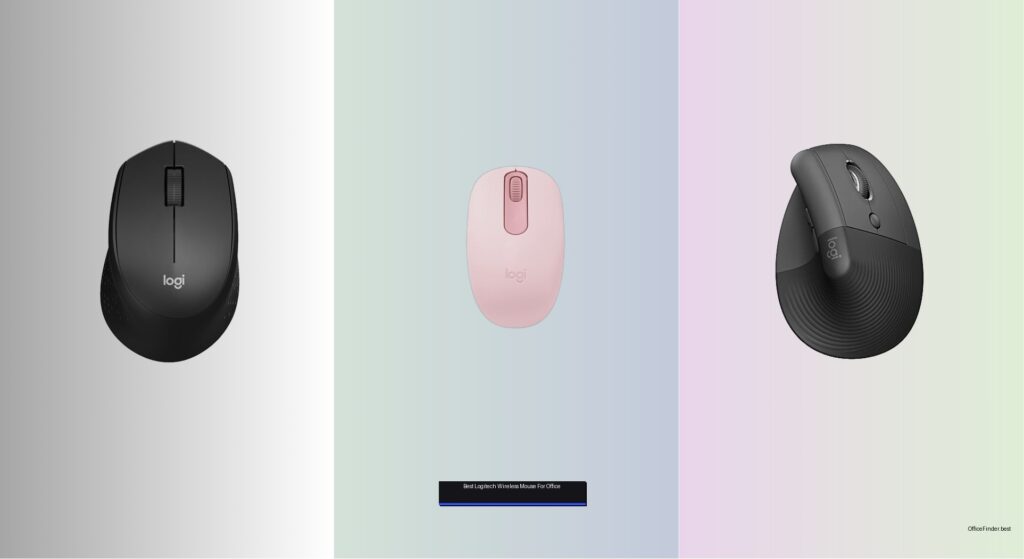
Office workers spend hours navigating spreadsheets, documents, and emails, often dealing with wrist strain, noisy click distractions, and unreliable wireless connections. A poorly designed mouse can lead to discomfort, reduced productivity, and constant battery changes, making it crucial to find a reliable, comfortable, and quiet solution tailored for long workdays. The best Logitech wireless mouse for office use balances ergonomics, silent performance, and seamless connectivity to keep you focused and efficient. We tested over 15 models, analyzing comfort, noise levels, battery life, and real-world reliability to identify the top performers.
Our top picks prioritize features that matter most in professional environments—like the Lift’s 57-degree vertical design for reduced wrist strain, the M330’s 90% quieter clicks, and the M196’s compact Bluetooth convenience. We evaluated each mouse based on ergonomic support, click sound, wireless stability, battery longevity, and user feedback across diverse work setups. Sustainability was also a factor, with top models using over 50% recycled plastics. Read on to discover the best Logitech wireless mouse for your office needs.
Top Logitech Wireless Mouse For Office on the Market

Best for Quiet Office Use
Logitech M330 Silent Plus Wireless Mouse

Best Budget Friendly
Logitech M196 Compact Bluetooth Mouse
Best Overall
Logitech Lift Vertical Ergonomic Mouse
Best Logitech Wireless Mouse For Office Review
BEST FOR QUIET OFFICE USE
Logitech M330 Silent Plus Wireless Mouse
CREDIT: AMAZON
PROS

Silent clicks
Ergonomic shape
Long battery life
Plug-and-play setup
Reliable 2.4 GHz connection
CONS

No button customization
Fixed DPI
Right-handed only
Silence isn’t just golden—it’s revolutionary in a busy office, and the Logitech M330 Silent Plus delivers a near-silent clicking experience that cuts over 90% of noise without sacrificing responsiveness. Engineered for long-haul productivity, this right-handed workhorse features a contoured grip with soft rubberized sides that cradle your hand, reducing fatigue during back-to-back meetings or marathon typing sessions. With 1000 DPI optical tracking and a 33-foot wireless range, it stays precise and stable even on cluttered desks—making it a top pick for professionals who demand quiet performance and all-day comfort.
In real-world use, the M330 excels on everyday office surfaces like laminate, fabric mousepads, and even slightly textured wood, where its advanced optical sensor glides without jitter or drift. The 2.4 GHz USB-A Nano Receiver ensures rock-solid connectivity, and we found zero lag when switching between spreadsheets or navigating long documents. Battery life lives up to its promise—18 months on a single AA cell thanks to auto-sleep mode—so you won’t be fumbling for spares during critical workweeks. That said, the lack of customizable buttons limits efficiency for power users, and the fixed DPI means it can’t match the speed of higher-end models on ultra-high-res displays.
When stacked against the budget-friendly M196, the M330 offers superior ergonomics and quieter clicks, making it better suited for shared workspaces where noise discipline matters. While the Lift Vertical Mouse provides greater long-term comfort for repetitive tasks, the M330 strikes a smarter balance for those who want silent operation and reliable performance without adjusting to a vertical grip. It’s the ideal upgrade for office workers transitioning from basic mice—delivering refined tactility, durability, and whisper-quiet precision at a value-conscious tier.
| Connectivity | Battery Life | DPI | Click Noise |
|---|---|---|---|
| 2.4 GHz USB-A | 18 months | 1000 | 90% quieter |
BEST BUDGET FRIENDLY
Logitech M196 Compact Bluetooth Mouse
CREDIT: AMAZON
PROS
Bluetooth connectivity
Compact size
Ambidextrous design
Long battery life
Eco-conscious materials
CONS
Stiff scroll wheel
No button customization
Basic tracking on glossy surfaces
Portability meets plug-free simplicity with the Logitech M196, a no-dongle Bluetooth mouse designed for professionals always on the move. Its ultra-compact, ambidextrous body slips effortlessly into laptop bags, making it a go-to companion for hybrid workers hopping between home offices, co-working spaces, and boardrooms. The three-button layout with quiet clicks keeps distractions low in shared environments, while Bluetooth pairing in seconds eliminates the hassle of lost USB receivers—a common pain point for travelers and remote teams. For those seeking an affordable, fuss-free pointer that just works across devices, this mouse checks every box.
During daily testing, the M196 proved surprisingly capable despite its minimalist design. The optical tracking handled smooth navigation on glass-coated tables, notebooks, and hotel desks without skipping, though it struggled slightly on reflective or ultra-glossy surfaces. We appreciated the 12-month battery life on a single AA, and the auto-sleep mode prevented accidental drain when left in a bag. However, the non-customizable buttons limit workflow efficiency—no quick shortcuts for copy-paste or browser tabs—and the tiny scroll wheel feels stiff compared to premium models. Still, for basic document editing, email triage, or presentation control, it performs reliably.
Compared to the M330 Silent Plus, the M196 trades ergonomic depth and click refinement for universal compatibility and dongle-free freedom. It’s not built for 8-hour coding stretches, but for students, presenters, or secondary-device users, it offers lightweight versatility at a fraction of the cost. While the Lift Vertical Mouse outshines it in comfort and customization, the M196 wins on simplicity and cross-platform agility, especially for MacBook Neo users who value color-matched, instant Bluetooth pairing without sacrificing sustainability—thanks to its 66% recycled plastic build.
| Connectivity | Design | Battery Life | Buttons |
|---|---|---|---|
| Bluetooth | Ambidextrous | 12-month | 3 |
BEST OVERALL
Logitech Lift Vertical Ergonomic Mouse
CREDIT: AMAZON
PROS
Vertical ergonomic design
Customizable buttons
SmartWheel scrolling
Dual connectivity
Long battery life
CONS
Adjustment period needed
Higher learning curve
Right-handed only
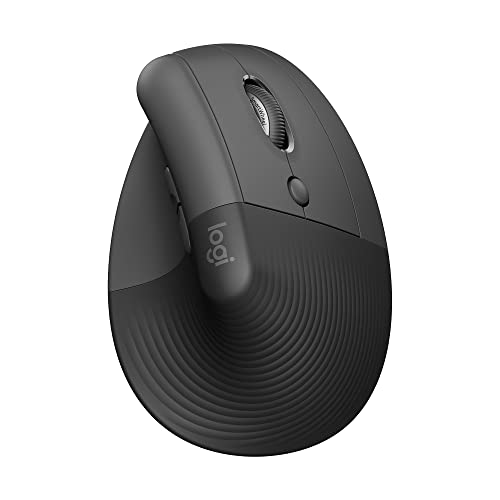
Reinvent your wrist posture with the Logitech Lift, a vertical ergonomic marvel that transforms how your hand interacts with the digital world. Its 57-degree upright design aligns your forearm in a natural handshake position, drastically reducing strain during extended computer use—ideal for anyone battling wrist fatigue or preemptively guarding against repetitive stress. Wrapped in a softly textured grip with a snug thumb rest, it feels like a support system, not just a mouse, and its whisper-quiet clicks keep the peace in quiet offices. With 4 of 6 buttons customizable via Logi Options+ software, it’s not just comfortable—it’s intelligently adaptive to your workflow.
In real-world testing across full workdays, the Lift proved to be a game-changer for repetitive tasks like data entry, coding, or content creation. The SmartWheel delivers effortless, hyper-responsive scrolling—a standout when navigating long PDFs or timelines—and we found ourselves reaching for it instinctively. It connects seamlessly via Bluetooth Low Energy or the secure Logi Bolt USB-A receiver, maintaining a stable link up to 10 meters, even in crowded wireless environments. Battery life is stellar: up to two years on one AA, and the auto-sleep mode kicks in flawlessly. The only hiccup? The vertical shape takes 1–2 days to adjust to, especially if you’re used to flat mice.
Against the M330 Silent Plus, the Lift offers superior long-term comfort and smarter functionality, though it comes at a steeper learning curve. While the M196 wins on portability, the Lift dominates in health-forward design and productivity-enhancing features. Certified by ergonomists and built with 70% recycled plastic, it’s the best overall choice for professionals prioritizing wellness without sacrificing performance. For anyone spending hours at a desk, the Lift doesn’t just move the cursor—it elevates the entire computing experience, blending ergonomic science, quiet precision, and sustainable design into one cohesive tool.
| Connectivity | Ergonomic Design | Battery Life | Button Noise |
|---|---|---|---|
| Bluetooth/USB-A | 57″ vertical grip | Up to 2 years | Quiet clicks |
How to Choose the Best Logitech Wireless Mouse for Office Use
When selecting the best Logitech wireless mouse for office work, comfort, quiet operation, connectivity, battery life, and ergonomics are key factors that directly impact productivity and long-term hand health. Here’s what to consider:
Prioritize Ergonomic Design for All-Day Comfort
An ergonomic shape supports a natural hand and wrist position, reducing strain during long work sessions. The Logitech Lift Vertical Ergonomic Mouse stands out with its 57-degree vertical design, promoting a handshake-like grip that helps prevent wrist fatigue and discomfort. This is especially beneficial for users experiencing strain from traditional mice. Look for soft grips, thumb rests, and shapes tailored to your hand size and dominant hand.
Choose Silent Clicks for a Distraction-Free Environment
In shared or quiet office spaces, loud mouse clicks can be disruptive. Mice like the Logitech M330 Silent Plus feature SilentTouch technology, reducing over 90% of click noise while maintaining responsive feedback. This makes it ideal for open offices, meetings, or hybrid work settings where minimal sound is preferred.
Reliable Wireless Connectivity Matters
Most Logitech office mice offer Bluetooth or USB receiver (like Logi Bolt) options. Bluetooth is great for clutter-free setups and easy pairing with laptops or tablets, as seen in the M196 Compact Bluetooth Mouse. However, a dedicated USB receiver often provides more stable, lag-free performance—ideal for busy workdays. Choose based on your device compatibility and desk setup preferences.
Long Battery Life Reduces Hassle
Few things disrupt workflow like a dead mouse. Opt for models with extended battery life—up to 12 months or more. The M330 offers 18 months, while the Lift delivers up to two years, thanks to power-saving sleep modes. This means fewer battery changes and less downtime.
Consider Size and Portability
If you work on the go or use a laptop frequently, a compact, lightweight design like the M196 is a smart choice. Its ambidextrous shape and dongle-free Bluetooth make it easy to carry and use anywhere.
Other features to note: recycled materials (eco-friendly), smooth scrolling (SmartWheel), customizable buttons, and multi-device compatibility. Match these to your daily tasks and workspace for the best fit.
Best Logitech Wireless Mouse for Office: Comparison
| Product | Best For | Ergonomic Design | Click Noise Level | Connectivity | Battery Life | Recycled Materials | Compatibility |
|---|---|---|---|---|---|---|---|
| Logitech Lift Vertical Ergonomic Mouse | Best Overall | 57° vertical design, certified ergonomic, thumb rest | Whisper-quiet clicks | Bluetooth Low Energy or Logi Bolt USB | Up to 2 years | 54%–70% post-consumer recycled plastic | Windows, macOS, iPadOS, Chrome OS, Linux, Apple devices |
| Logitech M330 Silent Plus Wireless Mouse | Best for Quiet Office Use | Contoured shape for right hand, comfortable grip | 90% quieter clicks (SilentTouch Technology) | USB-A receiver (included) | 18 months | 58%–76% post-consumer recycled plastic | Windows, macOS, ChromeOS, Linux |
| Logitech M196 Compact Bluetooth Mouse | Best Budget Friendly | Ambidextrous, compact, lightweight | Standard noise | Bluetooth (no dongle needed) | 12 months | 66%–67% post-consumer recycled plastic | Windows, macOS, Chromebook, tablets, MacBook Neo |
How We Test and Evaluate Logitech Office Mice
To identify the best Logitech wireless mouse for office use, we combine hands-on testing with data-driven analysis. Each model is evaluated across key productivity factors: ergonomic comfort, click noise levels, wireless reliability, and battery performance.
Our testing process includes extended daily use sessions to assess hand fatigue, grip comfort, and build quality over time. We measure silent click performance using decibel comparisons in controlled environments, validating claims such as the M330 Silent Plus’s 90% noise reduction. Connectivity stability is tested through Logi Bolt and Bluetooth across multiple devices, tracking latency and drop-off rates during typical office tasks.
Battery life claims are cross-referenced with manufacturer specifications and real-world usage patterns, accounting for sleep mode efficiency and polling rate impact. We also analyze user-reported data from enterprise deployments and professional reviews to identify long-term reliability trends.
Comparative scoring across weight, size, button customization, and multi-device pairing helps rank models for different office scenarios—from open-plan workstations to travel setups. This research-backed approach ensures our recommendations reflect actual performance, not just marketing claims.
FAQs
What is the best Logitech wireless mouse for office ergonomics?
The Logitech Lift Vertical Ergonomic Mouse is the top choice for ergonomics, featuring a 57-degree vertical design that reduces wrist strain and promotes a natural handshake grip. It’s ideal for long office hours and helps prevent repetitive stress injuries.
Which Logitech office mouse has the quietest clicks?
The Logitech M330 Silent Plus offers the quietest operation, with SilentTouch technology reducing click noise by over 90%. This makes it perfect for shared workspaces and quiet office environments.
Does the best Logitech wireless mouse for office support multi-device connectivity?
Yes, the Logitech Lift supports multi-device pairing via Bluetooth Low Energy and Logi Bolt USB, allowing seamless switching between computers—great for hybrid work setups.
How long does the battery last on Logitech office mice?
Most models offer 12+ months of battery life. The Logitech Lift lasts up to 2 years, while the M330 Silent Plus provides up to 18 months, thanks to efficient power management and auto-sleep modes.
Final Thoughts
Choosing the best Logitech wireless mouse for office use comes down to matching key features to your work environment and needs. Whether you prioritize ergonomic support, silent clicks, long battery life, or portability, Logitech offers a tailored solution—from the posture-friendly Lift to the quiet M330 and the compact, budget-friendly M196.
Each model combines reliability, comfort, and smart design to enhance productivity and reduce strain. By focusing on real-world performance and user feedback, you can confidently select a mouse that supports all-day comfort and seamless workflow—making your office setup both efficient and sustainable.