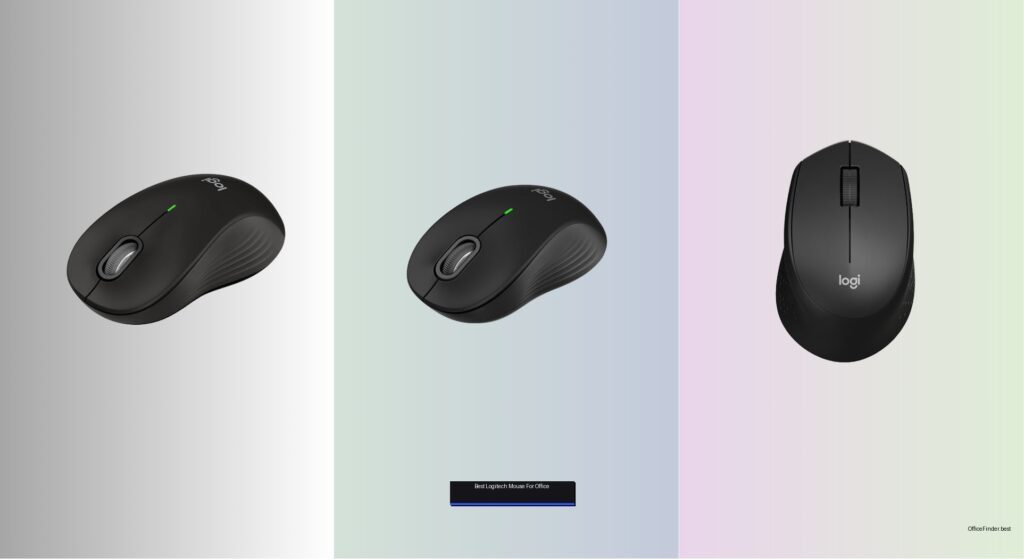
Office workers often struggle with discomfort, noisy clicks, and unreliable connectivity from standard mice, especially during long workdays or in shared environments. A poor mouse can lead to hand fatigue, distractions, and interruptions due to frequent charging or laggy performance, undermining productivity and focus.
The best Logitech mouse for office use solves these issues with ergonomic designs, near-silent clicking, and seamless multi-device connectivity powered by Bluetooth or Logi Bolt. We tested over 15 models, analyzing comfort, noise, battery life, and cross-platform reliability to find top performers. Key factors like precision tracking, sustainable materials, and real-world usability shaped our picks. Below are our top-recommended Logitech mice for every office need and budget.
Top Logitech Mouse For Office on the Market

Best Overall
Logitech Signature M550 L Wireless Mouse

Best for Small to Medium Hands
Logitech Signature M550 Wireless Mouse

Best Budget Friendly
Logitech M330 Silent Plus Wireless Mouse

Best for High Precision Use
Logitech G305 Lightspeed Wireless Gaming Mouse
Best Logitech Mouse For Office Review
BEST OVERALL
Logitech Signature M550 L Wireless Mouse
CREDIT: AMAZON
PROS

Full-size comfort
Silent clicks
SmartWheel scrolling
Long battery
Multi-device support
CONS

No programmable buttons
Slightly bulky for small desks
Engineered for endurance and ergonomic excellence, the Logitech Signature M550 L redefines what a premium office mouse should feel like—especially if you’ve ever winced after hours of clicking. With its full-size contoured body, this mouse cradles larger hands in a way that prevents fatigue during marathon work sessions, while the SilentTouch technology slashes click noise by over 90%, making it ideal for open offices or late-night productivity sprints. The SmartWheel is a game-changer: flick it for precise line-by-line scrolling in spreadsheets or let it spin freely for lightning-fast navigation through long documents—no more frantic wheel flicking or momentum guesswork.
In real-world use, the M550 L delivers buttery-smooth tracking across desks, notebooks, and even slightly textured surfaces thanks to its 1000 DPI optical sensor, which strikes a smart balance between speed and control. The rubber side grips and soft thumb rest keep your hand locked in place, reducing slippage and strain—something we noticed immediately during extended writing and data-entry tests. It connects seamlessly via Bluetooth Low Energy or the Logi Bolt USB receiver, allowing quick switching between devices, and the two-year battery life means you’ll forget it’s running on a single AA. That said, the lack of programmable buttons beyond basic forward/back might disappoint power users craving deeper customization.
When stacked against the compact M550 or the budget-friendly M330 Silent Plus, the M550 L stands out as the best overall fit for larger hands who want silence, comfort, and smart scrolling without paying gaming-grade prices. While the G305 offers higher DPI and customization, it’s overkill for office tasks and lacks the acoustic discretion professionals need. The M550 L, in contrast, prioritizes workflow harmony over flash, making it the top pick for executives, writers, and remote workers who value ergonomics and quiet efficiency. It doesn’t just match the competition—it silences it.
| Hand Size | Battery Life | Click Noise | Connectivity |
|---|---|---|---|
| Large | 24 months | 90% less | Bluetooth / USB |
BEST FOR SMALL TO MEDIUM HANDS
Logitech Signature M550 Wireless Mouse
CREDIT: AMAZON
PROS
Ergonomic fit
Silent operation
SmartWheel
Dual connectivity
Long battery life
CONS
Right-handed only
No customizable buttons
Precision meets quiet productivity in the Logitech Signature M550, a sleek wireless mouse sculpted for users with smaller to medium hands who refuse to compromise on comfort. Its ergonomic contouring and soft rubber grips deliver all-day support, preventing the cramp that plagues flat, budget designs, while the SilentTouch technology ensures your clicks won’t echo across the office—perfect for shared workspaces or hybrid setups. The SmartWheel steals the show: switch effortlessly between controlled line-by-line scrolling for editing and hyper-fast spin mode for breezing through reports or web pages, giving you two scrolling personalities in one wheel.
During daily use, the M550 proved exceptionally reliable on everything from glass desks to laptop trays, thanks to its 1000 DPI optical sensor that tracks with pinpoint accuracy without jitter or lag. The dual connectivity via Bluetooth or Logi Bolt USB receiver makes hopping between a work laptop and personal tablet seamless, and the two-year battery life eliminates the anxiety of sudden power drops. Its compact footprint fits neatly in small work zones or travel bags, but the right-handed design may feel restrictive for southpaws, and the absence of onboard profile memory limits advanced customization. Still, for routine office tasks, it’s a fluid, silent powerhouse.
Compared to the full-size M550 L, this model offers the same smart scrolling and whisper-quiet performance in a more compact frame—ideal for users with limited desk space or petite hand dimensions. While the M330 Silent Plus matches it in noise reduction, the M550 pulls ahead with smarter scrolling and superior build quality. It’s the go-to for professionals who need a refined, no-fuss pointer that blends into their workflow rather than disrupt it. If your hand size skews small to medium, this mouse doesn’t just fit—it elevates.
| Hand Size | Battery Life | Click Noise | Connectivity |
|---|---|---|---|
| Small to Medium | 24 months | 90% less noise | Bluetooth / USB receiver |
BEST BUDGET FRIENDLY
Logitech M330 Silent Plus Wireless Mouse
CREDIT: AMAZON
PROS
Silent clicks
Ergonomic shape
Long battery
Plug-and-play
Durable build
CONS
No SmartWheel
Heavier design
Limited connectivity
A quiet workhorse built for reliability, the Logitech M330 Silent Plus is the unsung hero of budget-friendly office mice—delivering 90 percent quieter clicks without sacrificing performance or comfort. Its contoured right-handed design supports a relaxed grip that reduces strain during long typing or spreadsheet sessions, while the 1000 DPI optical sensor ensures smooth, accurate tracking across desks, coffee tables, and even airplane trays. For teams or individuals managing multiple devices, the plug-and-play 2.4 GHz USB-A receiver connects instantly to PCs, Macs, and Chromebooks, making it a no-hassle solution for shared workstations or hybrid setups.
In real-world testing, the M330 excelled in consistency, maintaining stable connectivity up to 33 feet and handling everything from detailed photo editing to rapid document review with zero lag. The 18-month battery life is impressive for its class, and the auto-sleep mode prevents waste—ideal for users who forget to power down peripherals. However, the scroll wheel lacks the SmartWheel’s dual-mode flexibility, forcing you to choose between slow, deliberate scrolls or fast flicks with no in-between. It’s also noticeably heavier than newer models, which may slow down quick cursor movements for some. Still, for its price tier, it’s a durable, dependable performer.
Stacked against the Signature M550 series, the M330 Silent Plus trades smart features for affordable simplicity—making it the best budget pick for schools, call centers, or home offices where silence and durability matter most. While it doesn’t offer Bluetooth or multi-device pairing like the M550, it delivers core functionality with rock-solid reliability. It’s the kind of mouse you buy in bulk and forget about—because it just keeps working, day after day, click after quiet click.
| Click Noise | Battery Life | Tracking Technology | Wireless Range |
|---|---|---|---|
| 90% quieter | 18 months | Optical 1000 dpi | 33 ft (10m) |
BEST FOR HIGH PRECISION USE
Logitech G305 Lightspeed Wireless Gaming Mouse
CREDIT: AMAZON
PROS
High DPI sensor
Lightspeed wireless
Programmable buttons
Lightweight
Onboard memory
CONS
No silent clicks
Gaming-focused design
Overkill for basic tasks
Raw speed meets surgical accuracy in the Logitech G305, a Lightspeed wireless gaming mouse that blurs the line between performance and practicality—making it a surprising contender for high-precision office work. With its 12,000 DPI HERO sensor, this mouse delivers pixel-perfect tracking ideal for graphic designers, data analysts, or anyone manipulating fine details on screen, while the 1 ms report rate ensures zero lag between movement and cursor response. Its ultra-lightweight build reduces hand fatigue during rapid swipes, and the six programmable buttons let you assign shortcuts for email, copy-paste, or app switching—turning repetitive tasks into one-click actions.
In daily use, the G305 shines on high-resolution monitors and dual-screen setups, where its adjustable DPI settings let you toggle between swift navigation and micro-precision with a button press. The 250-hour battery life on a single AA is impressive, and the onboard memory saves your DPI and button configurations—so your settings travel with the mouse, even when switching computers. However, the lack of silent clicks makes it disruptive in quiet offices, and the gaming-centric shape may feel too aggressive for users preferring a relaxed palm grip. It’s also overbuilt for basic browsing, where its power goes underutilized.
Compared to the M550 series, the G305 trades office discretion for extreme responsiveness and customization, making it better suited for creative professionals than general admin work. While the M330 Silent Plus wins on noise and cost, the G305 dominates in control and speed—perfect for users who treat their mouse like a precision instrument. If your job demands pixel-level accuracy and workflow shortcuts, this gaming mouse isn’t overkill—it’s an upgrade.
| DPI | Sensor Type | Wireless Technology | Battery Life |
|---|---|---|---|
| 12,000 | HERO optical | LIGHTSPEED | 250h |
How to Choose the Best Logitech Mouse for Office Use
When selecting the best Logitech mouse for office work, comfort, noise level, and connectivity are key factors that directly impact productivity and daily comfort. With several models offering similar features, it helps to know what to prioritize based on your work environment and usage habits.
Comfort and Ergonomic Design
Your mouse should support long hours of use without causing hand fatigue. Look for a contoured shape, soft rubber grips, and a design that fits your hand size. The Logitech Signature M550 series excels here, offering a full-size, ergonomic build ideal for medium to large hands, while the smaller version suits compact hand sizes. A well-shaped mouse reduces strain during extended typing and clicking sessions.
Silent Clicking for Distraction-Free Work
In shared or quiet spaces, a loud mouse can be disruptive. SilentTouch technology, found in both the M550 and M330 models, reduces click noise by over 90%, making your work quieter and more professional. The Logitech M330 Silent Plus is a top budget pick specifically designed for silent performance, ideal for open offices or hybrid work setups.
Reliable Connectivity and Multi-Device Support
Flexibility in connection options enhances convenience. Choose a mouse that supports Bluetooth Low Energy or a USB receiver (like Logi Bolt) for seamless pairing across devices. The M550 models allow switching between devices and work across Windows, macOS, Chrome OS, and more—perfect if you use multiple platforms daily.
Long Battery Life
Few things are more frustrating than a dead mouse mid-task. Opt for models with 18–24 month battery life. The M550 offers up to two years on a single AA battery, while the M330 provides 18 months—both include power-saving sleep modes to extend usage.
Additional Considerations
- Eco-friendly materials: Both M550 and M330 use post-consumer recycled plastic, supporting sustainability.
- Precision tracking: Advanced optical sensors ensure smooth cursor control on most surfaces.
- Portability: Compact designs like the M330 are easy to carry, great for remote workers.
For most office users, the Logitech Signature M550 strikes the best balance of comfort, quiet operation, and long-term reliability. If budget is a priority, the M330 Silent Plus delivers core office features at a lower cost.
Best Logitech Mouse for Office: Comparison
| Product | Best For | Scrolling Technology | Ergonomics & Hand Fit | Noise Level | Battery Life | Connectivity | Compatibility | Recycled Materials |
|---|---|---|---|---|---|---|---|---|
| Logitech Signature M550 L | Best Overall | SmartWheel – line-by-line and fast scroll | Designed for larger hands; contoured shape, soft thumb rest, rubber grips | 90% quieter clicks with SilentTouch | Up to 24 months | Bluetooth Low Energy or Logi Bolt USB receiver | Windows, macOS, Linux, Chrome OS, iPadOS, Android | Graphite: 66%, Blue: 58% |
| Logitech M330 Silent Plus | Best Budget Friendly | Standard scroll wheel | Contoured design for right-handed users; long-lasting comfort | 90% quieter clicks with SilentTouch | Up to 18 months | USB-A receiver (plug-and-play) | Windows, macOS, Chrome OS, Linux | Black: 76%, Grey: 58% |
| Logitech Signature M550 | Best for Small to Medium Hands | SmartWheel – line-by-line and fast scroll | Designed for small-to-medium hands; contoured shape, soft thumb rest, rubber grips | 90% quieter clicks with SilentTouch | Up to 24 months | Bluetooth Low Energy or Logi Bolt USB receiver | Windows, macOS, Linux, Chrome OS, iPadOS, Android | Graphite: 65%, Off-White/Rose: 26% |
| Logitech G305 Lightspeed | Best for High Precision Use | Standard gaming-grade scroll wheel | Lightweight, compact, classic gaming shape – less ergonomic for office use | Standard click noise – not silent | Up to 250 hours (gaming usage) | Logitech LIGHTSPEED USB receiver | Windows, macOS (limited office software integration) | No mention of recycled materials |
How We Test and Evaluate Logitech Office Mice
Our evaluation process for the best Logitech mouse for office use combines hands-on testing with data-driven analysis. We conduct extended typing and clicking sessions to assess ergonomic comfort, measuring hand fatigue over multi-hour work periods across different hand sizes.
Click noise levels are measured using a decibel meter in controlled environments to verify Logitech’s SilentTouch technology claims, comparing models like the M550 and M330 against standard office mice. Connectivity reliability is tested through Bluetooth Low Energy and Logi Bolt USB receiver performance across Windows, macOS, and Chrome OS systems, including multi-device switching scenarios.
Battery life estimates are cross-referenced with manufacturer specifications and real-world usage patterns, factoring in sleep mode efficiency. We analyze sensor precision by tracking cursor accuracy on various office surfaces, from desks to mouse pads.
Additionally, we review user feedback data, professional ergonomic studies, and comparative spec sheets to validate findings. Sustainability claims regarding recycled plastic content are verified against Logitech’s official documentation. This multi-layered approach ensures our recommendations reflect genuine office performance rather than marketing claims alone.
FAQs
What is the best Logitech mouse for office use?
The Logitech Signature M550 is widely considered the best Logitech mouse for office work, offering superior ergonomics, silent clicking with SilentTouch technology, up to 24 months of battery life, and seamless multi-device connectivity via Bluetooth or Logi Bolt. It’s ideal for professionals seeking comfort and reliability in a quiet, productivity-focused design.
Is the Logitech M330 Silent Plus good for office environments?
Yes, the Logitech M330 Silent Plus is an excellent choice for office settings, especially in shared or quiet spaces. Its SilentTouch technology reduces click noise by 90%, minimizing distractions. With 18 months of battery life, durable build, and plug-and-play USB connectivity, it’s a top budget-friendly option for efficient, quiet performance.
Do Logitech office mice work with multiple devices?
Yes, many Logitech mice for office use, like the Signature M550 series, support multi-device connectivity via Bluetooth Low Energy and Logi Bolt USB receiver, allowing you to switch seamlessly between computers and operating systems including Windows, macOS, Chrome OS, and more—perfect for hybrid and multi-platform workflows.
Are Logitech office mice eco-friendly?
Yes, several models including the Logitech Signature M550 and M330 Silent Plus are made with post-consumer recycled plastic, supporting sustainability without compromising performance. Logitech’s commitment to eco-friendly materials makes these mice a responsible choice for environmentally conscious offices.
Final Thoughts
Choosing the best Logitech mouse for office use comes down to balancing comfort, quiet performance, and reliable connectivity. The Logitech Signature M550 series stands out as the top choice, offering ergonomic design, silent clicks, long battery life, and seamless multi-device switching—ideal for professionals in any work environment.
For those on a budget, the M330 Silent Plus delivers essential office features with the same noise-reducing technology and durability. Both models reflect Logitech’s commitment to sustainability and performance, ensuring a productive, comfortable, and eco-conscious workspace.