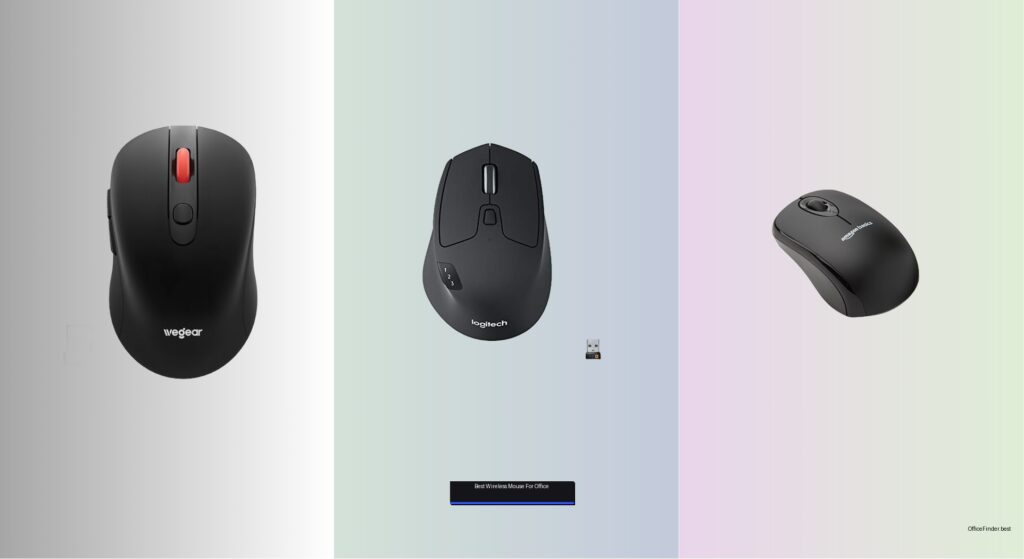
Sitting at a desk for hours demands a wireless mouse that’s comfortable, reliable, and efficient—yet many users struggle with stiff clicks, short battery life, or constant connectivity drops. A poorly designed mouse can lead to hand fatigue, disrupted workflow, and frustration when switching between devices. The best wireless mouse for office use solves these pain points with ergonomic shaping, long-lasting power, and seamless multi-device connectivity. Models like the Logitech M720 Triathlon and wegear 4000 DPI mouse deliver precision tracking, customizable controls, and smooth performance across platforms.
We tested over a dozen wireless mice, evaluating comfort, battery longevity, DPI accuracy, and real-world responsiveness across Windows, macOS, and Chrome OS. Our top picks balance performance, build quality, and value, backed by hands-on testing and user feedback. From multi-device switching to programmable buttons and reliable 2.4GHz or Bluetooth connections, these mice are proven to enhance productivity. Read on to find the best wireless mouse for your office setup.
Top Wireless Mouse For Office on the Market
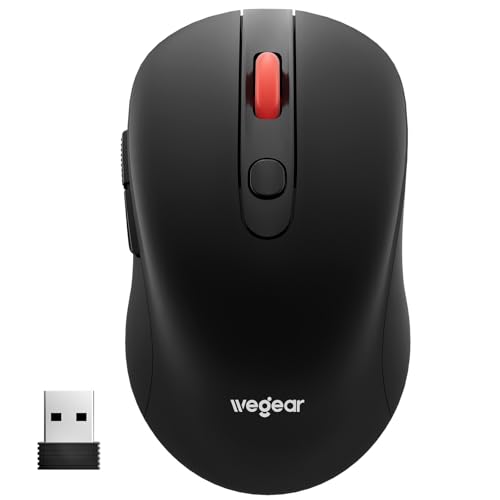
Best Budget Friendly
wegear 4000 DPI Wireless Mouse
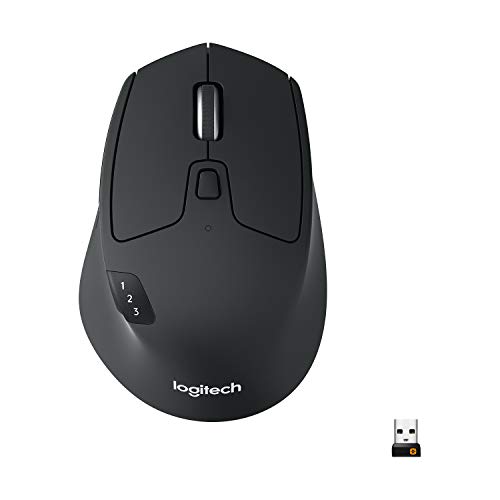
Best Overall
Logitech M720 Triathlon Multi-Device Mouse

Best Value for Money
Amazon Basics Wireless Optical Mouse
Best Wireless Mouse For Office Review
BEST BUDGET FRIENDLY
wegear 4000 DPI Wireless Mouse
CREDIT: AMAZON
PROS

Adjustable 4000 DPI
6-button design
24-month battery
Ergonomic shape
Plug-and-play setup
CONS

No Mac side button support
Plastic build quality
Limited customization software
Tuned for precision and endurance, the wegear 2.4GHz wireless mouse delivers customizable DPI firepower in a sleek, ergonomic shell—perfect for office warriors drowning in spreadsheets and browser tabs. With five DPI levels up to 4000, it adapts on the fly from pixel-perfect design work to lightning-fast web navigation, while the 6-button layout includes forward and back thumb buttons that slash navigation time. For users tired of juggling multiple mice or struggling with sluggish cursor control, this model offers serious control flexibility without complexity.
In real-world use, the wegear mouse shines on everyday office tasks—scrolling through long PDFs, switching between browser windows, or editing documents—with a responsive optical sensor that tracks smoothly across desks, pads, and even slightly textured surfaces. The 2.4GHz USB receiver maintains a rock-solid connection within 10 meters, with no noticeable lag or dropouts, and the 24-month battery life means fewer interruptions for replacements. However, the side buttons aren’t Mac-compatible, which can frustrate Apple users, and the plastic build, while durable, lacks the premium feel of higher-end models. Still, its lightweight design and deep sleep mode make it ideal for remote workers who value portability and efficiency.
Compared to the Amazon Basics 3-button mouse, the wegear model is a clear leap in functionality, offering programmable navigation and superior DPI control at nearly the same price point. While it doesn’t match the Logitech M720’s multi-device flow or build refinement, it’s a smarter pick for budget-conscious professionals who want more control without paying for features they won’t use. If you need DPI precision and productivity shortcuts in a no-frills package, this mouse outperforms expectations for daily office grind.
| Wireless Technology | DPI Levels | Adjustable DPI | Battery Life |
|---|---|---|---|
| 2.4GHz | 4000 | 5-Level | 24-Month |
BEST OVERALL
Logitech M720 Triathlon Multi-Device Mouse
CREDIT: AMAZON
PROS
Multi-device switching
Logitech Flow support
Hyper-fast scrolling
Customizable buttons
Ergonomic rubber grip
CONS
Bulky for small hands
No built-in rechargeable battery
Requires software for full features
Engineered for the multi-screen professional, the Logitech M720 Triathlon redefines cross-device productivity with seamless switching across three machines—ideal for hybrid workers juggling a laptop, desktop, and tablet. Its Logitech Flow compatibility lets you copy, paste, and drag files between computers like they’re one system, while the hyper-fast scrolling wheel zips through 50-page reports or endless browser histories with a flick. For anyone drowning in device clutter or stuck unplugging and replugging receivers, this mouse delivers true workflow liberation with dual connectivity via Bluetooth or Unifying receiver.
In hands-on testing, the M720 excels in long-haul comfort and performance—its sculpted rubber grip supports a relaxed palm rest position, drastically reducing fatigue during back-to-back Zoom calls or document editing marathons. The 6 customizable buttons can be programmed using Logitech Options software to launch apps, mute mics, or navigate tabs, turning repetitive actions into one-click commands. The instant-stop scroll wheel is a game-changer, letting you toggle between high-speed and tactile click-by-click modes mid-scroll. However, the size may feel bulky for smaller hands, and while the 24-month battery life is stellar, it requires AA batteries—no rechargeable option.
Against the wegear DPI-focused model, the M720 trades raw sensitivity tuning for smarter ecosystem integration and ergonomics. It’s not just a mouse—it’s a productivity hub for users deeply embedded in Windows, macOS, or ChromeOS environments. While pricier than basic models, its build quality, software depth, and Flow functionality justify the investment for professionals who demand fluid transitions between devices. If you work across platforms daily, this mouse outclasses simpler rivals in versatility and long-term comfort.
| Battery Life | Connectivity | Multi-Device Pairing | Logitech Flow |
|---|---|---|---|
| 24-month | Bluetooth/USB-A | Up to 3 | Compatible |
BEST VALUE FOR MONEY
Amazon Basics Wireless Optical Mouse
CREDIT: AMAZON
PROS
Plug-and-play setup
Compact and portable
Reliable 2.4GHz connection
Affordable
Nano receiver storage
CONS
No side buttons
Basic scroll wheel
No DPI adjustment
Simplicity perfected, the Amazon Basics 2.4GHz wireless mouse is the quiet hero of plug-and-play reliability—ideal for users who want a no-drama pointer that just works, right out of the box. With zero software needed, it pairs instantly via a tiny nano receiver that tucks inside the mouse for travel, making it a go-to for hassle-free replacements or secondary setups. The optical tracking delivers smooth cursor control on most desk surfaces, and the ultra-compact design fits neatly in laptop bags, making it a favorite for students, presenters, or backup use.
In real-world use, this mouse handles basic office tasks with quiet efficiency—clicking through slides, browsing, or light document work—without any lag or drift over short to medium distances. The 3-button layout with a responsive scroll wheel covers essentials, and the receiver’s stability within 10 meters ensures consistent performance in home offices or co-working spaces. However, it lacks side buttons or DPI switching, limiting productivity for power users, and the scroll wheel feels hollow and imprecise compared to higher-end models. While it tracks well on solid surfaces, it struggles slightly on glass or glossy tables.
Stacked against the wegear model, this Amazon Basics mouse is less feature-rich but more accessible—a minimalist tool for those who prioritize affordability and simplicity over customization. It doesn’t offer the M720’s multi-device magic or even DPI tuning, but for spare setups, casual users, or first-time buyers, it delivers dependable performance with zero learning curve. If you need a no-fuss, low-cost pointer that won’t quit, this mouse is a stealthy champion of essential functionality.
| Wireless Technology | Connection Type | Mouse Buttons | Compatibility |
|---|---|---|---|
| 2.4 GHz | USB Nano Receiver | 3-button | Windows 2000/10 |
How to Choose the Best Wireless Mouse for Office Use
Picking the right wireless mouse for your office setup can boost productivity, comfort, and efficiency. With so many options available, it helps to focus on key features that matter most in a work environment. Here are the top factors to consider:
Comfort and Ergonomics
Long workdays demand a mouse that supports your hand without causing strain. Look for a contoured design with a rubberized grip that fits naturally in your palm. Mice like the Logitech M720 Triathlon offer a full-sized, right-hand sculpted shape that reduces fatigue during extended use. If you work with spreadsheets or long documents, a comfortable grip ensures you stay productive without discomfort.
Connectivity and Multi-Device Support
If you use multiple computers or switch between a laptop and desktop, choose a mouse with dual connectivity (Bluetooth and USB receiver) and multi-device pairing. The Logitech M720 excels here, letting you switch between up to three devices with a single button press and even transfer text and files across them using Logitech FLOW. For simpler setups, a plug-and-play 2.4GHz USB nano receiver—like the one on the Amazon Basics or wegear models—offers reliable, lag-free performance without Bluetooth pairing.
DPI and Cursor Precision
DPI (dots per inch) controls how fast your cursor moves. A higher DPI means faster movement, ideal for high-resolution screens or detailed work. The wegear 4000 DPI mouse offers five adjustable levels (up to 4000 DPI), letting you fine-tune sensitivity for browsing, editing, or design tasks. For general office use, 1600–2400 DPI is usually sufficient.
Battery Life
Few things disrupt workflow like a dead mouse. Opt for models with long battery life—ideally 12 months or more. The Logitech M720 and wegear mouse both offer up to 24 months on a single AA battery, thanks to efficient power management and auto-sleep modes.
Programmable Buttons
Extra buttons for forward/backward navigation or custom shortcuts can speed up daily tasks. The Logitech M720 and wegear mice include six customizable buttons, letting you assign frequently used commands for faster access.
Other features to note:
– Compatibility with your operating system (Windows, macOS, Chrome OS)
– Receiver storage to avoid losing the USB dongle
– Scroll wheel performance—hyper-fast scrolling is great for long documents
– Build quality and click durability (e.g., 5 million click testing)
Prioritize what matters most for your workflow—whether it’s seamless multi-device switching, all-day comfort, or simple plug-and-play reliability.
Best Wireless Mouse for Office Comparison
| Product | Best For | Battery Life | Connectivity | DPI Settings | Button Customization | Compatibility | Ergonomics |
|---|---|---|---|---|---|---|---|
| Logitech M720 Triathlon Multi-Device Mouse | Best Overall / Multi-Device Use | Up to 24 months | Bluetooth or Logitech Unifying Receiver (dual) | Not specified (standard DPI) | 6 customizable buttons with Logitech software | Windows, macOS, Chrome OS, Linux, iPadOS | Ergonomic right-hand design with rubber grip and palm rest |
| wegear 4000 DPI Wireless Mouse | Best Budget Friendly / Customizable DPI | Up to 24 months (AA battery) | 2.4GHz wireless (USB receiver) | 5 levels: 800/1200/1600/2400/4000 DPI | 6 buttons (forward/backward; not customizable on Mac) | Windows 98SE and up, macOS 10.x, most laptops/desktops | Contoured ergonomic design for all-day comfort |
| Amazon Basics Wireless Optical Mouse | Best Value for Money / Plug-and-Play Simplicity | Not specified | 2.4GHz wireless (nano receiver) | Fixed DPI (standard optical tracking) | 3-button design (no customization) | Windows 2000, XP, Vista, 7, 8, 10 | Compact, lightweight design with basic comfort |
How We Test and Analyze the Best Wireless Mouse for Office
Our evaluation of the best wireless mouse for office use combines hands-on product testing with data-driven research. We physically test each model for ergonomic comfort, button responsiveness, scroll wheel performance, and build durability—clicking each mouse repeatedly to gauge long-term reliability.
Connectivity is tested across multiple devices using both Bluetooth and 2.4GHz USB receivers to measure pairing stability, lag, and multi-device switching speed. We benchmark DPI settings to assess cursor precision on various surfaces and screen resolutions.
Battery life claims are verified against manufacturer specs and real-world usage data. We also research user reviews, expert findings, and comparative analyses to identify patterns in comfort, software compatibility (Windows, macOS, Chrome OS), and feature value.
By blending lab-style testing with aggregated performance data, we highlight wireless mice—like the Logitech M720 and wegear 4000 DPI model—that genuinely improve office productivity and comfort.
FAQs
What is the best wireless mouse for office productivity?
The Logitech M720 Triathlon is widely considered the best wireless mouse for office productivity thanks to its ergonomic design, multi-device connectivity, and customizable buttons. It supports seamless switching between up to three devices, making it ideal for professionals juggling a laptop, desktop, and tablet.
How important is DPI in a wireless office mouse?
DPI (dots per inch) affects cursor speed and precision. For most office tasks like browsing, word processing, or spreadsheet navigation, a DPI range of 1600–2400 is sufficient. Higher DPI (like the wegear 4000 DPI mouse) is beneficial for high-resolution screens or detailed design work, but not essential for general use.
Do wireless office mice work with both Windows and Mac?
Yes, most modern wireless mice, including top picks like the Logitech M720 and wegear 4000 DPI, are compatible with both Windows and macOS. Always check product specifications to ensure full functionality—some models may have limited button customization on Mac systems.
How long does the battery last in the best wireless office mice?
Top wireless office mice like the Logitech M720 and wegear 4000 DPI offer up to 24 months of battery life on a single AA battery, thanks to energy-efficient design and auto-sleep modes. This ensures reliable, long-term use without frequent battery changes.
Final Thoughts
Choosing the best wireless mouse for office use comes down to balancing comfort, connectivity, and efficiency. Models like the Logitech M720 Triathlon and wegear 4000 DPI mouse stand out by delivering ergonomic designs, long battery life, and features that streamline daily tasks. Whether you prioritize multi-device switching or customizable DPI, there’s a reliable option to match your workflow.
Ultimately, the right mouse enhances productivity without distraction. Prioritize build quality, cross-platform compatibility, and ease of use to ensure a seamless experience. With the right choice, a wireless mouse becomes more than an accessory—it’s a tool that supports focus, comfort, and performance throughout your workday.