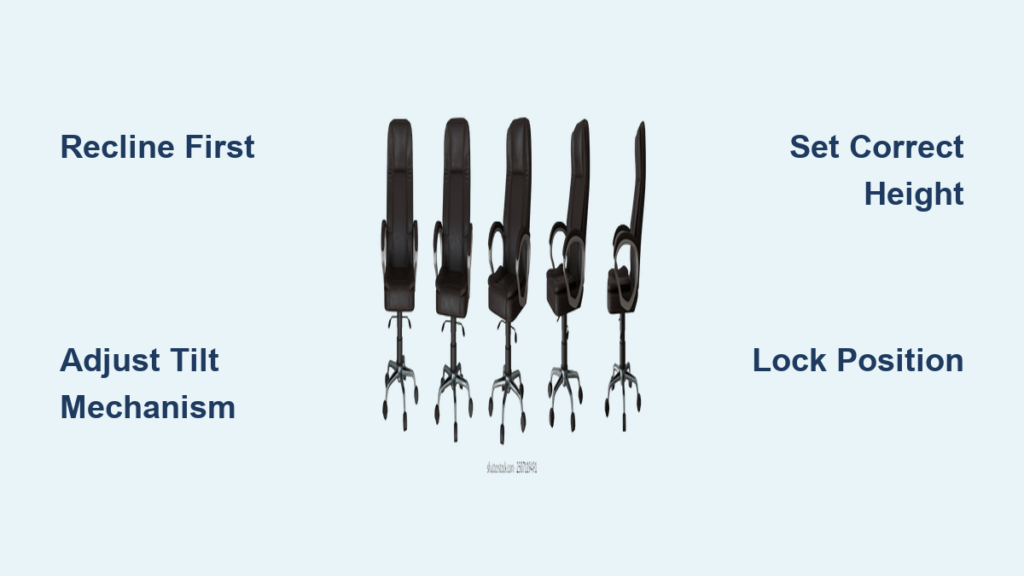
If your office chair leaves you with lower back pain, leg numbness, or constant shifting to find comfort, the issue might not be your posture—it could be your seat angle. Properly adjusting the office chair seat angle can dramatically improve spinal alignment, reduce pressure on your hips, and enhance blood flow during long work sessions. Unlike basic height or backrest adjustments, seat angle control allows you to tilt the seat pan forward or backward independently, helping you achieve the ideal 110–130 degree hip angle. This subtle but powerful feature is often overlooked because most users don’t know where the mechanism is—or that they must recline slightly before tilting forward.
In this guide, you’ll learn exactly how to locate, activate, and fine-tune your chair’s seat angle adjustment. Whether you’re troubleshooting a stiff mechanism or optimizing your ergonomic setup, we’ll walk you through every step—from identifying your chair’s control type to avoiding the most common mistakes. By the end, you’ll be able to adjust your seat angle like a pro and sit with precision, comfort, and long-term health in mind.
Find Your Chair’s Seat Tilt Mechanism

Check Under the Front Edge of the Seat
The seat angle adjustment is usually located beneath the front of the seat pan. Look for a lever, knob, button, or sliding rod near the base of the chair. On premium ergonomic chairs like the Herman Miller 498 SL, the forward tilt control may be positioned on the side of the mechanism housing. If you don’t see any visible controls, your chair likely lacks independent seat tilt—this feature is rare and typically only found on high-end models.
Identify Your Control Type
Different chairs use different mechanisms for seat angle adjustment. Knowing yours prevents frustration and damage:
• Lever: Pull to unlock forward tilt; push back to lock
• Knob: Turn to adjust tilt tension (direction varies by brand)
• Button: Press to release; tilt seat forward while engaged
• Sliding rod: Slide outward to unlock, tilt, then push back to lock
If your chair only reclines the backrest when you lean back, it likely uses synchro-tilt—not independent seat tilt. True seat angle adjustment lets you change the seat angle without moving the backrest.
Set Correct Seat Height First
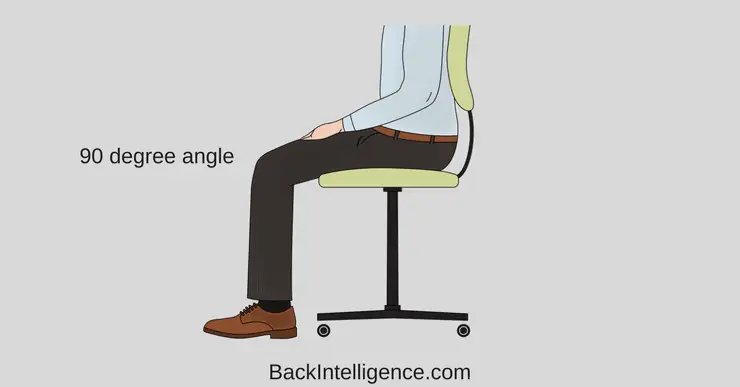
Position Thighs Parallel to the Floor
Before adjusting the seat angle, set your seat height correctly. An incorrect height makes tilt adjustments ineffective or uncomfortable.
• Use the lever on the right side of the chair to raise or lower
• Sit with feet flat on the floor
• Ensure thighs are parallel to the ground
• Knees should form a 90-degree angle
Pro tip: Lowering the chair slightly gives lighter users (under 150 lbs) better leverage when engaging the tilt mechanism.
Activate Forward Tilt the Right Way
Recline First to Unlock the Mechanism
This is the most misunderstood step: you must recline slightly to unlock forward tilt. Most chairs lock the seat in place when you’re sitting upright. Leaning back just 5–10 degrees disengages the safety lock.
- Sit normally in the chair
- Gently recline your upper body
- While reclined, press the forward tilt button or pull the lever
- Tilt the front of the seat downward to your desired angle
- Release the control—some models lock automatically
Common mistake: Trying to tilt forward while sitting upright. This won’t work on chairs with safety locks and can damage the mechanism over time.
Use the Sliding Rod (If Your Chair Has One)
Some chairs use a sliding rod under the seat for forward tilt:
• Pull the rod outward to unlock
• Tilt the seat forward while holding it
• Push the rod back in to lock the new angle
After setting, sit upright—your pelvis should feel slightly tilted forward, promoting a natural spine curve and reducing lower back strain.
Adjust Tilt Tension for Smooth Movement

Balance Resistance Based on Your Weight
Tilt tension controls how easily the seat moves when you recline or engage forward tilt. Too tight, and you can’t move; too loose, and the seat flops.
To adjust:
• Locate the tension knob under the seat near the base
• Turn gradually while testing movement
• Goal: The chair responds smoothly to your body weight
⚠️ Warning: There’s no universal rule for tension knob direction:
– Some brands: Clockwise = looser
– Others: Counterclockwise = looser
Always check your chair’s manual—manufacturer design varies.
Match Tension to Your Body Type
• Lighter users (under 150 lbs): Use lower tension for easier tilt activation
• Heavier users (over 180 lbs): Increase tension to prevent unintended movement
Test by reclining slightly—movement should feel controlled, not jerky or stiff.
Lock in Your Ideal Sitting Position
Choose the Right Angle for Your Task
Once the seat is tilted, select an angle that matches your activity:
• Typing or design work: Slight forward tilt (5–10°) opens hip angle and engages core
• Reading or calls: Return to neutral or slight recline for relaxation
• Drafting or standing desk use: Max forward tilt brings you closer to the desk
A forward-tilted seat reduces disc pressure and encourages active sitting.
Use Tilt Lock for Stability
Many chairs include a tilt lock to freeze the seat and backrest:
• To lock: Push the lever inward (often marked with a lock icon)
• To unlock: Pull the lever outward
Best practice: Lock during focused tasks to maintain posture; unlock during breaks to encourage subtle movement and circulation.
Fix Common Seat Tilt Problems
Chair Won’t Recline
Cause: Tilt tension is too high
Fix:
• Turn the tension knob counterclockwise (or as per manual)
• Lower seat height slightly for more leverage
• Ensure tilt lock is disengaged
If still stuck, check for debris or mechanical damage under the seat.
Forward Tilt Won’t Stay Set
Cause: Mechanism not fully engaged
Fix:
• Confirm you reclined first before tilting
• Check for a secondary lock (button or rod) that must be held
• Ensure the seat clicks or locks into place
If no resistance, your chair may not support true forward tilt.
Seat Feels Wobbly or Loose
Cause: Tilt tension too low
Fix:
• Tighten the tension knob slightly
• Test by reclining and returning—movement should be smooth
• Avoid over-tightening, which defeats dynamic sitting benefits
Optimize for Healthy Sitting Posture
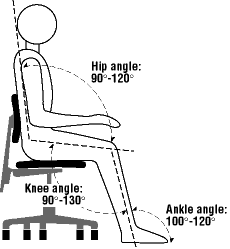
Maintain a 110–130 Degree Hip Angle
A forward-tilted seat opens the angle between your torso and thighs, reducing lower back pressure.
• Aim for 110–130 degrees at the hips
• Keep feet flat on the floor or a footrest
• Avoid perching on the edge of the seat
This posture aligns your spine naturally and reduces slouching.
Encourage Core Engagement
Forward tilt promotes active sitting by engaging abdominal and glute muscles. This helps prevent fatigue from static postures and improves circulation.
Best for:
• Long typing sessions
• Precision tasks (coding, graphic design)
• Users with lower back pain
Avoid extreme angles unless your chair is designed for it.
Choose the Right Chair for Seat Tilt

Independent Seat Tilt Is a Premium Feature
Most office chairs only recline the backrest. True independent seat tilt—where the seat moves alone—is rare and found only on high-end ergonomic chairs.
When shopping, look for:
• Separate controls for seat and backrest
• Infinite adjustment (lock at any angle)
• Smooth locking mechanism with no slippage
• Contoured seat pan that supports sit bones
Chairs like the Herman Miller 498 SL and certain Aeron configurations offer this level of customization.
Don’t Confuse Synchro-Tilt with Seat Tilt
Many chairs use synchro-tilt, where the seat and backrest move together. This is not the same as independent seat angle adjustment. With synchro-tilt, you can’t tilt the seat forward while keeping the backrest upright.
If you need precise posture control, insist on independent seat tilt.
Is Seat Tilt Worth It for You?
Best for Long-Hour Desk Workers
Seat tilt isn’t essential for everyone. But if you:
• Work 6+ hours daily at a desk
• Experience back, hip, or leg discomfort
• Use a standing desk or drafting table
• Want maximum ergonomic control
Then yes—seat tilt is worth it. It reduces spinal pressure, improves circulation, and supports dynamic sitting. For casual users, basic adjustments may suffice. But for professionals who demand precision, seat tilt is a game-changer.
Frequently Asked Questions About Office Chair Seat Angle
How do I know if my chair has seat angle adjustment?
Look for a lever, knob, or sliding rod under the front or side of the seat. If your seat tilts forward independently of the backrest, you have the feature. Most standard chairs only recline the backrest—true seat tilt is rare and found on premium ergonomic models.
Why can’t I tilt my seat forward?
You likely didn’t recline slightly first. Most chairs lock the forward tilt mechanism when you’re sitting upright. Lean back 5–10 degrees, then press the button or pull the lever while tilting forward.
Does forward seat tilt help with back pain?
Yes. A slight forward tilt (5–10°) opens the hip angle to 110–130 degrees, reducing pressure on the lower spine. It also promotes a natural lumbar curve and engages core muscles, which helps prevent slouching and fatigue.
How tight should the tilt tension be?
The tension should allow smooth, controlled movement with your body weight. Lighter users need less tension; heavier users need more. Test by reclining—movement should feel natural, not stiff or bouncy.
Can I add seat tilt to a regular office chair?
No. Seat tilt requires a specialized mechanism built into the chair base. You can’t retrofit it. If you need this feature, invest in a high-end ergonomic chair like the Herman Miller 498 SL or select Aeron models.
What’s the difference between seat tilt and seat height?
Seat height changes how high your thighs are off the ground. Seat tilt changes the angle of the seat pan—forward or backward—without changing height. Both are important, but seat tilt offers finer control over posture and spinal alignment.
Key Takeaways for Adjusting Your Office Chair Seat Angle
Mastering your office chair’s seat angle starts with one rule: recline slightly before tilting forward. This unlocks the mechanism and prevents damage. Once engaged, fine-tune the angle and tension to match your body and task. Set your seat height first, use tilt lock when needed, and always test adjustments gradually.
Independent seat tilt is a premium feature that’s worth it if you sit for long hours or struggle with back pain. While not all chairs offer it, knowing what to look for helps you choose wisely. Whether you’re adjusting your current chair or shopping for a new one, prioritize true seat angle control for long-term comfort, posture, and productivity.
Your next step: Sit down, recline, and try the forward tilt. Small changes in seat angle can lead to big improvements in how you feel at the end of the workday.